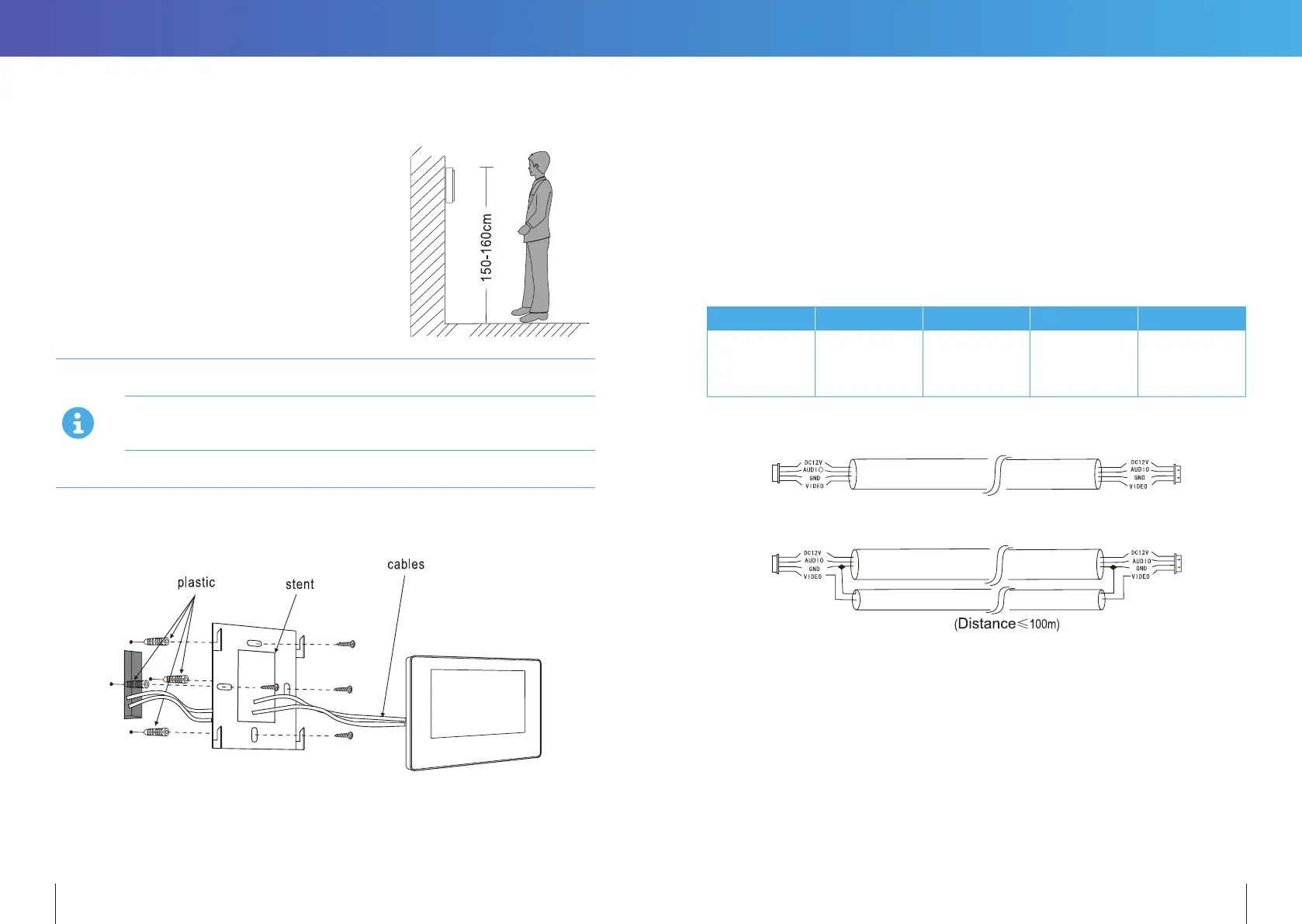
6. INSTALLATION OF INDOOR MONITOR
• Select the most suitable position
where the monitor is located
at user’s eye level .
Keep a distance of 30cm or more from AC power to avoid electrical interference.
Avoid installation of the device near strong radiation source, eg. TV, DVR, PCs
etc.
Do not drop, shake or knock the device to avoid damage to its components.
To install the indoor unit, please follow these steps as below:
7. INSTALLATION NOTE
Keep intercom wires more than 30cm away from AC mains power to avoid interference
The electric lock is not included in the package. Use 12VDC electric strike only.
Do not exceed 500mA.
Cable Requirements
1. CAT5e or CAT6 network cable connection mode:
Panacom RED BLACK WHITE YELLOW
CAT5e or CAT6*** Brown, Blue
Brown-White,
Blue-White,
Green-White,
Orange-White
Green Orange
*** Cable distance≤50 meters
2. 4C ordinary unshielded and shielded wire connection mode:
3. 3C ordinary unshielded +75 ohm coax video wire connection mode :
8 9


 To Next Page