5
PRO STUDIO FLASH KIT
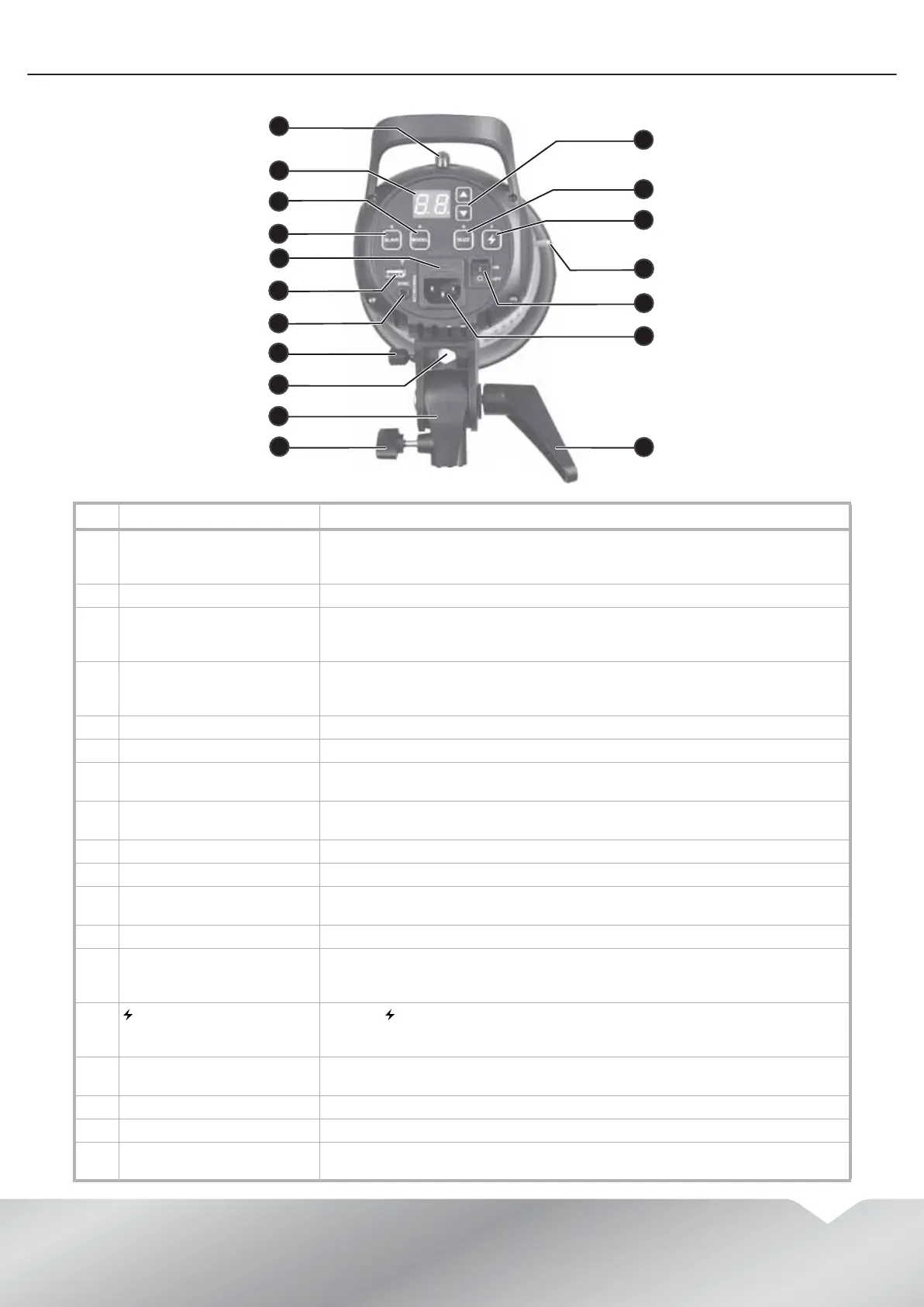
Flash head
# Item Description
1 Light sensor Senses the light from your camera’s flash and triggers your flash. If you have the
remote control receiver installed on one of the flashes, this flash triggers the
second flash.
2 Digital display Displays the brightness level of the flash or modeling lamp.
3 MODEL button and modeling
lamp indicator
Press the MODEL button to turn the modeling lamp on or off. When the modeling
lamp is on, the modeling lamp indicator lights. Press and hold the button for two
seconds to change the lamp’s brightness level.
4 SLAVE button and indicator Press the SLAVE button to select a slave mode. When the slave feature is in
fire-on-flash mode, the indicator lights blue. When the slave feature is anti-flash
mode, the indicator lights red.
5 Fuse Protects the flash from power surges and overloads.
6 Accessory port Connect optional accessories to this port.
7 SYNC jack Connect the PC sync cable or remote trigger receiver to this jack and to the sync
port on a camera to let the camera trigger the flash.
8 Umbrella knob Loosen to insert an umbrella in the umbrella mounting hole, then tighten to
secure the umbrella.
9 Umbrella mounting hole Insert an umbrella through this hole to create special lighting effects.
10 Mounting bracket Attach your flash head to this bracket.
11 Mounting bracket knob Loosen this knob, attach a flash head to a light stand, then tighten the knob to
secure the flash head to the stand.
12
S
and
T
buttons Press to increase or decrease the flash lamp or modeling lamp brightness.
13 BUZZ button and indicator Press the BUZZ button to turn on the audio feedback feature. When this feature is
turned on, the buzz indicator lights and your flash makes a sound when the flash
is ready for the next shot.
14 (test) button and indicator Press the button to test the flash without taking a picture or to release the
stored flash power. The indicator turns off after the test button is pressed and
lights again when the flash is ready for the next shot.
15 Reflector/lamp cover release
pin
Slide this pin to release the reflector or lamp cover from the flash head.
16 ON/OFF switch Press to turn your flash on or off.
17 AC power socket Plug the power cord into this socket and into a grounded power outlet.
18 Flash head angle adjustment
lever
Adjusts the angle of your flash head.
2
3
4
5
5
7
5
9
5
1
5
8
56
5
2
3
4
5
57
59
510
12
13
14
18
1
58
56
511
15
17
16


 To Next Page