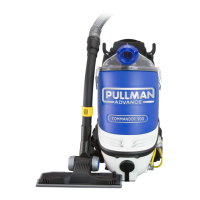
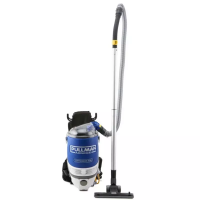
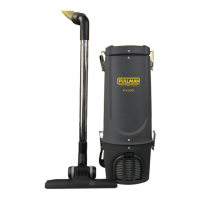
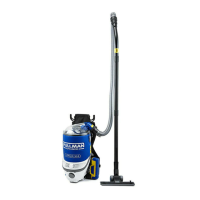
The Pullman Advance Lithium 950 Backpack is a professional commercial cleaning device designed for efficient and powerful vacuuming. It is engineered and designed specifically for commercial cleaners, offering a blend of advanced technology and user-friendly features.
Function Description:
The Lithium 950 Backpack functions primarily as a vacuum cleaner, but it also features a blower port, allowing it to transform into a blower for added versatility. Its main purpose is to collect dirt and dust from various surfaces, including carpets and hard floors, in commercial settings. The backpack design ensures portability and ease of movement, making it suitable for cleaning large areas efficiently.
Important Technical Specifications:
- Motor: 450W high-efficiency brushless motor, which prolongs motor life and provides superior performance and reliability.
- Battery: Powerful 43.2V DC Li-Ion batteries. The unit includes two lithium-ion batteries.
- Runtime: Up to 1 hour in Eco Mode and up to 30 minutes in Turbo Mode.
- Capacity: 5.5 Litres for dust collection.
- Weight: 6.7Kg (unit & batteries only).
- Charger: 240V AC 50Hz.
- Filter System: Large 5.5L Dust Bin & Patented Vortex Filter Chamber. The patented vortex filter chamber design eliminates the need for a filter cone, maximizing dust storage capacity. It also features a Professional Grade Exhaust Filter and a Pre-Motor sponge filter.
- Hose: 1.2m Vacuum Hose.
- Accessories: Gulper Advance Floor Tool (ideal for carpets and hard floors), Paper Bags (5pcs), Cloth filter bag, Patented Vortex HEPA Filter Chamber, Long Crevice Tool, Lithium Batteries (2pcs), Battery Charger, Aluminium Rods (2pcs), Pre-Motor sponge filter.
Usage Features:
- Ergonomic & Adjustable Harness: The backpack is equipped with a hiking-quality harness with fully adjustable shoulder straps and a 3-level height adjustment (Tall, Medium, Small) to ensure a perfect fit for every user.
- 3 Stage Height Adjust Ergonomic Back Frame: Provides a comfortable fit and even weight distribution, ensuring the unit's weight is distributed over the waist rather than the shoulders.
- Patented Active Air Ventilation System (AAVA): An innovative patented design combined with airflow cool mesh technology that removes hot air from the user's back for enhanced comfort. The breathable harness mesh allows air to flow through, removing moisture from the body.
- Comfort Support System: Features a vibration-free harness with cushioning support inserts to ensure weight is correctly centered on the hips.
- Convenient Tool Belt: Allows for easy access to accessories during operation.
- Blower Port (Patented): A handy blower port at the front of the Lithium 950 allows the vacuum to be easily transformed into a blower.
- On/Off Button: The unit features an On/Off button with "I" for Eco Mode, "II" for Turbo Mode, and "O" to switch off.
- Battery Status Indicator: Each battery has a status indicator with four green lights to show the charge level.
- Assembly: The hose connects to the inlet at the top of the backpack with a clockwise twist to lock. The 2-piece rod connects, and the floor tool attaches to the rod.
- Battery Installation: Batteries are inserted until they click into position and must be fully charged before first use. Removal involves pressing a blue release button.
Maintenance Features:
- Filter Maintenance: For maximum performance, the Cloth Filter Bag should be replaced every 3 months. Both the HEPA filter and the Patented Vortex HEPA Filter Chamber are recommended to be replaced every 6 months.
- Cleaning Filters: The clear lid can be removed, and any installed dust bag disposed of. The cloth dust bag can be lifted out and emptied. The Patented Filter drum can be removed and gently tapped to clean. The exhaust HEPA filter can be pulled up and tapped to clean.
- Battery Care: Batteries should be removed if the cleaner will not be used for a long period to maintain battery life. The charger should be placed on a flat, level surface. Do not attempt to open or repair the battery pack or charger.
- Troubleshooting: The manual provides a checklist for common issues such as the cleaner not turning on, deteriorating performance, abnormal sounds, or loss of suction, along with recommended treatments. These often involve checking battery insertion, blockages, or filter cleanliness.
- Spare Parts: A list of spare parts is provided with their respective part numbers, including filter sets, the Vortex HEPA Filter Chamber, cloth filter bags, Unifit 900 Dust Bags, Battery Set, and Charger.
- Warranty: The device comes with a 2-year warranty on parts and labour, excluding the battery which has a one-year warranty. The warranty is valid only in the country of purchase and requires adherence to instructions to avoid voiding it. Regular care and maintenance are recommended to prolong the life of accessories and consumables.


 To Next Page
 General