12
Programming Menu
Programmable Features
The vehicle has to be running to turn o cruise control.
NOTE: To access the programming menu of the device, cruise control must be
turned o.
STEP 1 - The engine must be turned o with the igniton in the Run position.
STEP 2 - (Push Button Start only) Without putting your foot on the brake
pedal, hold the Start Engine button until the gauges turn on and a green light
is seen on the start button. (Approx. 5 seconds)
STEP 3 - Using the steering wheel controls on the Right Keypad (up or down
buttons), change the menu on the Dash Cluster Screen to the Speed Screen
in order to see changes. (Also seen on speedometer)
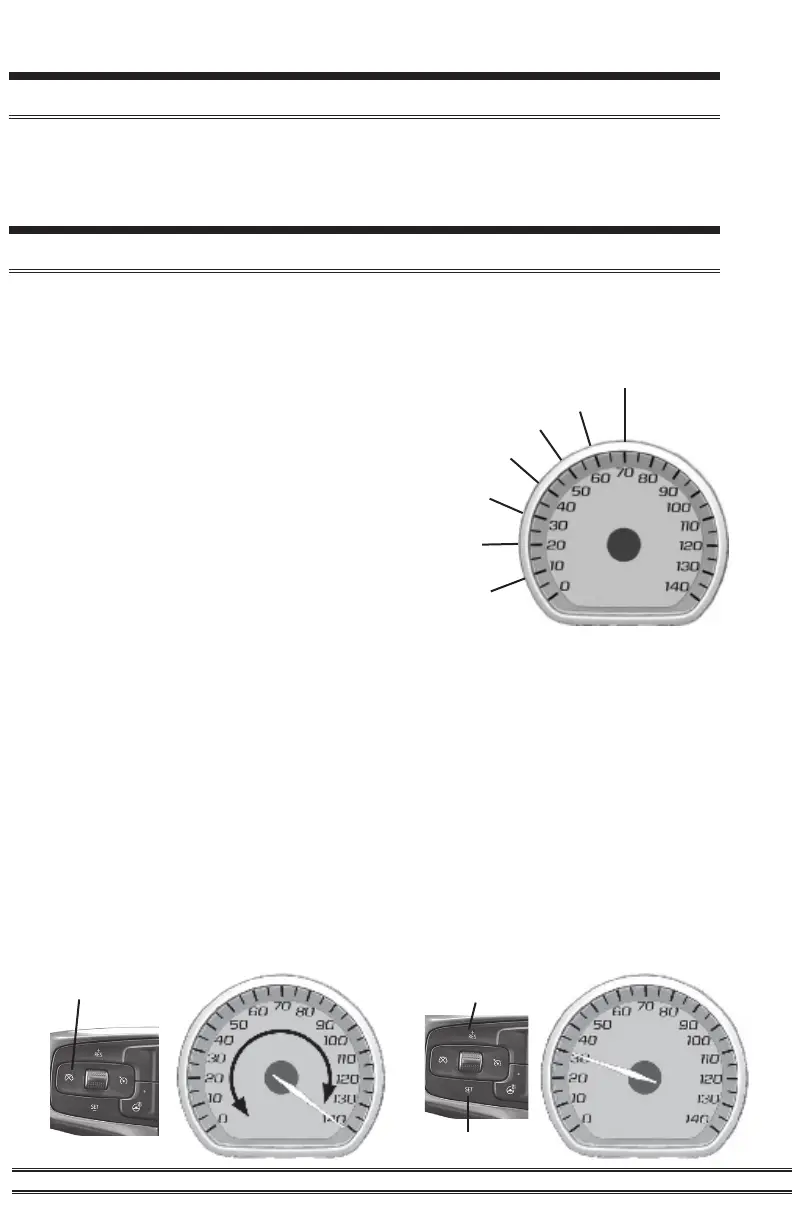
STEP 4 - Hold the cancel cruise control button until the speedometer sweeps
to 140 (approx. 5 seconds).
STEP 5 - Using +RES or -SET, navigate to the desired programming mode.
Seven modes can be accessed through the programming menu. The
speedometer (MPH) gauge is used to display the modes and programming
inputs. The cruise control switches will be used to navigate the programming
menu.
10 - Speed Limiter Adjustment 2020-2021 (98-117
MPH)
20 - TPMS Adjustment (40-99 PSI)
30 - Tire Size Correction (Input stock then
modied sizes for front and rear tires)
40 - Axle Ratio (Input stock then modied axle
ratio)
50 - Clear DTC’s
60 - Manual Regeneration
70 - Transmission Relearn
Access the Programming Menu
Speed Limiter
TPMS
Tire Size
Axle Ratio
Manual Regen
Transmission Relearn
Clear DTC’s
Cancel
Res
Set


 To Next Page