Time format
Select either 12-hour indication format or 24-hour indication format.
Calendar format
Select either "Day of the week-Date” format or “Month-Date” format.
Power save
Select the transition time to the power save mode among 0, 1, 3, 6, 12
and 18 hours.
When the selected transition time elapsed without any button operation,
the watch automatically enters the power save mode.
If the transition time is set to 0, the power save function will not be
activated.
Contrast level
Adjust the contrast level of the display among seven levels ranging
from “-3” to “3.”
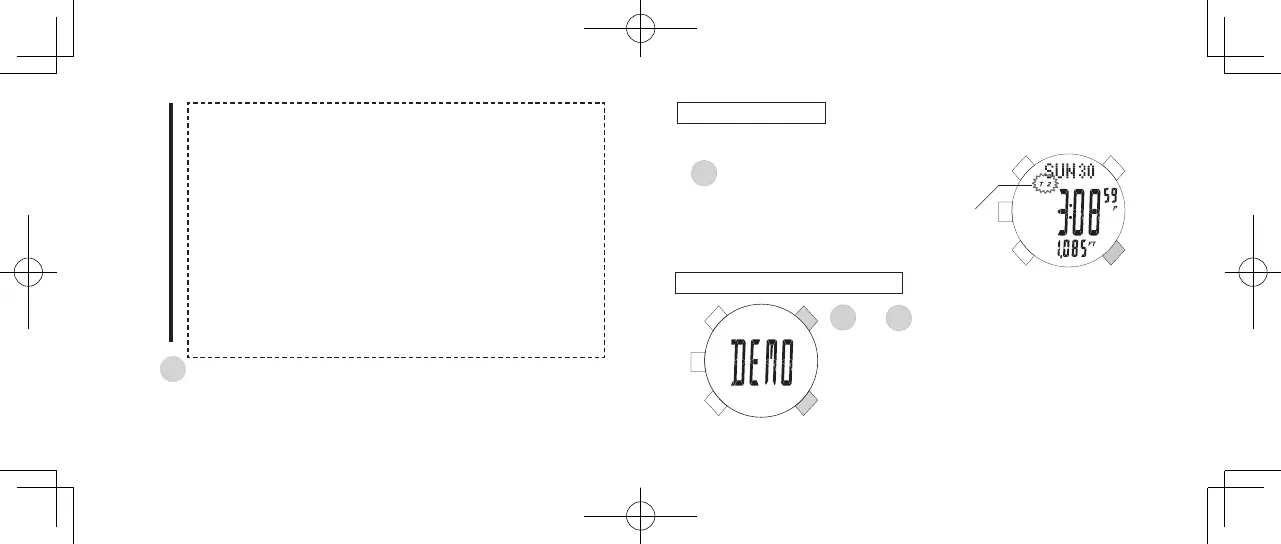
TIME ZONE SETTING
Two time zones (T1 and T2) are provided.
Keep holding down for 2 seconds to select
the time zone.
E
Time zone indicator
C
Press to conrm the settings and return to the TIME mode.
s
ALARM SOUND DEMONSTRATION



 To Next Page