Graphic data display of elevation changes
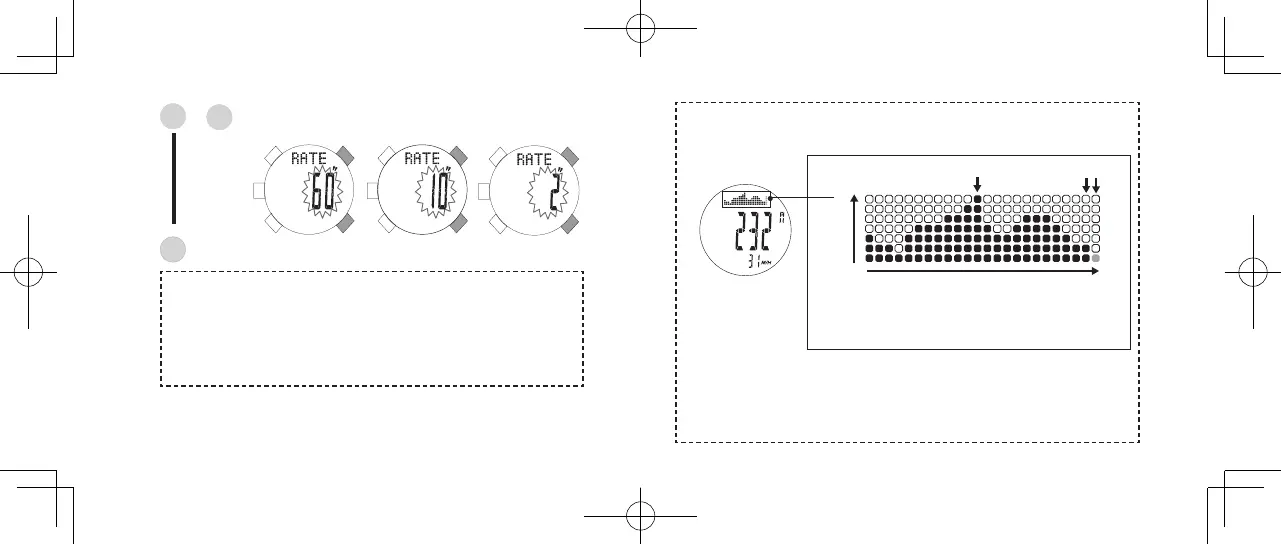
At the top of the display, the watch provides a graphic data of elevation changes
over the past two hours.
Press to select the sample rate among "60 seconds," "10
seconds," and "2 seconds."
D
E
or
Press to go back to the ALTIMETER mode display.
C
Sample rate
In the Altimeter Mode, the default measurement interval is set to 60 seconds.
This rate can be changed to either 2-second intervals with time limit of
maximum 10 minutes or 10-second intervals with time limit of maximum
60 minutes. When the measurement exceeds the time limit, the sample
rate returns to 60-second intervals.
s
• One division of the vertical axis is 10 meters (30
feet), one division of horizontal axis is 5 minutes.
• The blinking column at far right indicates the current
altitude.
7 divisions
24 divisions
1 hour ago
5 minutes ago
now
• The illustration above indicates that the altitude 5 minutes ago was
approximately 10 meters higher than the current altitude, and the altitude at 1
hour ago was approximately 60 meters higher than the current altitude.
• This graphic data represents the transition of altitude. To check the current
altitude, see the gure shown at the center of the display.



 To Next Page