12
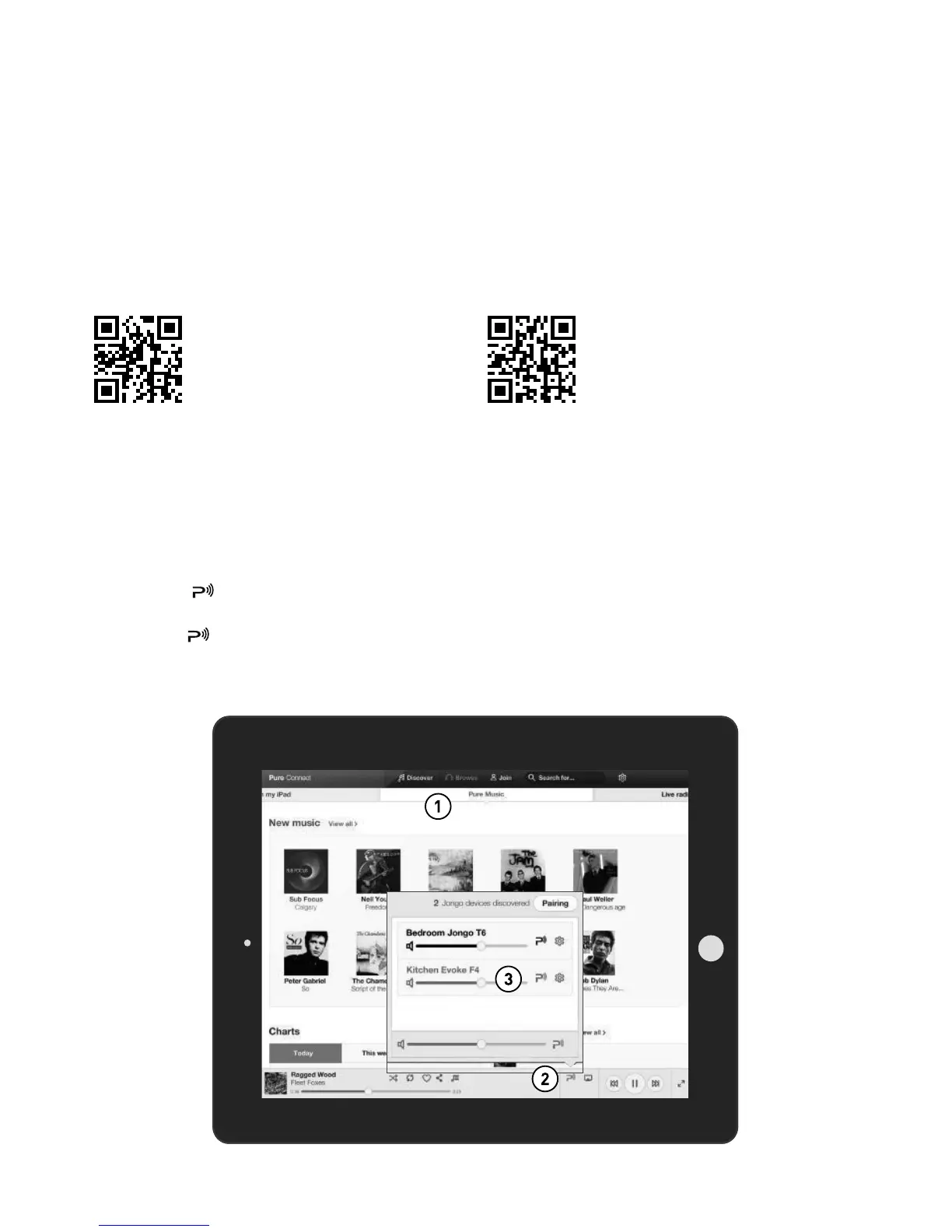
Streaming from the Pure Connect app
Download the Pure Connect app
You can download the Pure Connect app on your smartphone or tablet from the Apple App Store or
Google Play.
You can use the Pure Connect app to stream any music stored on your smartphone or tablet as well as
all the content available on Pure Connect to Evoke and other Jongo compatible devices.
Note: Any devices that you want to use with the Pure Connect app will need to be on the same network.
from the Apple App Store
from Google Play
Selecting Evoke or other Pure Jongo compatible device in the Pure
Connect app
With the Pure Connect app you can stream to a single Jongo device or multiple Jongo devices
simultaneously.
To start streaming content:
1. Select the content that you want to stream in the Pure Connect app.
2. Tap the icon in the app player bar on your iOS or Android device to view a list of available
devices on your network.
3. Tap the icon next to the Pure Jongo compatible devices that you want to stream to.
Your selected content will start playing on the Jongo devices that you selected.
See the help supplied with the app for more information on streaming to a Jongo device.
A
Pure Connect app



 To Next Page