Controls and sensors
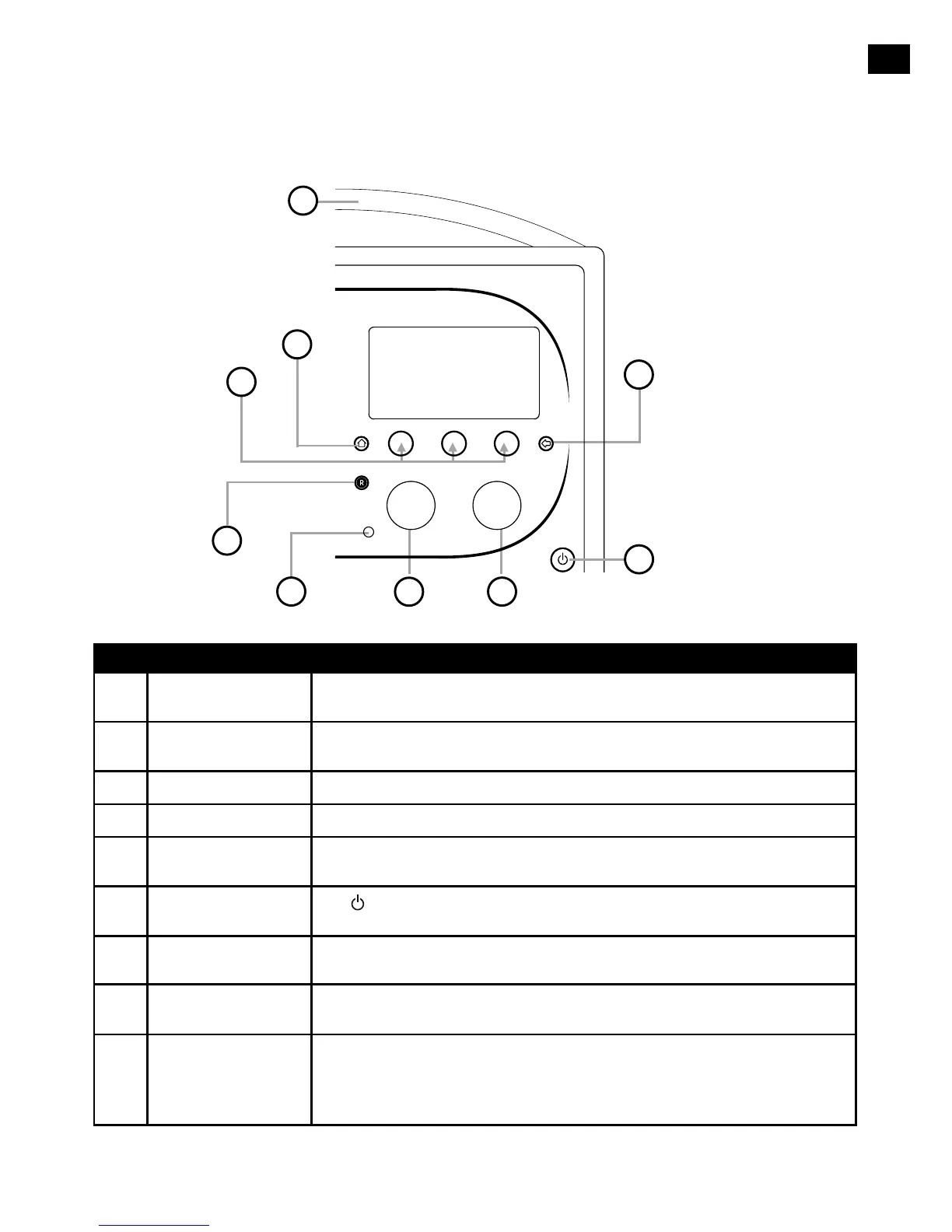
No. Control Description
1 Home Tap to return to the Home screen.
2
Context-sensitive
touch buttons
Tap the button that corresponds to the function shown on screen that you
want to use.
3 Back Tap to go back to the previous screen.
4 Volume/mute dial Turn to adjust volume. Push to mute and un-mute.
5 Select dial
Turn to navigate menus, stations or options and push to select an item.
Push to pause a media track or podcast.*
6 Standby touch key
Tap
to switch between Sleep, Standby and On. See page 6 for
more information.
7 Light sensor Do not cover. Adjusts the display brightness according to the light levels in
your room (only works when brightness level is set to ‘Automatic’).
8 Record button Tap to instantly record the internet radio station that is playing. See page
15 for more information.
9
SnoozeHandle
Tap to snooze the alarm. Grip and hold to brighten the display to maximum
brightness for 3 seconds.
Note: The alarm will not sound if Evoke is powered down and if Evoke is not
connected to mains power.
* The > symbol indicates that you will need to use the same control to navigate through the various menu options.
SelectVolume
1
2
3
4
5
6
7
8
9



 To Next Page