-3-
ENGLISH
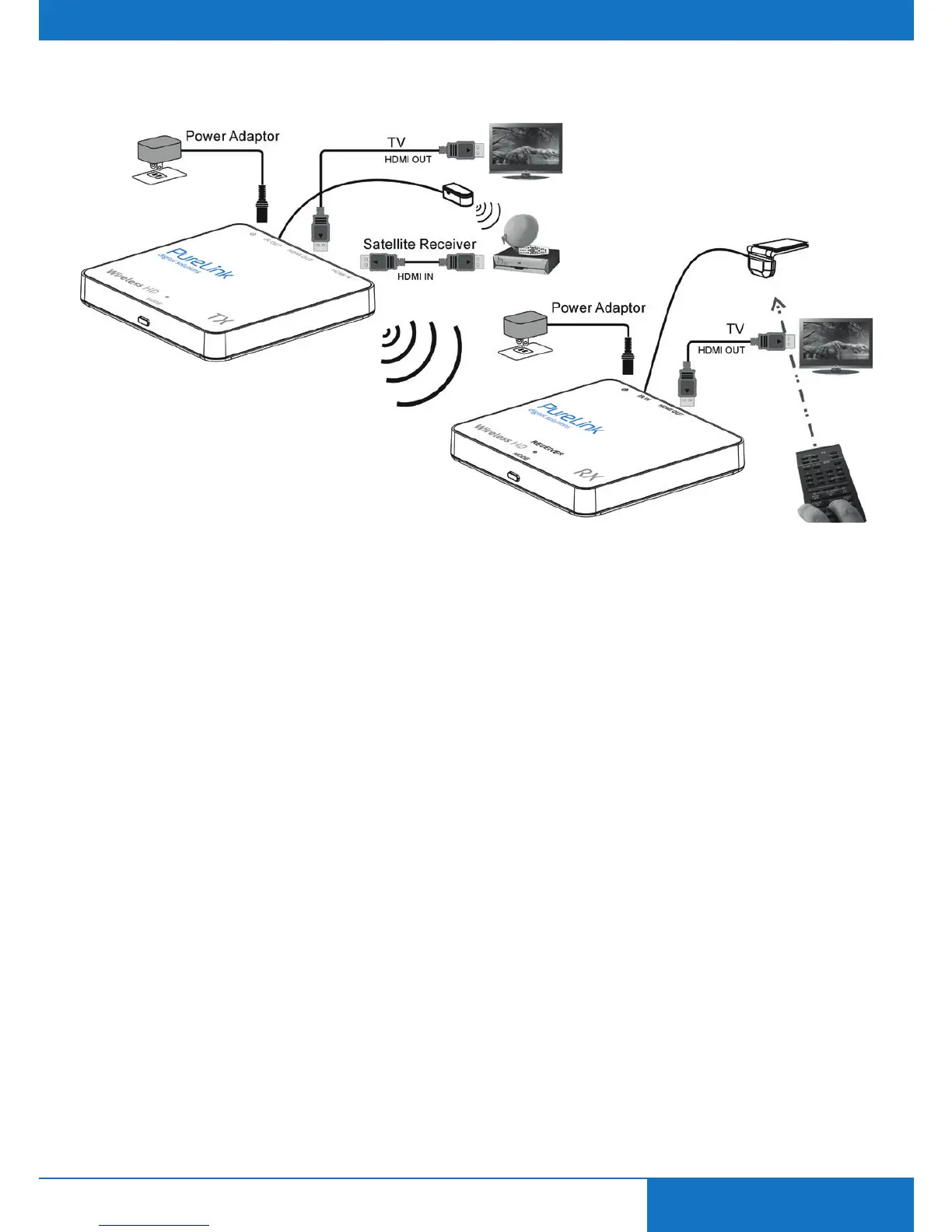
3. CONNECTION
Step 1:
Use an HDMI cable to connect the HDMI IN of the CSW110 transmitter with a source device. You can
use another HDMI cable to connect the HDMI OUT to a display (Loop-Through).
Step 2:
Use an HDMI cable to connect the HDMI OUT of CSW110 receiver to a display device.
Step 3:
(Skip this step if you don‘t need IR Extension) Connect the IR emitter to the CSW110 transmitter. Then
place the emitter in front of the source device’s IR receiver. Connect the IR receiver to the CSW110
receiver. Then place the receiver probe in place, accessible for your remote control.
Step 4:
Connect a DC 5V1A power adapter to the power jack (MicroUSB) of the CSW110 transmitter.
Step 5:
Connect the other DC 5V1A power adapter to the power jack (MicroUSB) of the CSW110 receiver.
Step 6:
To pair receiver and transmitter, press the MODE key on the receiver‘s box and then press the MODE
key on the transmitter.


 To Next Page