EasyManua.ls Logo

PureLink PT-E-HD50 - User Manual

PureLink PT-E-HD50
20 pages
Print Icon
To Next Page IconTo Next Page
Loading...
User Manual
PT-E-HD50
To avoid EMI issue, complete STP Cat6 cable is strongly recommended!
User Manual
HDMI Extender over Single Cat.X with HDBaseT, RS232, Bi-directional IR, Ethernet & POC
Model PT-E-HD50
Designed in Germany
© 2016 PureLink GmbH All rights reserved.
Question and Answer IconNeed help?

Do you have a question about the PureLink PT-E-HD50 and is the answer not in the manual?

Summary

Safety and Precautions

General Safety Instructions

Crucial safety guidelines to prevent injury and device damage.

Key Features

Technical Specifications

Connection Setup Guide

Unit Panel Layout

TX Unit Front Panel

Identifies and describes the connectors on the front of the TX unit.

Installation and Setup

HDBaseT Manager Software

Updating Device Firmware

Comprehensive steps for updating the firmware using the software.

Monitoring Connection Status

How to use the software to monitor the real-time connection status.

Interpreting Connection Status

Explains how to read successful and failed connection indicators.

Fail-Safe Configuration

Adjusting Fail-Safe Sensitivity

Adjusting parameters for wire quality and video error tolerance.

Summary

Safety and Precautions

General Safety Instructions

Crucial safety guidelines to prevent injury and device damage.

Key Features

Technical Specifications

Connection Setup Guide

Unit Panel Layout

TX Unit Front Panel

Identifies and describes the connectors on the front of the TX unit.

Installation and Setup

HDBaseT Manager Software

Updating Device Firmware

Comprehensive steps for updating the firmware using the software.

Monitoring Connection Status

How to use the software to monitor the real-time connection status.

Interpreting Connection Status

Explains how to read successful and failed connection indicators.

Fail-Safe Configuration

Adjusting Fail-Safe Sensitivity

Adjusting parameters for wire quality and video error tolerance.

Overview

The PureLink PT-E-HD50 is an HDMI Extender designed to transmit HDMI video and audio signals over a single Cat.X cable, leveraging HDBaseT technology. This device also incorporates support for RS232, bi-directional IR, Ethernet, and Power over Cable (POC), making it a versatile solution for extending various signals over long distances.

Function Description

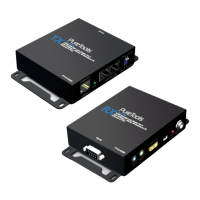
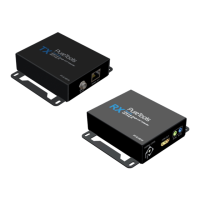
The primary function of the PT-E-HD50 is to extend HDMI signals, including Deep Color, full 3D, and 4K2K@30 (via HDBaseT technology), over a single Cat.5/5e/6 cable. It consists of two units: a transmitting unit (PT-E-HD50-TX) and a receiving unit (PT-E-HD50-RX). The TX unit captures input HDMI/DVI signals along with IR control packets, while the RX unit equalizes the transmitted HDMI signal and reconstructs IR and serial control signals. This allows for the extension of HDTV sources like DVD players, Blu-ray Disc players, PS3, and PCs to distant display monitors, including HDMI or DVI-enabled TVs and LCD PC monitors.

Beyond HDMI extension, the PT-E-HD50 integrates several other functionalities:

  • RS232 Control: It provides a full duplex RS-232 control path, supporting speeds up to 115,200 bps. This is particularly useful for interactive applications, such as touch panels, allowing for serial communication over the same Cat.X cable.
  • Bi-directional IR Pass-Through: The device facilitates bi-directional IR signal transmission, enabling control of source devices from the display location and vice versa. This eliminates the need for separate IR cabling, as IR signals are transmitted alongside HDMI over the single Cat.X cable.
  • Ethernet Extension: An integrated Ethernet port allows for the extension of LAN/network devices, providing network connectivity at both the transmitting and receiving ends.
  • Power over Cable (POC): This feature simplifies installation by allowing either the TX or RX unit to power both devices using a single power supply, reducing the number of power outlets required.

The PT-E-HD50 is designed to ensure high-quality video and audio transmission, supporting DTS-HD Master Audio and Dolby TrueHD high bit rate audio. It also includes HDCP and EDID bypass, ensuring compatibility with various HDMI sources and displays. The auto equalization feature helps maintain signal integrity over long cable runs.

Usage Features

The PT-E-HD50 is designed for ease of use and robust installation, making it suitable for digital signage, home theater, and professional AV installations.

  • Simple Connection: Users connect an HDMI source to the TX unit and an HDMI display to the RX unit using standard HDMI cables. A single Cat.5/5e/6 cable then links the TX and RX units for signal transmission.
  • IR Control: IR blasters and receivers are connected to the respective TX and RX units. The IR blaster emits IR command signals received from the IR receiver at the other end to control devices. Conversely, the IR receiver captures IR signals from remote controls to send them to the other end. Careful placement of IR blasters and receivers is crucial for proper functionality.
  • RS232 Connectivity: A DSUB-9 connector on both units allows for connection to serial port devices, enabling control and data exchange.
  • Network Integration: The Ethernet port on both units allows for connecting network devices, extending LAN connectivity.
  • Power Flexibility: With POC, only one power adapter is needed, which can be connected to either the TX or RX unit, simplifying power management.
  • Robust Installation: The wall-mounting housing design ensures easy and secure installation in various environments.
  • Firmware Management: The device includes a mini-USB port for firmware updates, allowing users to keep the device up-to-date with the latest features and improvements.

Maintenance Features

The PT-E-HD50 incorporates a specialized software called "HDBaseT Manager" to assist with monitoring, troubleshooting, and maintenance, ensuring optimal performance and stability.

  • HDBaseT Manager Software: This software is designed to detect and investigate potential problems in the connecting environment, particularly concerning the Valens chip inside the device. It offers four key services:

    • Firmware Management: Allows users to quickly check the current firmware version of both TX and RX units and update them as needed. This ensures the device operates with the latest enhancements and bug fixes.
    • Status Monitoring: Provides real-time information about the connection condition, including Valens Mode, Source Type, Hot Plug Detect (HPD) status, cable length, Video Bit Error Rate (BER), and MAXERR. This helps users understand the health of the connection at a glance.
    • Burn-In Test: Enables engineers or installers to generate a technical file that reveals unusual situations for accurate analysis. This is particularly useful for diagnosing intermittent issues or performance degradation over time.
    • Fail-Safe Setting: This feature allows for manual configuration of conditions under which the device will automatically reset to ensure stability during transmission. Users can set parameters for wire quality, video error tolerance, and time intervals. If the set conditions for trouble (e.g., poor wire quality or high video error) persist for the specified time, the device will reset to maintain signal quality. This proactive measure helps prevent prolonged signal degradation.
  • Connection Status Indicators: The HDBaseT Manager provides visual cues (green, yellow, or red lights) to indicate the quality of the connection status, making it easy to identify good or poor signal conditions.

  • Cable Recommendations: To avoid EMI issues and ensure optimal performance, the use of complete STP Cat6 cable is strongly recommended. For resolutions greater than 1080p, a Cat-6 cable is specifically advised. EIA/TIA-568-B termination (T568B) for Cat-5/5e/6 cables is also recommended for better performance.

  • Troubleshooting Support: The software provides detailed information on various connection parameters like HPD, Cable Length, Video BER, and MAXERR, which are crucial for diagnosing and resolving connectivity issues.

  • General Care: As with all electronic equipment, the PT-E-HD50 should be handled with care. Users are advised to follow all instructions and warnings, ensure proper ventilation, avoid servicing the unit themselves (unless explicitly explained in the manual), and use only the provided power adapter and cables. Cleaning should be done with liquid or aerosol cleaners only after unplugging the device.

PureLink PT-E-HD50 Specifications

General IconGeneral
ModelPT-E-HD50
Power Supply5V DC
Audio Formats SupportedLPCM, Dolby Digital, DTS
CategoryExtender
Maximum Resolution4K@60Hz
Video Resolutions Supported480i, 480p, 576i, 576p, 720p, 1080i, 1080p, 4K@60Hz
Connector TypeRJ45, HDMI
Connectors (Transmitter)HDMI Input, RJ45
Connectors (Receiver)HDMI Output, RJ45

Related product manuals