User Manual
PT-E-HD50
8. IR Pass-Through
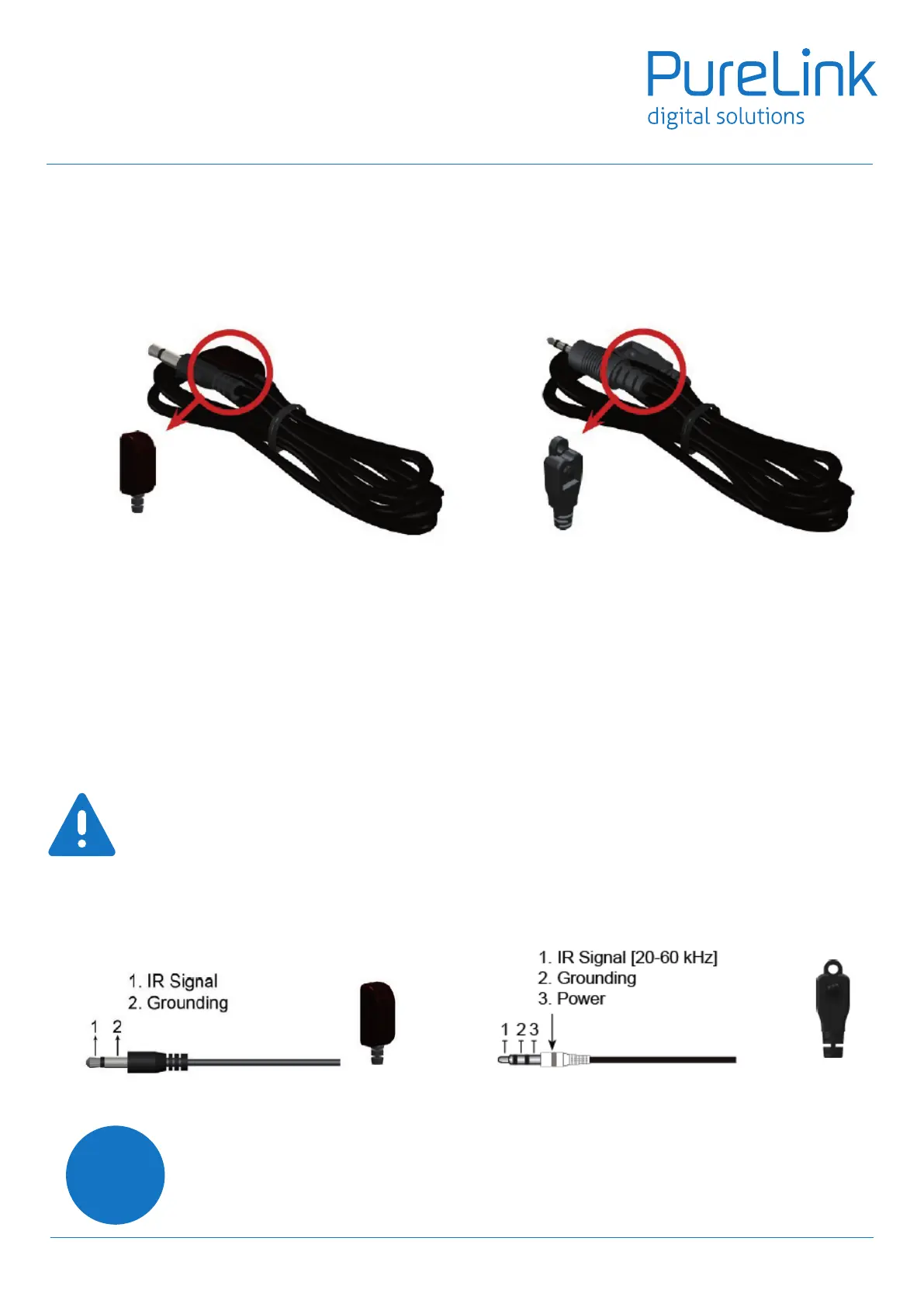
IR Extenders
IR Sockets
IR Blaster IR Receiver
IR BLASTER:
plug in the IR blaster to emit all IR command signals received from the IR receiver from the other end to control
the devices corresponding to the IR signals.
IR RECEIVER:
plug in the IR receiver to receive all IR command signals from the IR remote controls of the corresponding devices.
CAUTION
Incorrect placement of IR Blaster and Receiver may result in the failure of the IR extenders. Please check
carefully before plugging in the IR extender to the respective IR sockets. Warranty will not cover the
damage.
DenitionofIREarphoneJack
IR Blaster IR Receiver
You can buy any IR extension cables in the market that are compatible to the definition of the IR
sockets for the matrix if necessary for replacement use. However, IR cables longer than 2m (6-ft)
may not work.
i
8


 To Next Page