11
P: 479.419.4800 | F: 479.419.4801 | www.purkeys.net
PRODUCT NAME INSTALLATION GUIDE
Setting Your LVD Set Point
LVD SETTINGS
ere are four low voltage disconnect (LVD) settings available on the
controller.
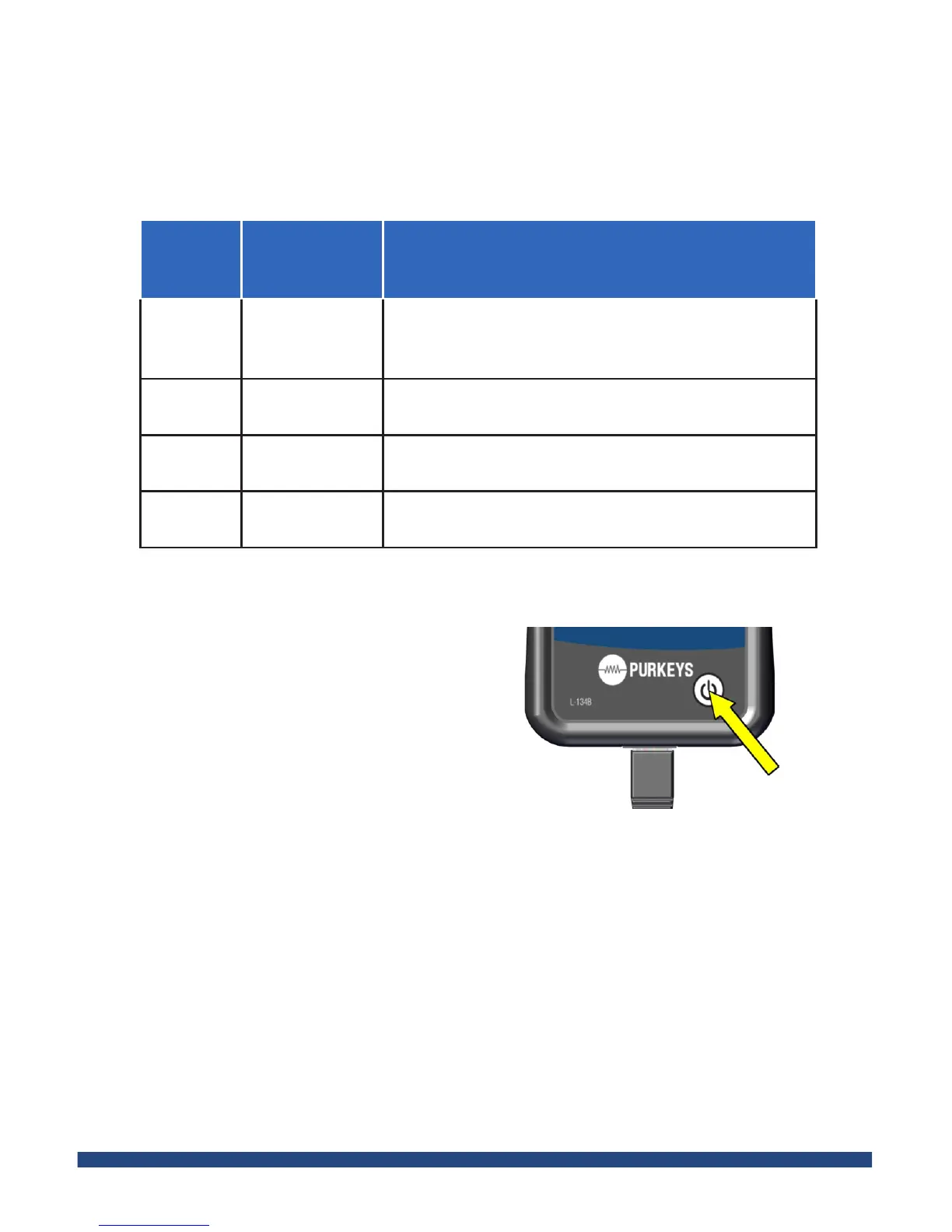
Step 1: Press the power button on
the remote module. All lights will
be green.
Setting
Approximate
Voltage
Function
Low 11.8
Allows the battery to reach near 0% state of
charge (ideal for deep cycle batteries that are
not needed to start a truck)
Medium
1
12.0
Allows the battery to reach about 25% state of
charge
Medium
2
12.2
Allows the battery to reach about 50% state of
charge
High 12.4
Allows the battery to reach about 75% state of
charge
Step 2: Press the power button ten
times. All lights will turn yellow.
Step 3: To cycle to the correct setting, press the power button. Each time the
button is clicked, a yellow light will indicate the setting.
• For low: Press the power button 1 time, showing 1 yellow light
• For medium 1: Press the power button 2 times, showing 2 yellow lights
• For medium 2: Press the power button 3 times, showing 3 yellow lights
• For high: Press the power button 4 times, showing 4 yellow lights
Step 4: Once you have chosen an LVD setting, wait for the LEDs to turn
green; this means the LVD is set and ready for use.


 To Next Page