EasyManua.ls Logo

Pyle PDA77BU - User Manual

Pyle PDA77BU
12 pages
Print Icon
To Next Page IconTo Next Page
Loading...
PDA77BU
Compact Home Theater Amplifier Stereo
Receiver with Bluetooth Wireless Streaming, Independent Mic Echo
& Volume Control, MP3/USB/SD/AUX/FM Radio (800 Watt)
Please note that PYLEUSA reserve the right to make production changes during
the life of our product lines that may impact the information in this manual.
Question and Answer IconNeed help?

Do you have a question about the Pyle PDA77BU and is the answer not in the manual?

Summary

PDA77 BU Amplifier Overview

Safety and Operating Precautions

General Safety Warnings

Essential safety guidelines for operating the audio equipment.

Electrical Safety and Grounding

Instructions to prevent electric shock and ensure proper grounding.

Operational and Installation Safety

Guidelines on usage, environment, handling, and installation safety.

Maintenance and Servicing

Guidance on proper installation and when to seek professional servicing.

Getting Started and Setup

Introduction to the Manual

Recommended review of manual before operating the amplifier.

Audio Input;Output Connections

Guide to connecting audio sources and output devices to the amplifier.

FM Radio Operation Guide

Steps to connect antenna, scan, and select FM radio stations.

Remote Control Operation

Remote Control Buttons and Functions

Detailed explanation of remote buttons and their operations for various modes.

Device Features and Operation

Remote Control Usage Notes

Notes on remote compatibility and specific mode limitations for the unit.

USB;SD Media Playback

Supported file formats and port usage for USB/SD media playback.

Navigation and Folder Search

How to search and navigate through folders and tracks on USB/SD media.

Control Panel Button Functions

Explanation of the physical buttons on the amplifier's control panel.

FM Radio Tuning Procedures

Detailed instructions for scanning and tuning radio stations.

Connectivity and Display Information

Bluetooth Device Pairing

Step-by-step guide to connect and pair Bluetooth devices with the amplifier.

Console Display Screen Guide

Explanation of information shown on the device's display for various modes.

Panel Layout and Connections

Front Panel Controls and Ports

Description of buttons, knobs, and ports on the front of the unit.

Rear Panel Connectors and Settings

Details on audio input/output, speaker terminals, and power voltage selector.

Health and Environmental Notice

California Prop 65 warning regarding product contents and potential health risks.

Product Specifications and Features

Key Product Features

Summary of the amplifier's main capabilities and functionalities.

Package Contents

List of items provided in the product package.

Bluetooth Connectivity Specifications

Information on Bluetooth version, network name, and wireless range.

Technical Performance Data

Detailed technical data including power output, frequency response, and dimensions.

Overview

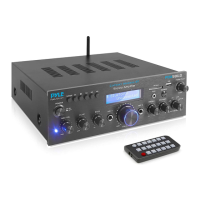
The Pyle PDA77BU is a compact home theater amplifier and stereo receiver designed for versatile audio playback and microphone functionality. It features a 4-channel amplifier design, making it suitable for driving multiple speakers in a home theater setup.

Function Description:

The PDA77BU serves as a central hub for various audio sources. Its primary function is to amplify audio signals for speaker output. It integrates a Bluetooth wireless streaming module, allowing users to connect and play music from a wide range of Bluetooth-enabled devices such as iPhones, Android smartphones, iPads, tablets, and laptops. The amplifier also includes a built-in FM radio receiver for tuning into local radio stations.

For local media playback, the unit is equipped with USB flash drive and SD memory card readers, supporting MP3 and WAV file formats. This allows users to play their digital music libraries directly from these storage devices.

A key feature of the PDA77BU is its dual microphone inputs, making it ideal for karaoke or public address applications. These microphone inputs come with independent controls for echo (reverb depth) and delay, allowing users to customize the vocal effects. Additionally, the microphone volume can be adjusted independently.

The amplifier offers multiple audio input options, including RCA (L/R) audio input connectors for connecting external devices like DVD players, CD players, or TVs. An AUX (3.5mm) input is also available for connecting portable media players. For output, it provides RCA (L/R) audio output connectors, which can be used to connect to other amplifiers or recording devices. Speaker output is handled via four pairs of banana plug speaker output connectors, supporting a 4-channel speaker system.

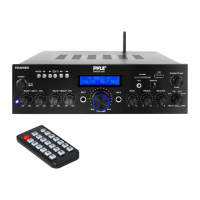
The front panel features a digital LED display that shows information about the current mode, track number, elapsed time, and FM frequency. A comprehensive set of control buttons on the front panel, along with a remote control, provides full command over all functions.
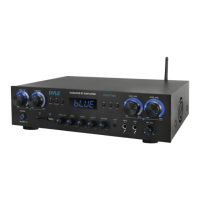
Important Technical Specifications:

  • Power Output: 800 Watt MAX (400 Watt RMS)
  • Amplifier Design: 4 Channel
  • Tone Control: +/- 10dB (Bass and Treble)
  • Frequency Response: 20-20KHz
  • Freq. Adjustment: +/-2dB
  • Signal to Noise Ratio: >85dB
  • Total Harmonic Distortion (T.H.D.): <1.0%
  • Bluetooth Version: 5.0
  • Bluetooth Network Name: 'PyleUSA'
  • Wireless Range: Up to 30'+ ft.
  • Bluetooth Antenna: 2.4G
  • Supported File Formats (USB/SD): MP3, WAV
  • FM Radio Frequency Range: 87.5MHz to 108MHz
  • Power Supply: 110/240V, Switchable
  • Power Output (per channel): 25W x 4
  • Dimensions (L x W x H): 13.8" x 9.8" x 3.5" -inches
  • Remote Control Battery: 3V Lithium Cell (CR2025) Included

Usage Features:

  • Wireless BT Streaming: Easy pairing with Bluetooth devices (e.g., 'PYLEUSA' or 'BT' network name). The unit provides an audible confirmation upon successful pairing.
  • USB/SD Card Playback: Supports direct playback of MP3 and WAV files from USB flash drives and SD cards. The unit features folder searching capabilities via the remote control, displaying folder numbers (e.g., "F001") and track numbers.
  • FM Radio: Connect an FM antenna, select FM mode, and use the auto-scan function to find and store radio stations (87.5MHz to 108MHz). Stations can be selected using PREV/NEXT buttons or directly via numeric keys on the remote.
  • Microphone Controls: Independent knobs for Microphone Volume, Reverb Depth, and Delay Time allow for precise adjustment of vocal effects. The MIC/MUSIC button on the front panel switches the Bass/Treble knobs between adjusting music frequencies and microphone frequencies.
  • Audio Inputs: Connect CD/DVD/TV audio outputs via RCA jacks or portable devices via the 3.5mm AUX input.
  • Output Options: RCA (L/R) audio output for connecting to other audio equipment.
  • Master Volume Control: Independent master volume knobs for each of the four channels (CHA, CHB, CHC, CHD), as well as a main master volume knob.
  • Tone Controls: Dedicated Bass and Treble knobs for adjusting music frequencies.
  • DSP Effects: The remote control offers 8 types of DSP (Digital Signal Processor) effects, including General, Live, VBass, POP, Classic, Jazz, Rock, and 3D.
  • Repeat Modes: Select between "One-Repeat" (current file) or "All-Repeat" (all files) for USB/SD playback.
  • Mute Function: A dedicated button on the remote control for muting audio output.
  • Power Voltage Selector: Switchable between 115V and 230V for international compatibility.

Maintenance Features:

  • Safety Precautions: The manual emphasizes important safety warnings, including not removing the cover (no user-serviceable parts inside), avoiding exposure to rain or moisture, and not operating near heat sources.
  • Cleaning: Clean the unit only with a dry cloth.
  • Wiring: Ensure all equipment is turned OFF during wiring. Protect wires from being walked on or pinched.
  • Grounding: Proper grounding is essential to maintain the unit's built-in grounding safety.
  • Servicing: Refer all servicing to qualified service personnel, especially if the apparatus is damaged, exposed to liquids, or malfunctions.
  • Ventilation: The unit has a cooling fan and an air outlet; avoid stacking objects on it to ensure proper airflow and prevent overheating.
  • Remote Control Battery: Requires two AAA batteries for operation. The manual specifies the remote control battery type as a 3V Lithium Cell (CR2025) for the included battery.

Pyle PDA77BU Specifications

General IconGeneral
BrandPyle
ModelPDA77BU
CategoryAmplifier
LanguageEnglish

Related product manuals