FUNCTION
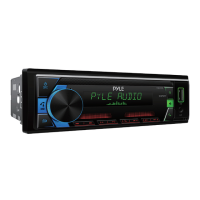
•Press the Volume knob and Rotate to select Audio/Display/Tuner/Clock/Beep/
Animation/Demo mode function. Press the Volume knob again to Select desire
function mode.
AUDIO MODE
•Press the Volume knob and Rotate to select SW Level/Manual EQ/Q factor/Preset
EQ/Bass boost/Loudness/Subwoofer set/Fader/Balance/X’Over/DTA Setting/Car type.
•Long Pless Volume knob to selet 2 way/3 way X’Over mode.
SW LEVEL
•Press the Volume knob and Rotate to select -13 ~ +13 level.
MANUAL EQ
•Press the Volume knob and Rotate to select 25 band frequencies level.
Q FACTOR
•Press the Volume knob and Rotate to select 1/1.5/2.5/3.5 dierent Q factor value.
PRESET EQ
•Press the Volume knob and Rotate to select user/Natural/Rock/Pop/Easy/Top40/
Jazz/Powerful.
BASS BOOST
•Press the Volume knob and Rotate to select Bass bosst level.
LOUDNESS
•Press the Volume knob and Rotate to select Loudness level.
SUBWOOFER SET
•Press the Volume knob and Rotate to Switch ON/OFF.
FADER
•Press the Volume knob and Rotate to select Fader position.


 To Next Page