www.PyleUSA.com
6
18. AUDIO INPUT: Connect the audio input RCA jacks of other devices, to these RCA
jacks
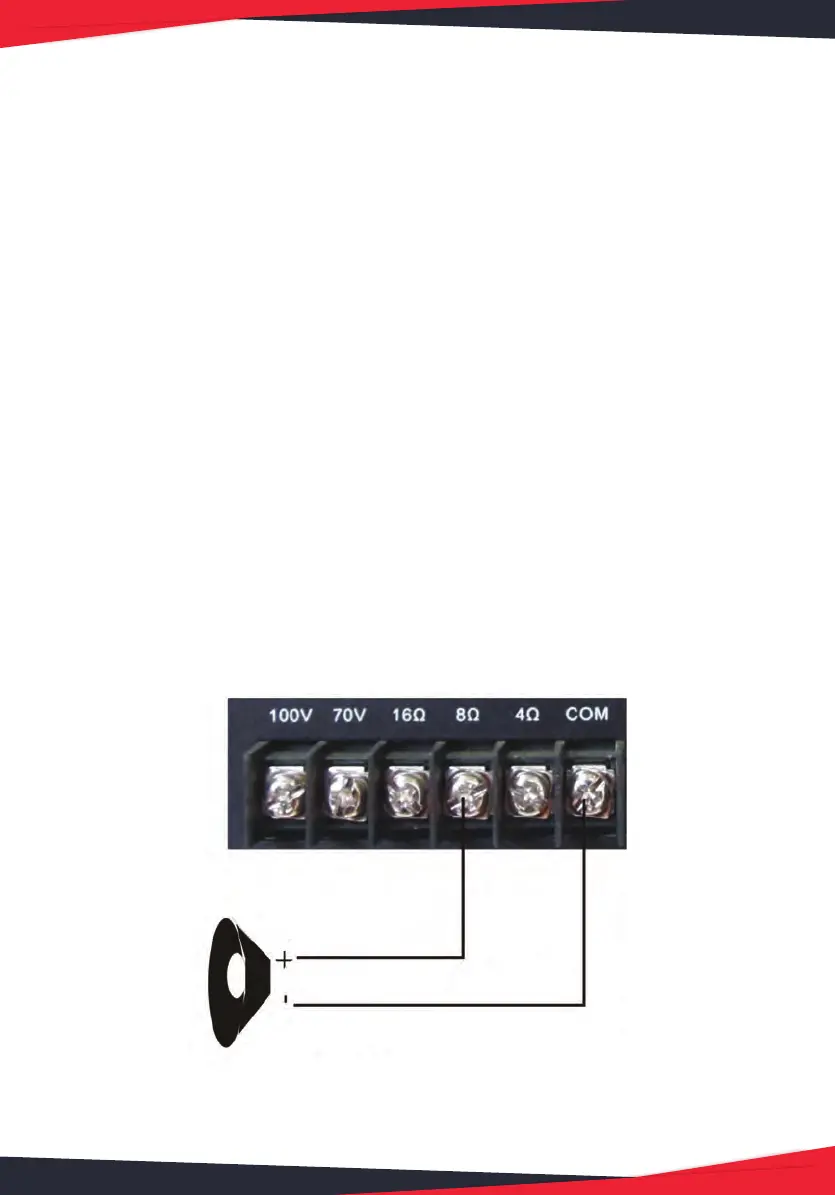
19. SPEAKER TERMINALS: Com/4-ohm/8-ohm/16-ohm/70V/100V, To Connect
speaker wires to the selected terminals.
20. BLUETOOTH ANTENNA: Please pull the antenna out when using Bluetooth
input
21. POWER DC INPUT: Connect the DC Power input terminals.
22. FUSE: Built-in 10A fuse
23. POWER SUPPLY: Connect to AC power socket.The unit is working with AC-115V
only, make sure to choose the correct voltage before you turn on the unit.
SPEAKER CONNECTION
One or more speakers (4,8,16 Ohms) can be connected to the amplier with or
without transformers. However, before you connect any speakers to the amplier,
the total impedance must be calculated in order to avoid damage to the amplier.
A total speaker impedance greater than 16 Ohms or less than 4 Ohms can cause this
damage to occur.
SYSTEM 1: SINGLE SPEAKER SYSTEM
NOTE: Connect the speaker (+) to the amplier’s 4-Ohm, 8-Ohm or 16-Ohm
terminal, depending on the speaker being used.
ONE SPEAKER
8 ohm Speaker


 To Next Page