EasyManua.ls Logo

Pyramid Studio Pro PM-8501 - Page 8

Pyramid Studio Pro PM-8501
16 pages
Print Icon
To Next Page IconTo Next Page
To Previous Page IconTo Previous Page
Loading...
AUDIO
CONNECTION
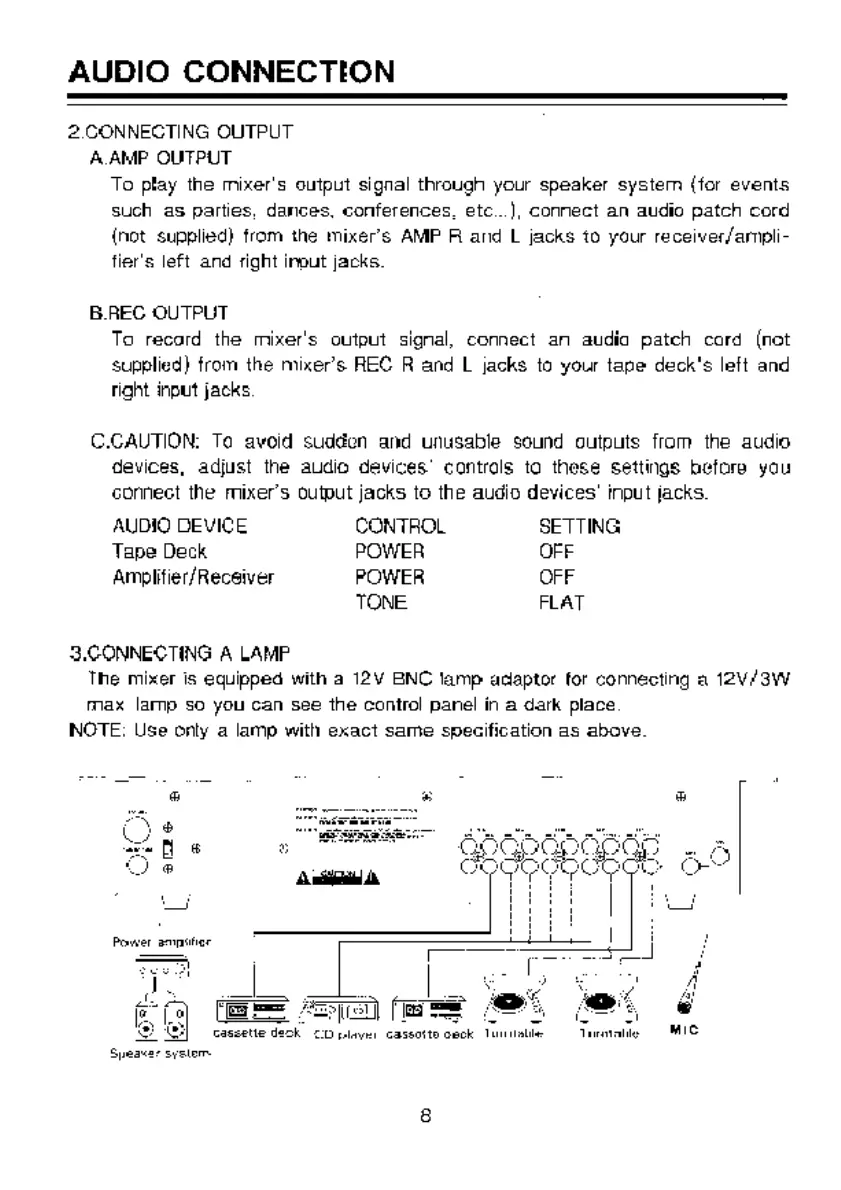
2.CONNECTING
OUTPUT
ААМР
OUTPUT
To
play
the
mixer's
output
signal
through
your
speaker
systern
(for
events
such
as
parties,
dances,
conferences,
еіс...),
connect
an
audio
patch
cord
{not
supplied)
from
the
mixer's
AMP
А
and
L
jacks
to
your
receiver/ampli-
fier's
left
and
right
input
jacks.
B.REC
OUTPUT.
To
record
the
mixer's
output
signal,
connect
ап
audia
patch
cord
(not
supplied}
from
the
mixer's
REC
В
and
L
jacks
to
your
tape
deck's
left
and
right
input
jacks
C.CAUTION:
To
avoid
suddon
and
unusable
sound
outputs
from
the
audio
devices,
adjust
the
audio
devices’ contrals
ta
these
settings
before
you
connect
the
mixer's
output
jacks
to
the
audio
devices’
input
jacks.
AUDIO
DEVICE
CONTROL
SETTING
Tape
Deck
POWER
OFF
Amplifier/Recsiver
POWER
OFF
TONE
FLAT
S.CONNECTING
A
LAMP
The
mixer
is
equipped
with
a
12V
BNC
lamp
adaptor
for
connecting
a
12V/3W
max
lamp
so
you
can
see
the
control
panel
ín
a
dark
place.
NOTE:
Use
only
a
lamp
with
exact
same
specification
as
above.
E=
сашепе
deck
CO
player
caseorto
opok
None
Tarento
MIC

Related product manuals