QBC STAR™ System User’s Manual
3–2 L–000867(A)
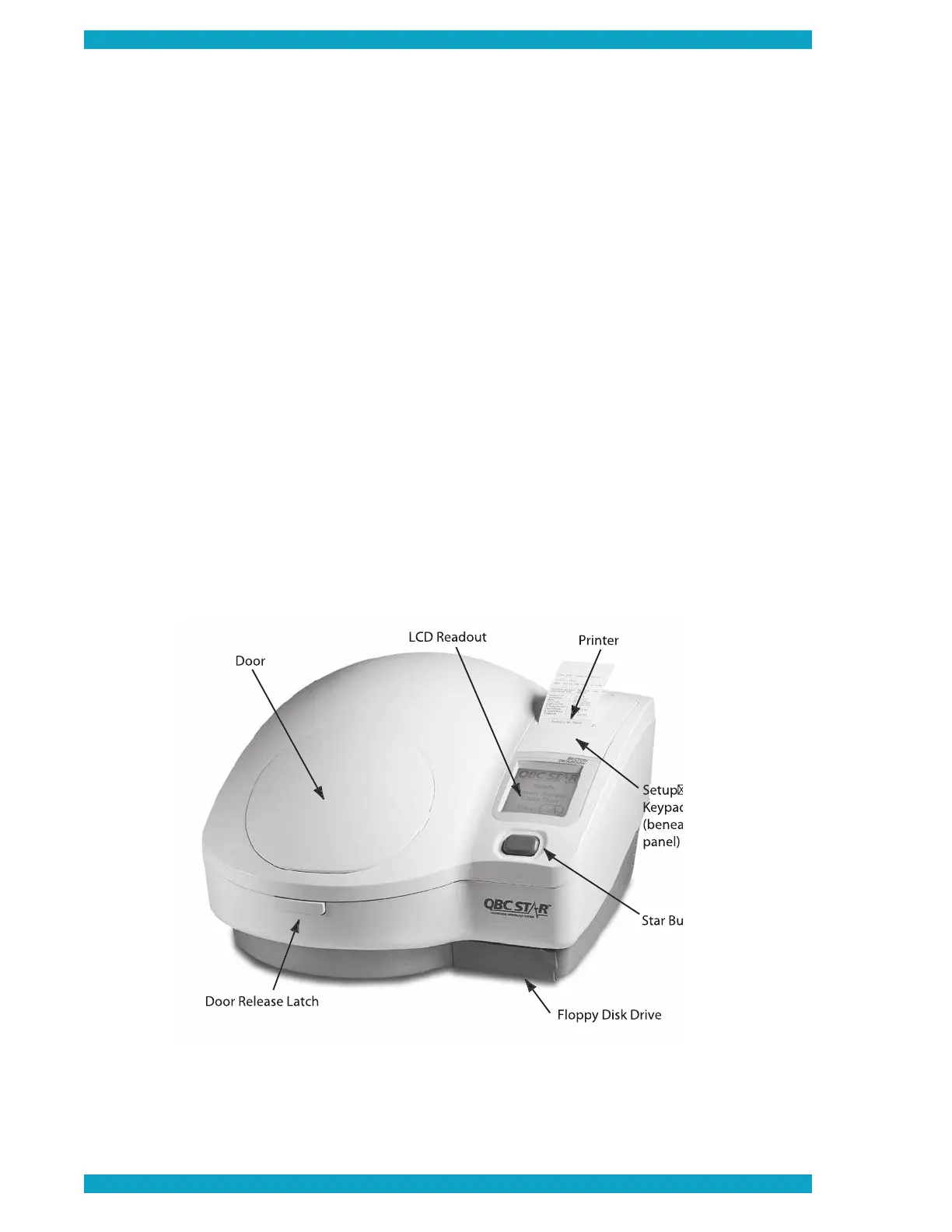
“Star” Button
The “Star” Button is located on the top of the
instrument, toward the right side. It is teal colored.
See Figure 6. This button has several functions:
• Start Testing – when an untested tube is in the analyzer
• Abort Testing – when the instrument is in the process of testing
• Reprint Test Results – after automatic test results printout, before opening door
The button will only perform these functions at the times described above.
Door Release Latch
The door release latch is located on the front panel of the
instrument, just below the door. It is
used to pop open the door on the top of the instrument. The door can only be opened when the system
determines that it is safe to do so. The door is locked electromechanically when it is unsafe to open the
tube is being centrifuged). Pressing the door release latch at such a time
Liquid Crystal Display (LCD)
All system prompts (instructions for use) are presented on the Liquid Crystal Display (also called the LCD or LCD
Readout). In addition, the test results are shown on the LCD. If any errors occur during the system’s self-tests
or during operation of the unit, this information too is shown on the LCD. See Figure 6.
Figure 6 – QBC STAR Controls and Indicators


 To Next Page