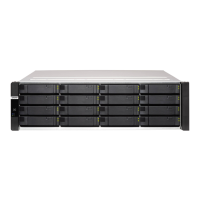
No. Component No. Component
1 OLED panel power button 2 Power button
Operation User Action Result
Power on NAS Press the power button. • Both storage controllers power on.
• All storage and management services are
disabled.
Tip
• System startup takes 10 to 15
minutes, depending on the number
of installed drives and connected
devices. Check the rear panel LEDs
to determine the startup status. For
details, see Rear Panel LEDs.
• This button can only be used to
power on the two storage
controllers. Use the respective rear
panel storage controller power
button to power off the storage
controllers. For details, see Storage
Controller Power Button.
Power on OLED
display
Press the OLED button. The OLED display powers on.
Power off OLED
display
Press the OLED button. The OLED display powers off.
Front Panel LEDs
The front panel LEDs indicate system status and related information when the NAS is powered on. The
following LED information applies only when the drive is correctly installed and when the NAS is connected
to the network.
For details on the location of the LEDs, see Front Panel.
LED Status Description
System power Blue System powered on
ES1686dc User Guide
Product Overview 9


 To Next Page
 Loading...