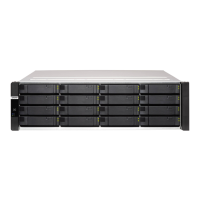
Component ES1686dc-2123IT-64G
ES1686dc-2142IT-96G
ES1686dc-2142IT-128G
Memory slots 8 x DDR4 RDIMM or LRDIMM slots per controller
Important
• Use only QNAP memory modules to maintain
system performance and stability. For NAS devices
with more than one memory slot, use QNAP
modules with identical specifications.
• Using unsupported modules may degrade
performance, cause errors, or prevent the
operating system from starting.
• You can only use one type of dual in-line memory
module (DIMM) at a time. Do not use registered
DIMM (RDIMM) with load-reduction DIMM
(LRDIMM) memory.
Maximum memory 512 GB RAM: 8 x 64 GB
Flash memory 4 GB (dual-boot OS protection)
Cache for Copy-to-Flash 64 GB per controller
Storage
Drive bays 16 x 3.5-inch SAS 12 Gbps
Note
The interface is backward compatible to SAS 6 Gbps.
Drive compatibility 3.5-inch bays:
• 3.5-inch SATA hard disk drives
• 3.5-inch SAS hard disk drives
• 2.5-inch SATA hard disk drives
• 2.5-inch SATA solid-state drives
• 2.5-inch SAS hard disk drives
• 2.5-inch SAS solid-state drives
Tip
For the list of compatible drive models, go to https://
www.qnap.com/compatibility.
A QDA-SA or QDA-SA2 drive adapter is required for
installing SATA HDD/SSD. For more details, see the
drive adapter Quick Installation Guide.
SSD cache acceleration support 3.5-inch drive bays: 1 to 16
Network
10 Gigabit Ethernet ports 4 x 10GbE SFP+ ports per controller
Gigabit Ethernet ports 3 x GbE RJ45 ports per controller
External I/O Ports & Expansion Slots
ES1686dc User Guide
Product Overview 5


 To Next Page
 Loading...