Home
QNAP
Network Hardware
TS-853A
User Manual
Page 60 (RAM Upgrade for IS-453 S)
QNAP TS-853A - RAM Upgrade for IS-453 S
92 pages
Manual
Save Page as PDF
To Next Page
To Next Page
To Previous Page
To Previous Page
Loading...
60
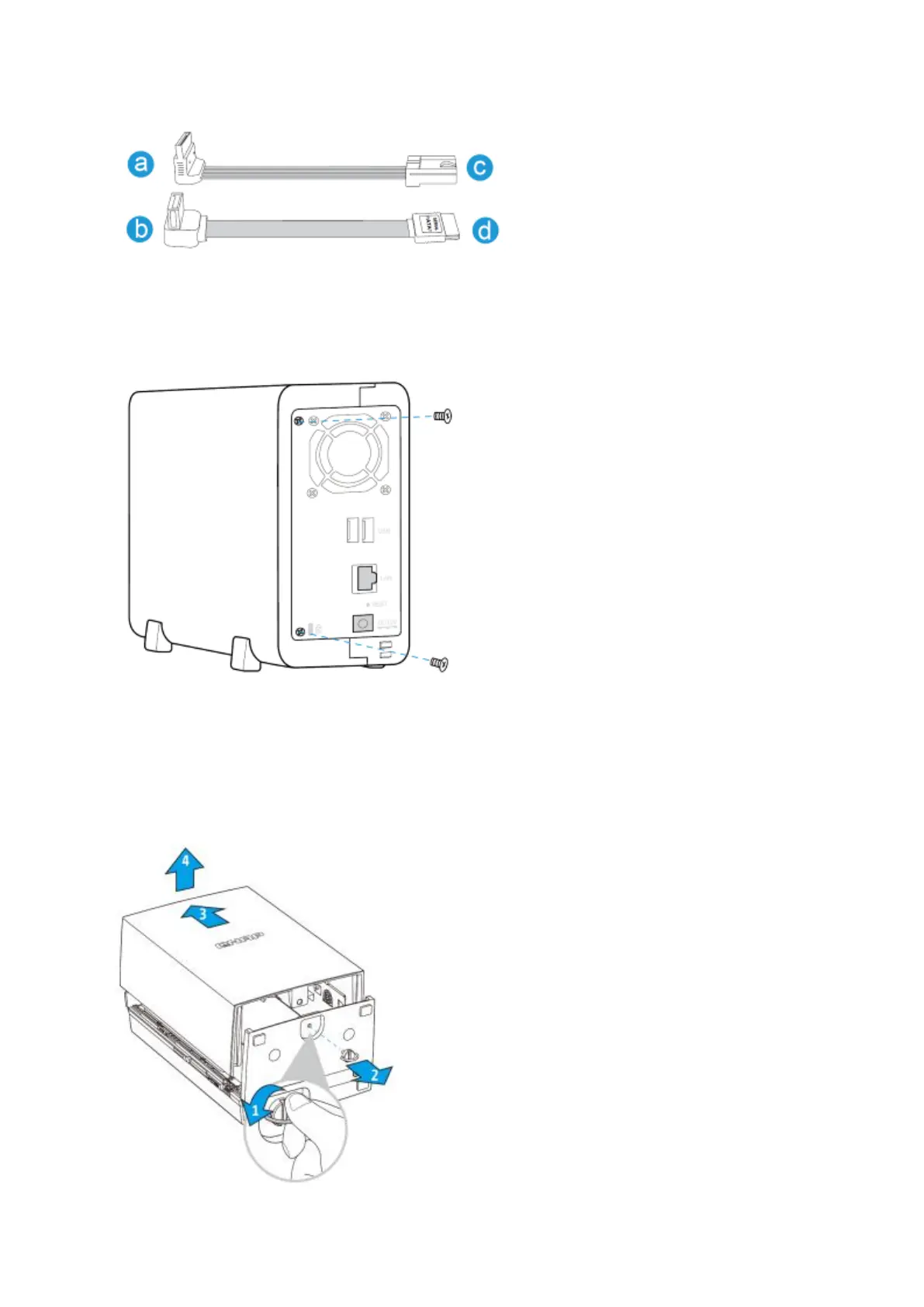
3.
After
instal
ling
th
e
h
ard
drives,
cover
the
NAS
with
t
he
case
c
ove
r
and
fa
sten
the
roun
d
head screws. Then, pl
ace the NAS verticall
y on the stands.
7.1.4.
TAS-1
68
, T
AS-268, TS
-128, TS-
228
1.
Re
move the tooll
ess screw and t
op cover
.
59
61
Table of Contents
Main Page
default chapter
8
Table of Contents
8
Safety Warnings
10
Chapter 1. CPU and Memory Specifications
11
Chapter 2. Power Button and Reset Button Behavior
26
Chapter 3. USB One Touch Copy
27
Chapter 4. LED and Alarm Buzzer Specifications
28
Chapter 5. Upgrade Memory on QNAP Turbo NAS (RAM Module Installation)
31
TS-453Mini (4-Bay)
31
Ts-451S, Ts-531P, Ts-651, Ts-851, Ts- X 53/ X 53S Pro , Ts-563, Tvs
33
Bay )
33
Ts-431U, Ts-451U, Ts
35
Series (4/8/12- Bay )
35
Ts-251+, Ts-251, Ts-451+, Ts-451
38
Is-453S
41
Chapter 6. Network Expansion Card Installation
43
TVS-463, TS-531P, TVS-663, TVS-863, TS-563, TS-879 Pro, TS-1079 Pro
43
Ts-463U, Ts-463U-Rp
43
Ts-463U, Ts-463U-Rp, Tvs-471U
47
Ts-863U, Ts-863U-Rp, Ts-1263U, Ts-1263U-Rp
51
Chapter 7. Install and Hot-Swap Hard Drives
54
Install Hard Drives
54
TVS-X63, TS-X53A, TS-563, TS-X53 Pro, TS-651, TS-851, TS-531P
54
TS-453Mini
55
TS-112P, TS-212P and TS-251C
58
Tas-168, Tas-268, Ts-128, Ts-228
60
Is-453S
62
Hard-Swap Hard Drives
64
Chapter 8. RAID Recovery
67
Chapter 9. Use the LCD Panel
69
Chapter 10. Install Power Supply Unit
74
1U Turbo NAS with Hot-Swappable PSU
74
3U Turbo NAS (TS-853U-RP, TS-1253U-RP Only)
75
Other manuals for QNAP TS-853A
Hardware User Manual
135 pages
Related product manuals
QNAP TS-653B-8G
20 pages
QNAP TS-433
51 pages
QNAP TS-453A
135 pages
QNAP TS-431P
135 pages
QNAP TS-653A
135 pages
QNAP TS-231+
135 pages
QNAP TS-231P
135 pages
QNAP TS-253A
135 pages
QNAP TS-431KX
54 pages
QNAP TS-431XeU
41 pages
QNAP TS-433-4G
51 pages
QNAP TS-1283XU-RP
54 pages



 To Next Page