+7(495) 797-3311 www.qtech.ru
Москва, Новозаводская ул., 18, стр. 1
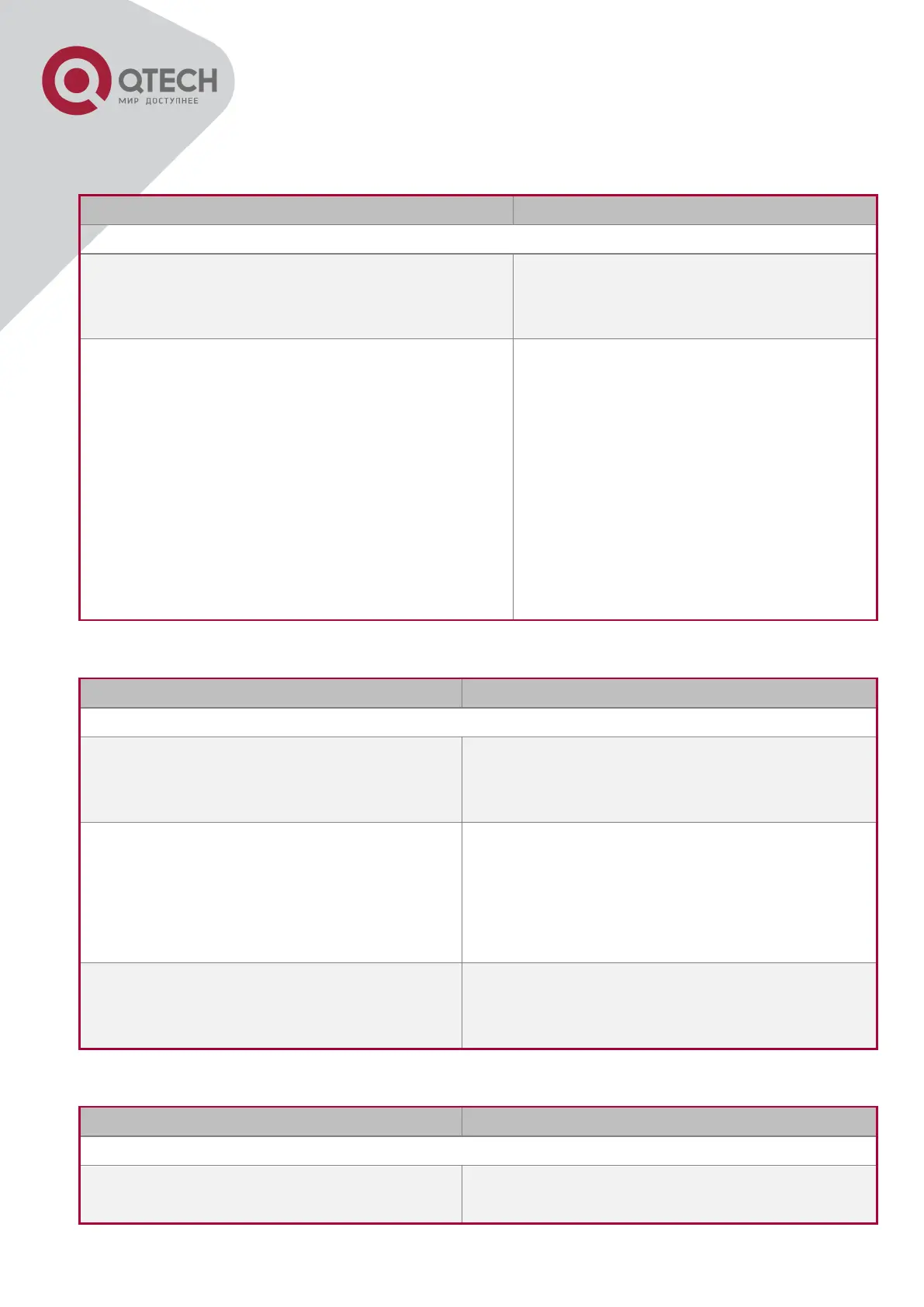
3. Bind flexible QinQ policy-map to port
1. Configure class map
class-map <class-map-name>
no class-map <class-map-name>
Create a class-map and enter class-map
mode, the no command deletes the
specified class-map.
match {access-group <acl-index-or-name> | ip
dscp <dscp-list>| ip precedence <ip-
precedence-list>| ipv6 access-group <acl-
index-or-name>| ipv6 dscp <dscp-list> | ipv6
flowlabel <flowlabel-list> | vlan <vlan-list> |
cos <cos-list> | c-vlan <vlan-list> | c-cos <cos-
list>}
no match {access-group | ip dscp | ip
precedence|ipv6 access-group| ipv6 dscp |
ipv6 flowlabel | vlan | cos | c-vlan | c-cos}
Set the match standard of class-map,
(classify data flow by ACL, IPv4
Precedent or DSCP, etc for the class
map); the no command deletes the
specified match standard.
2. Configure policy-map of flexible QinQ
policy-map <policy-map-name>
no policy-map <policy-map-name>
Create a policy-map and enter policy-map
mode, the no command deletes the specified
policy-map.
class <class-map-name> [insert-before
<class-map-name>]
no class <class-map-name>
After a policy-map is created, it can be
associated to a class. Different policy or new
DSCP value can be applied to different data
flows in class mode; the no command deletes
the specified class-map.
set {s-vid <new-vid> | c-vid <new-vid>}
no set {s-vid | c-vid}
Assign the new cos and vid value to the packets
which match the class map, no command
cancels the operation.
3. Bind flexible QinQ policy-map to port
service-policy <policy-map-name> in
no service-policy <policy-map-name> in
Apply a policy-map to a port, the no command
deletes the specified policy-map applied to the


 To Next Page
 Loading...