EasyManua.ls Logo

QUAD 66 - Audio Controls and Adjustments; Volume Control; Balance Control

QUAD 66
17 pages
Print Icon
To Next Page IconTo Next Page
To Previous Page IconTo Previous Page
Loading...
I
I
I
Volume
Balance
Tilt
LH BALANCE
I
CENTRAL
BALANCE
RH BALANCE
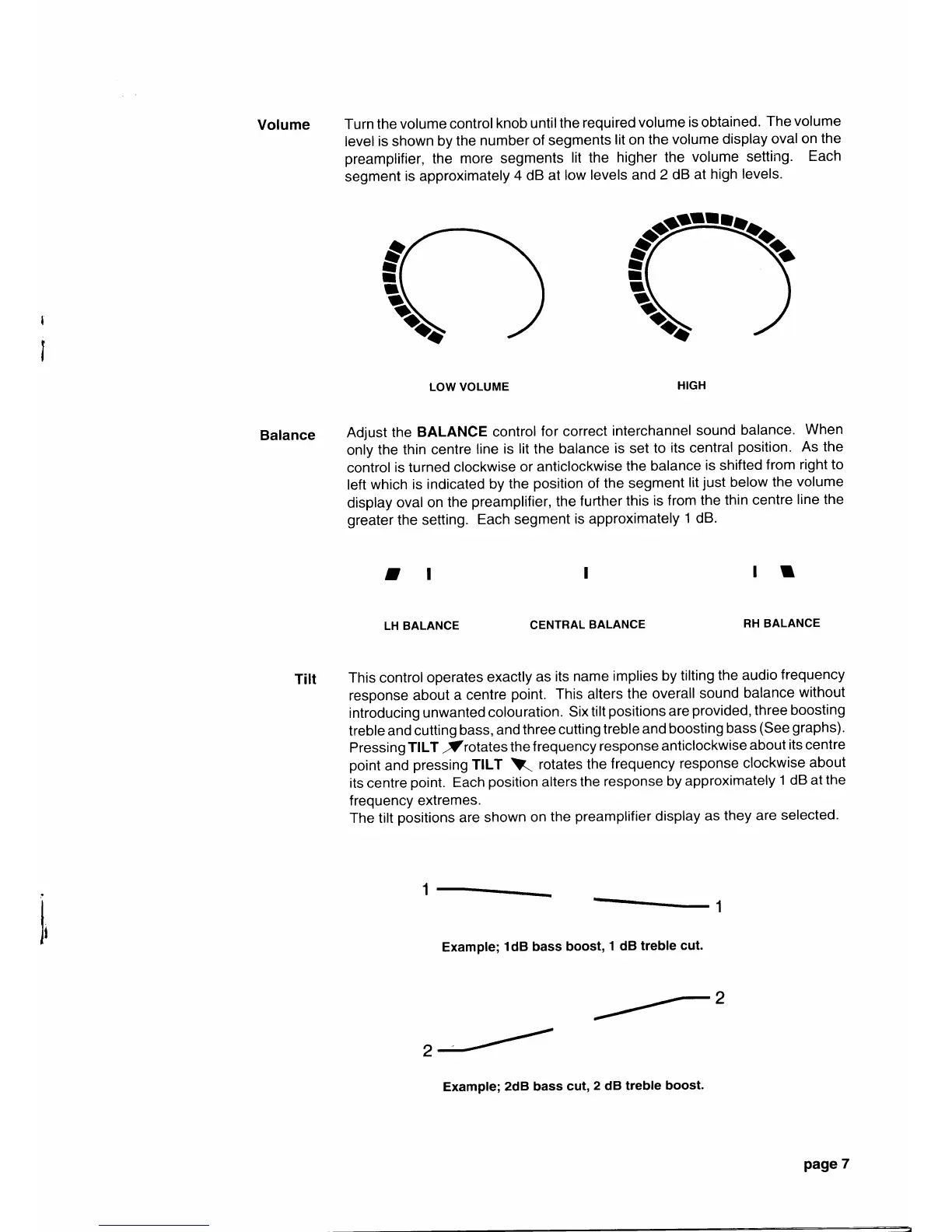
Turn the
volume
control
knob
untilthe
required
volume
is obtained.
The volume
level
is
shown
by the
number
of segments
lit
on
the
volume
display
oval
on
the
preamplifier,
the
more segments
lit the
higher the
volume
setting.
Each
segment
is approximately
4 dB at
low
levels and
2 dB
at
high
levels.
LOW VOLUME
HIGH
Adjust
the
BALANCE
control
for correct
interchannel
sound
balance.
When
only
the
thin centre
line
is
lit
the
balance
is
set
to
its central
position.
As the
control
is turned
clockwise
or
anticlockwise
the balance
is shifted
from
right to
left
which is
indicated
by the
position
of
the segment
lit
just
below
the
volume
display
oval
on
the
preamplifier,
the
further
this
is from
the
thin centre
line the
greater
the
setting.
Each segment
is approximately
1 dB.
I
t
ll
This control
operates
exactly
as
its
name
implies
by tilting
the audio
frequency
response
about
a
centre
point.
This alters
the
overall
sound
balance
without
introducing
unwanted
colouration.
Six
tilt
positions
are
provided, three boosting
treble
and
cutting
bass,
and
three
cutting
treble
and boosting
bass
(See
graphs).
Pressing
TILT
/rotates
the
f requency
response
anticlockwise
about
its centre
point
and
pressing
TILT
\(
rotates
the
frequency
response
clockwise
about
its
centre
point.
Each
position
alters
the
response
by
approximately
1 dB at
the
frequency
extremes.
The tilt
positions
are
shown
on
the
preamplifier
display
as
they
are
selected.
Example;
1dB bass boost,
1 dB
treble
cut.
2
2
I
ra
Example;
2dB bass
cul,2
dB
treble
boost.
page
7

Other manuals for QUAD 66

Related product manuals