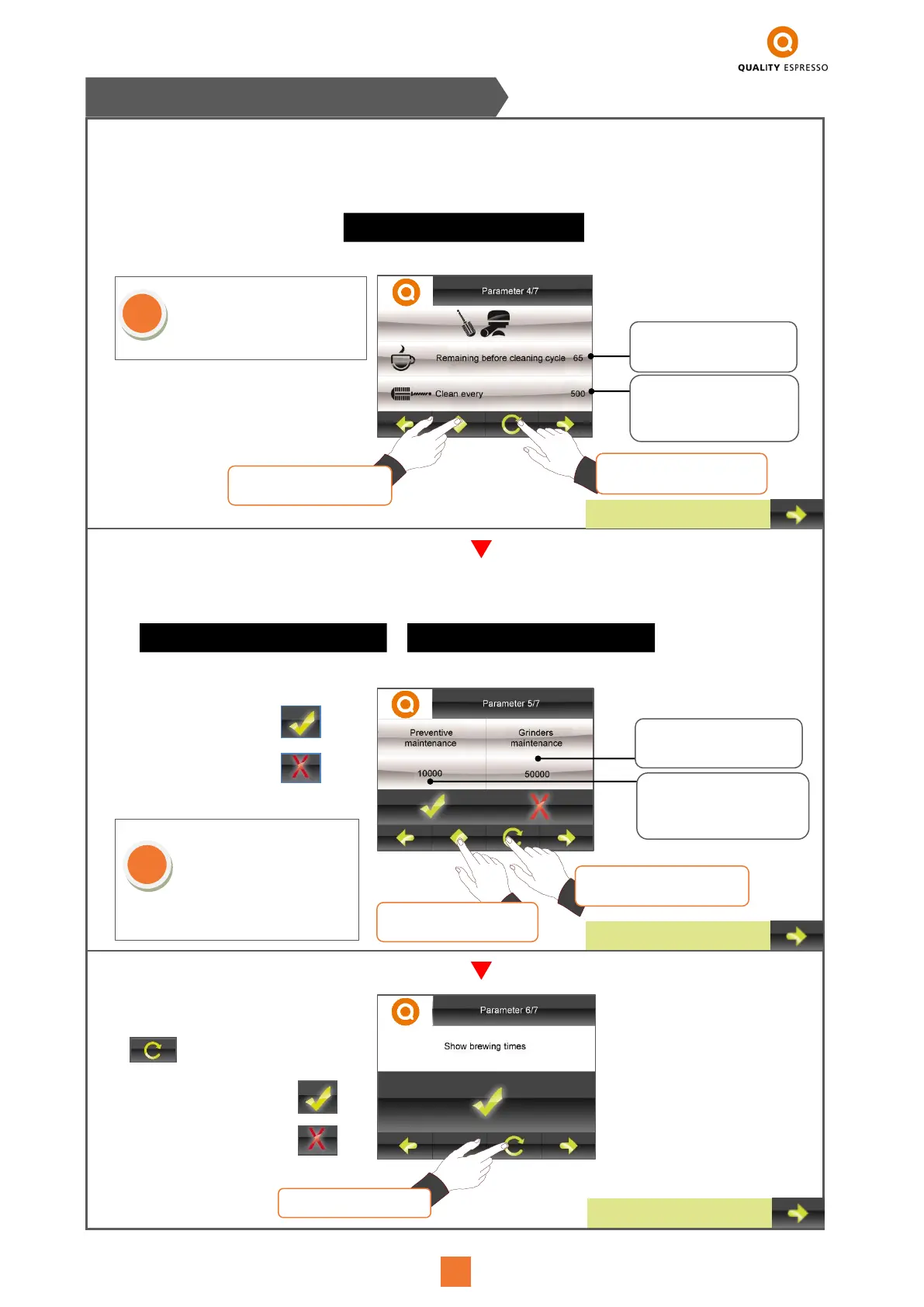
- Users may programme the warning to request the machine's preventive maintenance or to change the grinder's
blades. Upon reaching the programmed amount, the following messages will appear.
- To programme the number of coffees, after which the machine will show a warning message on the Display to
request a group cleaning cycle using the blind filter (cleaning accessory). The message will remain in view until we run
a complete cleaning cycle and will be counted in the “Performance record”, refer to page 42, point 7.2.4. The messa-
ge shown on the Display will be:
It is advisable to clean the groups
everyday at the end of the day. To
view the procedure to be followed,
refer to section 4.2 - page 31
W28-PREVENTIVE MAINTENANCE
- Users may select or not the option
for viewing the brewing times on the
Display's main screen. By using the
button:
- To activate the function
- To deactivate the function
To activate the warning
To deactivate the warning
7.2 TECHNICAL PERSONNEL MENU
After having performed the preventive
maintenance, enter this screen and re-
programme the number of coffees until
the next Maintenance. After having re-
established the values, the maintenan-
ce will be recorded in the “Performan-
ce record” section, refer to page 42,
point 7.2.4.
Press to select the
value to be changed.
When pressed, we
modify the value.
Indicates the coffees
remaining until the warning
message is shown.
Users may change the
number of coffees after
which the cleaning message
will appear on the Display.
Press to select the value
to be changed.
Press to change the
selected value.
Number of coffees after
which the machine will
request a change of blades.
Number of coffees after
which the machine will
request a preventive
maintenance.



 To Next Page