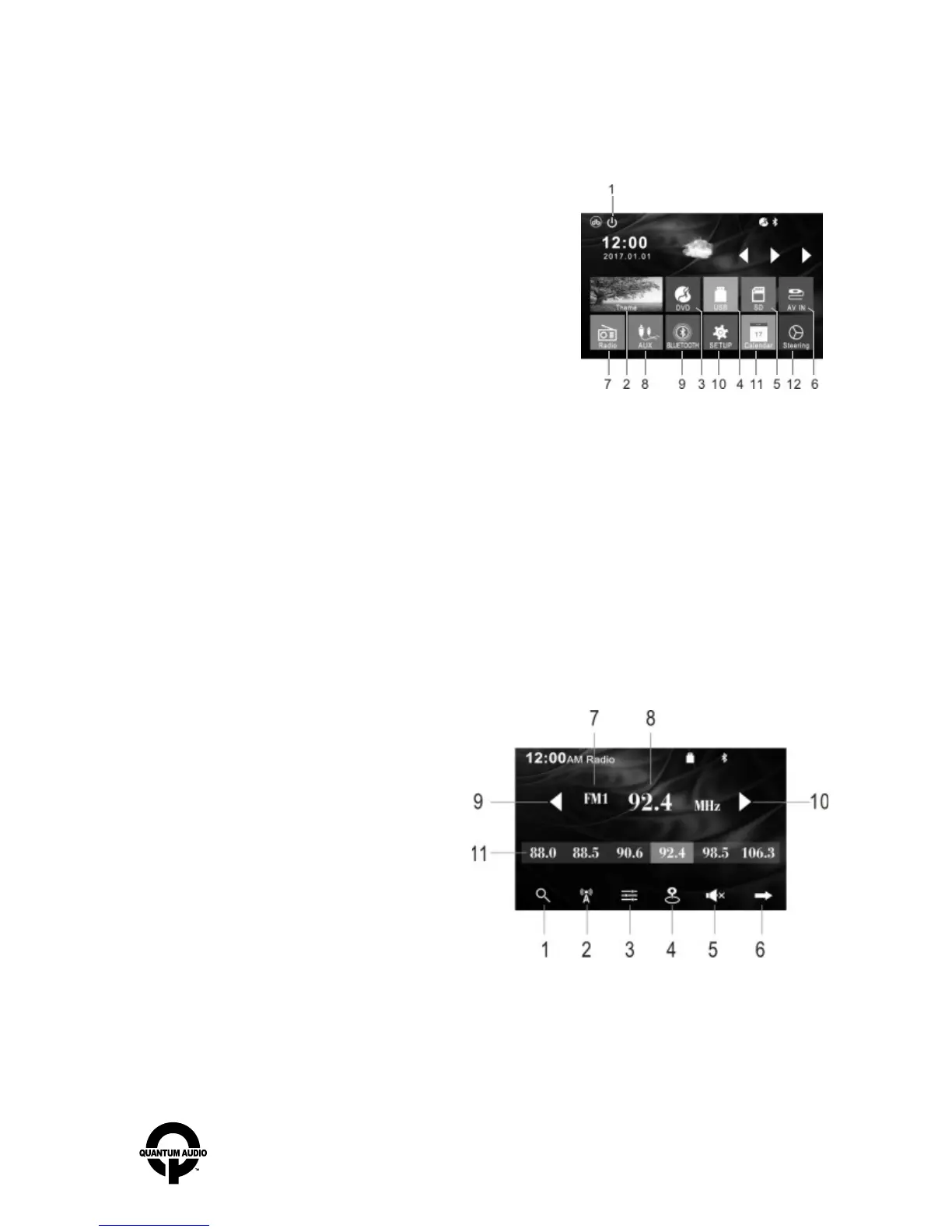
Main Interface
Once powering on the unit, it will automatically enter into the main interface as shown below.
Radio Tuner
Press “mode” button to switch, or touch the “RADIO” icon on the main Interface to enter the RADIO tuner.
- 11 -
1. Touch icon to turn off screen display. Touch anywhere on screen to turn display back on.
2. WALLPAPER: THEME.
3. DVD mode
4. USB: Memory signal input mode, (Must have USB in slot to select)
5. SD: Memory signal input mode, (Must have SD CARD in slot to select)
6. AV IN: AV signal input mode.
7. RADIO: radio mode
8. AUX: Audio signal input mode.
9. BTPHONE: Bluetooth function.
10. SETUP: Setup menu.
11. CALENDAR: Check calendar.
12. STEERING: Learn function for steering wheel control. Module sold separately.
1. AMS: Hold 3 seconds for auto music search.
2. BAND
3. EQ.
4. Tuner sensitivity.
5. Mute.
6. Automatic search.
7. Radio Bands.
8. Radio frequency.
9. Radio tuning back
10. Radio tuning forward
11. RADIO memory frequency, hold for 3 seconds to save.
www.quantumaudio.net


 To Next Page