Appearance and Function Introduction
- 7 -
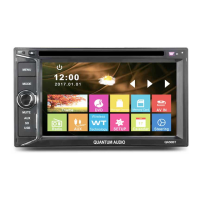
1. Reset button.
2. MENU button: The menu switching.
3. MODE button: The mode switching.
4/5. PWR/MUTE dial button: Short press to turn on, when the radio is powered on. Long press to
turn off; while radio on, short press is mute. Rotate the button left and right to adjust the volume.
6. AUX: Audio auxiliary input jack under cover.
7. SD card slot under cover.
8. USB card slot under cover.
9. Eject/Enter the disc.
10. Remote control window.
Connect To Storage Accessories
Connecting With USB
1. Under power on mode, click the USB icon in the main interface. It will play the USB.
2. It will display “USB READ ”, then play the file.
3. Pull out the USB when you want to stop playing.
If there are some files in the memory card that can’t be played, please delete them, then re-connect to the unit to read the file.
Connecting With SD Card
1. Under power on mode, click the SD icon in the main interface. It will play the SD card.
2. Pull out the SD card when you want to stop playing.
4/5
www.quantumaudio.net


 To Next Page