Quantum Scalar i500: FC I/O Fan Blade Replacement
6-68064-01 Rev A
December 2013
2 Removing an FC I/O Fan Blade
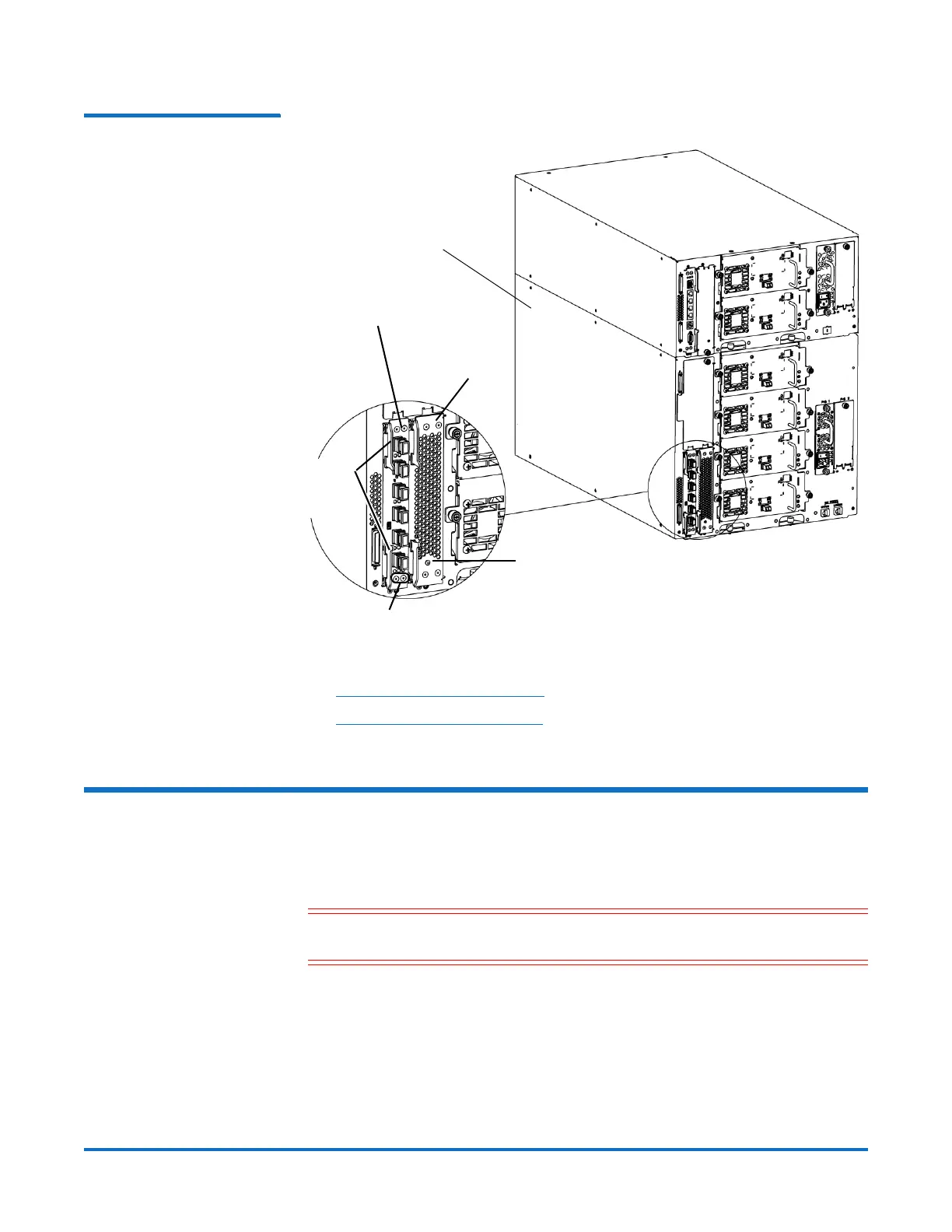
Figure 1 FC I/O Blade and Fan
Blade Bays in an Expansion
Module
To replace the FC I/O fan blade, refer to the following sections:
• Removing an FC I/O Fan Blade on page 2
• Replacing an FC I/O Fan Blade on page 3
Removing an FC I/O Fan Blade
These instructions explain how to remove an FC I/O fan blade from your library.
You can remove an FC I/O fan blade while the library is powered on.
Caution: Do not permanently remove an FC I/O fan blade unless you also
permanently remove the FC I/O blade to which it is associated.
Required tools: None
1 Save the library configuration:
a From the Web client, select Tools > Save/Restore Configuration.
b Select Save System Configuration, and click Apply.
2 Access the back of the expansion module containing the FC I/O fan blade.
Expansion module
FC I/O blade
Fan blade
Latch
hooks,
locked
FC I/O blade LEDs
FC I/O fan blade LED



 To Next Page
 Loading...