Commissioning
QubEV QUBEV-UG-02 Installation and Operation Manual
Page 12 of 15 November 2020
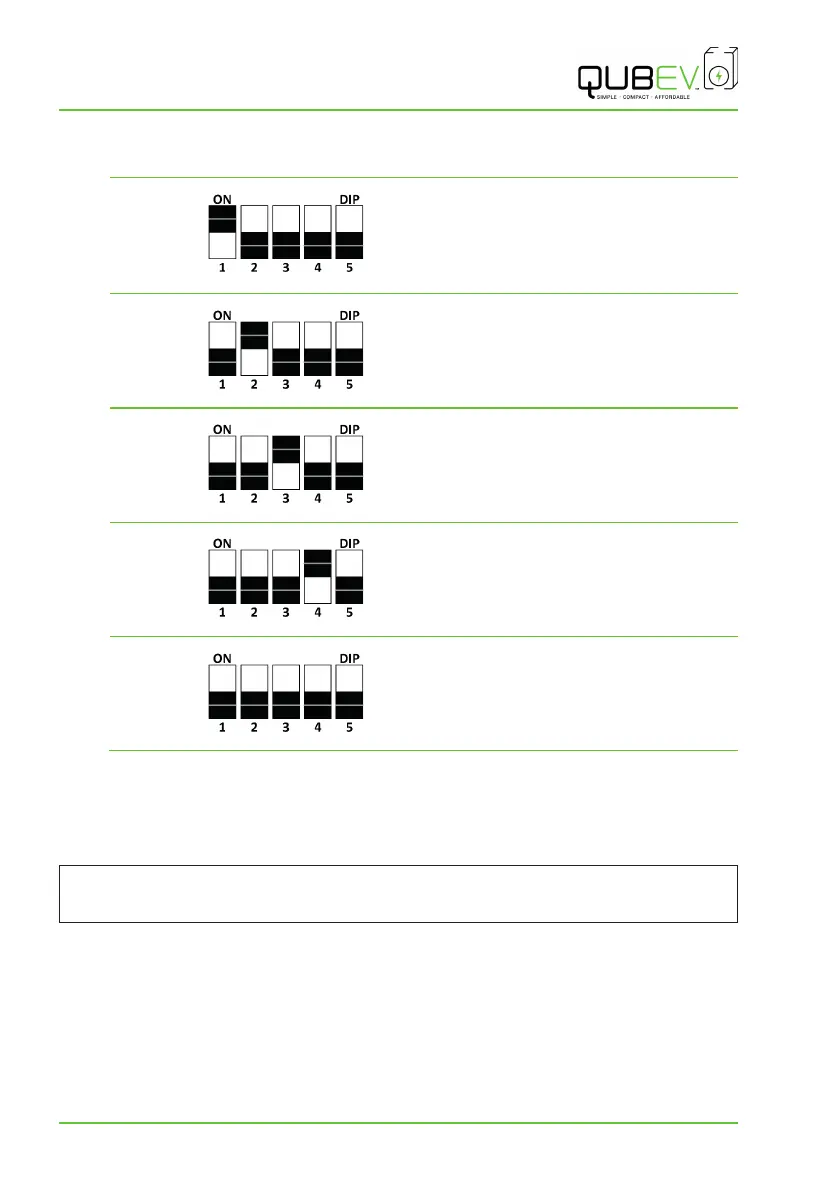
AMP Setting Record
Charger Serial Number: ____________
10 Amp
Name: _____________________________
Signature: _________________________
Date: ______________________________
16 Amp
Name: _____________________________
Signature: _________________________
Date: ______________________________
20 Amp
Name: _____________________________
Signature: _________________________
Date: ______________________________
25 Amp
Name: _____________________________
Signature: _________________________
Date: ______________________________
32 Amp
Name: _____________________________
Signature: _________________________
Date: ______________________________
3. Installers may add their name and the date of installation/setting as a record of the work.
4. Refit the Charge Control Unit cover.
Testing
WARNING: Electrical Power
Testing may require power to be applied whilst the front panel is removed. If this is not
required, replace the front panel NOW.
1. Switch ON the power to the unit and test in accordance with the current Electrical Wiring
Regulations.
x Make sure this product has been installed in compliance with the current Electrical
Wiring Regulations (including recommended earthing arrangements).
2. Make sure you are satisfied that the installation is complete and is in a safe condition.
3. Refit the front panel, taking care not to trap any electrical cables. Secure the panel with the
fixings removed earlier in the process.


 To Next Page