EasyManua.ls Logo

Queclink GD100 - User Manual

Queclink GD100
13 pages
Print Icon
To Next Page IconTo Next Page
Loading...
GD100Usermanual
TRACGV3SUM001‐1‐
GD100UserManual
GSM/GPRS/GPSTracker
TRACGD100UM001
Version:R1.02
GD100

Questions and Answers

  • B
    Brian SmithAug 2, 2025
    What to do if there is no response from configure port when configuring Queclink GD100 GPS through USB?
    • K
      Karen WhiteAug 3, 2025
      If you're experiencing no response from the configure port when configuring your Queclink GD100 GPS via USB, consider the following: * The driver for the GD100 might not be installed on your computer. Install the USB driver and try again. * The switch on the GD100 might be in the 'OFF' position. Turn the switch on and plug in the USB port again.
  • J
    Judy RodriguezAug 10, 2025
    What to do if Queclink GPS GD100 can't get successful GPS fixing?
    • M
      Michael DennisAug 10, 2025
      If your Queclink GPS GD100 is unable to get a successful GPS fix, it might be due to a weak GPS signal. Try moving the GD100 to a location with a clear view of the sky. Also, ensure that the top surface (the side with the indicator LED) is facing upwards towards the sky.
  • S
    Seth MunozAug 18, 2025
    Why can't messages be reported to the backend server by GPRS on my Queclink GPS?
    • A
      Aaron LynnAug 18, 2025
      If messages are failing to be reported to the backend server via GPRS on your Queclink GPS device, there are several potential reasons: * The SIM card may not support GPRS, so try using a SIM card that does. * The APN might be incorrect; you should ask your network operator for the correct APN. * The IP address or port of the backend server could be wrong. Ensure the IP address for the backend server is a valid address on the Internet.
  • M
    Michelle SmithAug 26, 2025
    What to do if the CELL LED always flashes quickly on Queclink GD100 GPS?
    • W
      wayne23Aug 26, 2025
      If the CELL LED on your Queclink GD100 GPS is always flashing quickly, it could be due to one of two reasons: * The SIM card might not be inserted correctly. Please ensure the SIM card is properly inserted into the GD100. * The GSM signal may be too weak, preventing the GD100 from registering to the network. Try moving the GD100 to a location with better GSM coverage.

Summary

0 Revision History

1 Introduction

1.1. Reference

Lists the GD100 @Track Air Interface Protocol document for communication between the device and the backend server.

2 Product Overview

2.1. Appearance

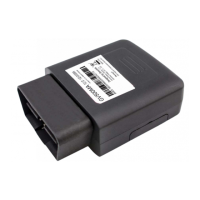
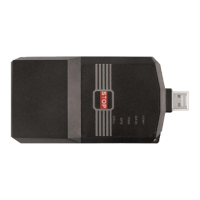
Provides visual details and images of the GD100 device, including the USB port and switch.

2.2. Button;Switch;USB Interface Description

Details the function of the START/STOP button, toggle switch, and USB port for device operation and configuration.

2.3. LED Description

Explains the status indicated by each LED on the GD100, including CELL, GPS, PWR, TEMP, and DATA lights.

2.4. UDISK Buffer File

Describes the GD100's ability to save buffered data to mass storage, encrypted using AES with the device IMEI as the key.

3 Getting Started

3.1. Part list

Lists the components included with the GD100 device, specifically the GD100 Locater itself.

3.2. Turn on;Turn off

Provides instructions on how to power the GD100 device on and off using the toggle switch.

4 Troubleshooting and Safety Info

4.1. Troubleshooting

Addresses common issues encountered with the GD100, such as CELL LED flashing, GPRS reporting errors, and GPS fixing problems.

4.2. Safety Info

Outlines important safety precautions, including avoiding disassembly, extreme temperatures, humidity, and use on airplanes or near medical equipment.

Queclink GD100 Specifications

General IconGeneral
GSM850/900/1800/1900 MHz
GPRSClass 12
Position Accuracy (CEP)2.5m
TTFF (Open Sky) Cold start32s
Storage Temperature-40°C to +85°C
Communication InterfaceRS232
Operating Temperature-20°C to +55 °C
GPS ChipsetMTK
AntennaInternal
ConnectivityGPRS

Related product manuals