Need help?
Do you have a question about the Queclink GV50 and is the answer not in the manual?
Lists the GV50(P) Protocol Reference document.
Verifies all included items for the GV50(P) device.
Lists the components for GV50 and GV50P models.
Details the 2-pin cable and pin definitions for the GV50 model.
Details the 4-pin cable and pin definitions for the GV50P model.
Describes the Micro USB connector for internal interface on GV50(P).
Instructions on how to open the device case.
Instructions on how to close the device case.
Procedure for inserting a SIM card into the device.
Guide to installing the internal backup battery.
Details on how to operate the backup battery switch.
Information on connecting the device to a power source.
Explanation of device status indicators (LEDs).
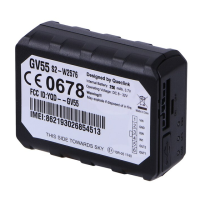
The GV50(P) is a compact GPS tracker designed for a wide range of vehicle tracking applications. It integrates a highly sensitive GPS receiver and a quad-band GPRS subsystem, supporting 850/1900 MHz frequencies. This allows for real-time or periodic location monitoring via a backend server and mobile devices. A key feature is its built-in 3-axis accelerometer, which enables motion detection and contributes to extended battery life through sophisticated power management algorithms.
The primary function of the GV50(P) is to provide location tracking for vehicles. It utilizes GPS technology to pinpoint its geographical position and GPRS for transmitting this data to a remote server. The device is designed to be a reliable tool for fleet management, personal vehicle tracking, and other applications where knowing the location of an asset is crucial. Its ability to operate on quad-band GPRS networks ensures broad compatibility across different regions.
The integrated 3-axis accelerometer plays a vital role in enhancing the device's functionality. Beyond simple motion detection, it allows the GV50(P) to implement intelligent power-saving strategies. For instance, when the vehicle is stationary, the device can enter a low-power mode, conserving battery life. Upon detecting movement, it can automatically wake up and resume full tracking operations. This intelligent power management is essential for devices that need to operate autonomously for extended periods without frequent recharging or external power.
The GV50(P) supports the @Track protocol, which is fully documented for straightforward system integration. This protocol facilitates a variety of reports, including emergency alerts, notifications for geo-fence boundary crossings, low battery warnings, and scheduled GPS position updates. These reporting capabilities make the GV50(P) a versatile solution for various tracking needs, from basic location monitoring to more complex security and operational oversight.
The GV50(P) is designed for ease of use and installation. Before initial use, users are instructed to check the included parts list to ensure all components are present. The device itself is compact, making it suitable for discreet installation within a vehicle.
Opening and Closing the Case: The device case can be opened using a triangular pry-opener. This allows access to the internal components for SIM card and battery installation. To open, the opener is inserted into a gap in the case and pushed up until the case unsnaps. Closing the case involves placing the cover back and sliding it until it snaps securely into place.
SIM Card Installation: A standard SIM card is required for GPRS communication. To install it, the case must be opened, and the device should not be powered (the 2-Pin cable unplugged and the internal battery switch in the OFF position). The SIM card holder slides open, the SIM card is inserted with the gold-colored contact area facing down and aligned with the cut mark, and then the holder is closed. Finally, the device case is closed.
Internal Backup Battery: The GV50(P) includes an internal Li-ion backup battery. This battery needs to be installed before use. Once installed, a switch must be moved to the "ON" position for the backup battery to be active. This switch also has an "OFF" position, which is the default when the device is shipped on an aircraft. When the switch is in the "OFF" position, the battery cannot be charged or discharged.
Power Connection: The device is powered via a 2-Pin cable (for GV50) or a 4-Pin cable (for GV50P). The input voltage range is 8V to 32V, making it compatible with both 12V and 24V vehicle electrical systems without the need for external transformers. For the GV50, the red wire (PIN1) is for VIN (external DC power input), and the black wire (PIN2) is for GND. For the GV50P, the red wire (PIN1) is for VIN, the black wire (PIN2) is for GND, the brown wire (PIN3) is for digital output, and the white wire (PIN4) is for ignition.
LED Status Indicators: The GV50(P) features two status LEDs: a CELL LED and a GPS LED. These LEDs provide visual feedback on the device's operational status.
The GV50(P) is designed for robust operation, but certain aspects require attention for optimal performance and longevity.
Battery Management: The internal Li-ion backup battery is crucial for continuous operation, especially when external power is interrupted. Users must ensure the battery is installed correctly and the ON/OFF switch is in the "ON" position for the battery to function and charge. It's important to note that when the switch is in the "OFF" position, the battery will neither charge nor discharge. This feature is particularly relevant for shipping or long-term storage to prevent battery drain.
Device Reset: In case of operational issues, the device can be reset. This involves removing the external DC power, switching off the backup battery, and then reconnecting the external power supply and switching on the backup battery. This procedure helps in resolving potential software or communication glitches.
SIM Card Access: The design allows for easy access to the SIM card, which is beneficial for troubleshooting or replacing the SIM card if needed. The instructions for opening and closing the case are straightforward, enabling users to perform this maintenance task without specialized tools beyond the triangular pry-opener.
Firmware Updates and Configuration: While not explicitly detailed in the provided excerpt, the mention of the "@Track protocol" and "Manage Tool" suggests that the device supports remote configuration and potentially firmware updates. This capability is a significant maintenance feature, allowing for software improvements, bug fixes, and adjustments to operational parameters without physical access to the device.
FCC Compliance: The device adheres to FCC rules for Class B digital devices, indicating it has been tested to minimize harmful interference in residential installations. Users are advised on measures to correct interference if it occurs, such as reorienting antennas, increasing separation from receivers, or connecting to different circuit outlets. This information is important for ensuring the device operates within regulatory guidelines and maintains reliable communication. The FCC radiation exposure statement also provides guidance on safe installation distances, recommending a minimum distance of 20cm between the radiator and the user's body.
 General
| Digital Outputs | 1 |
|---|---|
| Humidity | 5% to 95% non-condensing |
| Operating Temperature | -20°C to +55°C |
| GSM Frequency | 850/900/1800/1900 MHz |
| GPRS | GPRS multi-slot class 12 |
| Location Accuracy | <2.5m CEP |
| TTFF (Open Sky) Hot Start | 1s |
| AGPS | Support |
| GPS Antenna | Internal |
| GSM Antenna | Internal antenna |
| Storage Temperature | -40°C to +85°C |
| Antenna | Internal |
| Certifications | RoHS |

 To Next Page