EasyManua.ls Logo

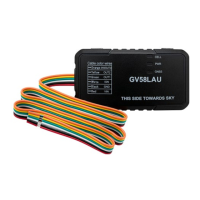
Queclink GV58LAU - User Manual

Queclink GV58LAU
18 pages
Print Icon
To Next Page IconTo Next Page
Loading...
GV58LAU User Manual
TRACGV58LAUUM001 0
GV58LAU User Manual
GSM/GPRS/LTE Cat4/WCDMA
GNSS Tracker
TRACGV58LAUUM001
Version: 1.00

Questions and Answers

  • D
    Daniel HarrisAug 12, 2025
    Why Queclink GPS device cannot get GNSS fix?
    • K
      Kristen CollierAug 12, 2025
      The Queclink GPS device may fail to get a GNSS fix if the GNSS signal is weak. To resolve this, move the device to a location with open sky. Also, ensure that the top surface of the device (the side with the LED indicator) is facing the sky to optimize signal reception.
  • J
    Jason YangAug 19, 2025
    What to do if messages cannot be reported to the backend server on Queclink GPS?
    • E
      Edward ChristianAug 19, 2025
      If messages from your Queclink GPS device are not reaching the backend server, the IP address or port of the backend server may be incorrect. Ensure that the IP address for the backend server is a valid, identified address on the Internet.
  • J
    Jacob SalazarAug 27, 2025
    What to do if the CELL LED always flashes quickly on Queclink GPS?
    • S
      smithkevinAug 27, 2025
      If the CELL LED on your Queclink GPS device flashes quickly after turning it on, it indicates that the signal is too weak, preventing the device from registering to the network. Move the device to an area with better GSM coverage.
  • R
    Richard WilsonSep 2, 2025
    How to power off Queclink GPS device?
    • D
      Dr. Destiny RaySep 2, 2025
      The Queclink GPS device cannot be powered off while the charger is connected. Disconnect the charger and try again.

Queclink GV58LAU Specifications

General IconGeneral
BrandQueclink
ModelGV58LAU
CategoryGPS
LanguageEnglish

Related product manuals