The Quectel L89 R2.0 EVB (Evaluation Board) is a comprehensive reference tool designed to facilitate the evaluation and development with the Quectel L89 R2.0 GNSS module. This EVB is part of the GNSS Module Series and provides a platform for users to familiarize themselves with the module's capabilities, test its functionalities, and integrate it into various applications. The board is equipped with a range of interfaces and indicators that simplify the process of interacting with and monitoring the L89 R2.0 module.
Function Description
The primary function of the L89 R2.0 EVB is to serve as an evaluation and development platform for the L89 R2.0 GNSS module. It enables users to:
- Power the Module: The EVB is powered via a Micro-USB connector (J103), accepting a DC power supply of 4.5-5.5 V, typically 5.0 V, with a current capability greater than 200 mA. This ensures stable operation of the GNSS module.
- Communicate with the Module: The Micro-USB interface (J103) also serves as the user interface for NMEA sentence output and command input. This allows for seamless communication between the EVB and a PC using dedicated software tools.
- Receive GNSS Signals: The EVB includes an antenna connector (J403) for an active GNSS antenna. The provided antenna supports multiple GNSS constellations, including GPS/QZSS L1 C/A, Galileo E1, GLONASS L1, BeiDou B1I, IRNSS L5, and SBAS L1. This multi-constellation support ensures robust and accurate positioning.
- Monitor Module Status: Several LEDs on the EVB provide visual indications of the module's operational status:
- 1PPS Indication LED (D303): Flashes at 1 Hz when a successful position fix is achieved, and is extinct when there is no position fix.
- TXD Indication LED (D304): Flashes when data is output from the UART TXD pin, and is extinct or bright when no data is output.
- JAM_IND Indication LED (D305): Flashes when there is jamming that may interfere with the desired signal(s), and is extinct when there is no jamming.
- GEOFENCE Indication LED (D306): Flashes to indicate a high output level and is extinct for a low output level. The output level state of this pin is configurable.
- AADET_N Indication LED (D307): Flashes when an external active antenna is being used, and is extinct when an internal antenna is in use.
- Control Module Operation: The EVB features a power switch (S101) to turn the board on and off, and a RESET_N button (S301) to perform a short reset of the L89 R2.0 module. A WAKEUP button (S302) is also available to wake up the module from Backup mode.
- Access Test Points: The EVB provides test points (J401) for various signals, including RXD, TXD, 1PPS, RESET_N, GND, 3.0V, SCL, SDA, and 3D_FIX. These test points allow for detailed signal monitoring and debugging.
Usage Features
The L89 R2.0 EVB is designed for ease of use, enabling quick setup and evaluation of the GNSS module.
- Out-of-the-Box Evaluation: The EVB kit includes all necessary accessories, such as the evaluation board, an active GNSS antenna, a Micro-USB cable, and mounting hardware (bolts and coupling nuts). This allows users to start evaluating the module immediately after assembly.
- Simple Connectivity: Connecting the EVB to a PC is straightforward using the provided Micro-USB cable. The power switch (S101) allows for easy power-on and power-off of the board.
- Software Tools for Interaction: Quectel provides dedicated software tools to interact with the EVB and the L89 R2.0 module:
- QCOM Tool: This tool facilitates communication with the module via the Micro-USB interface. Users can configure COM port settings, baud rate, and view NMEA sentences output from the module. It provides a basic interface for sending commands and receiving data.
- QGNSS Tool: This advanced tool is used for verifying the status of the L89 R2.0 module. It offers a graphical interface to visualize GNSS information, such as satellite positions (sky view), signal-to-noise ratio (CNR), time, position, speed, and precision. It supports multi-constellation display, showing satellites from GPS, BeiDou, GLONASS, Galileo, QZSS, NavIC, and SBAS. The tool also provides detailed data views for longitude, latitude, altitude, speed, HDOP, PDOP, fix mode, UTC time, and total duration. An analysis section displays metrics like Time to First Fix (TTFF), Quality Indicator, Total Times, Fixed Points, RTK Float, RTK Fixed, CEP 95, and RMS.
- QGPSFlashTool: This tool is used for upgrading the firmware of the L89 R2.0 module via the UART interface. It guides users through the process of selecting the firmware file, configuring serial port settings, and initiating the upgrade. The tool provides visual feedback on the upgrade progress, indicating success or failure.
- Clear Visual Indicators: The various LEDs on the EVB provide immediate visual feedback on the module's operational state, such as successful position fix, data transmission, jamming detection, and antenna usage. This helps in quickly diagnosing issues and understanding the module's behavior.
- Configurable Features: Some features, like the output level state of the GEOFENCE indication pin, are configurable, allowing users to tailor the EVB's behavior to specific application requirements.
- Comprehensive Documentation: The user guide provides detailed instructions on setting up the EVB, connecting accessories, using the software tools, and understanding the various interfaces and indicators. It also includes references to other relevant documents for in-depth information on hardware design and software tool usage.
Maintenance Features
While the L89 R2.0 EVB is primarily an evaluation tool, certain aspects contribute to its maintainability and reliability.
- Robust Design: The EVB is designed to be a stable platform for testing, with clearly labeled components and interfaces to prevent misconnections.
- Firmware Upgrade Capability: The QGPSFlashTool allows for easy firmware upgrades, ensuring that the L89 R2.0 module can always run the latest software versions with improved features, bug fixes, and performance enhancements. This is a critical maintenance feature for long-term use and adaptation to evolving GNSS standards.
- ESD Handling Precautions: The manual emphasizes the importance of proper ESD (Electrostatic Discharge) handling procedures during mounting, handling, and operation. This helps protect the sensitive electronic components on the EVB and the L89 R2.0 module from damage, ensuring their longevity.
- Technical Support: Quectel provides comprehensive technical support, including access to schematic and PCB layout design files for the EVB. This support is invaluable for users who need to understand the underlying hardware design or troubleshoot complex issues.
- Clear Safety Guidelines: The manual outlines safety precautions to be observed during all phases of operation, including usage, service, and repair. These guidelines cover aspects such as compliance with local regulations, avoiding explosive and flammable materials, ensuring stable power supply, and proper wiring. Adhering to these safety measures helps prevent damage to the EVB and ensures safe operation.
- Regular Software Updates: The availability of updated software tools (QCOM, QGNSS, QGPSFlashTool) from the Quectel website ensures that users can always access the latest versions, which may include new features, improved stability, and compatibility with newer operating systems.
- Reset Functionality: The RESET_N button on the EVB allows for a quick reset of the L89 R2.0 module, which can be useful for recovering from unexpected states or for initiating a fresh start during testing.
In summary, the Quectel L89 R2.0 EVB is a well-designed and supported evaluation platform that simplifies the process of working with the L89 R2.0 GNSS module. Its comprehensive features, user-friendly tools, and clear documentation make it an ideal choice for developers and engineers looking to integrate advanced GNSS capabilities into their products.

 Need help?
 General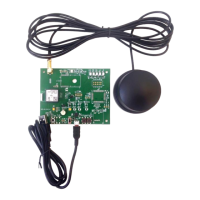

 To Next Page