Press the CH1, CH2, CH3, or CH4 to select the corresponding channel
from 1~4. When the temperature and airflow settings are finished, long
press CH1~CH4 to confirm and save the parameters.
7.Setting of Furnace Temperature Mode
In mode 3 furnace temperature mode, long press CH1, CH2,
CH3 or CH4 to enter the parameter setting interface.
The setting of temperature and airflow rate are the same as 6.1 and
6.2. Press the buttons respectively to increase and decrease
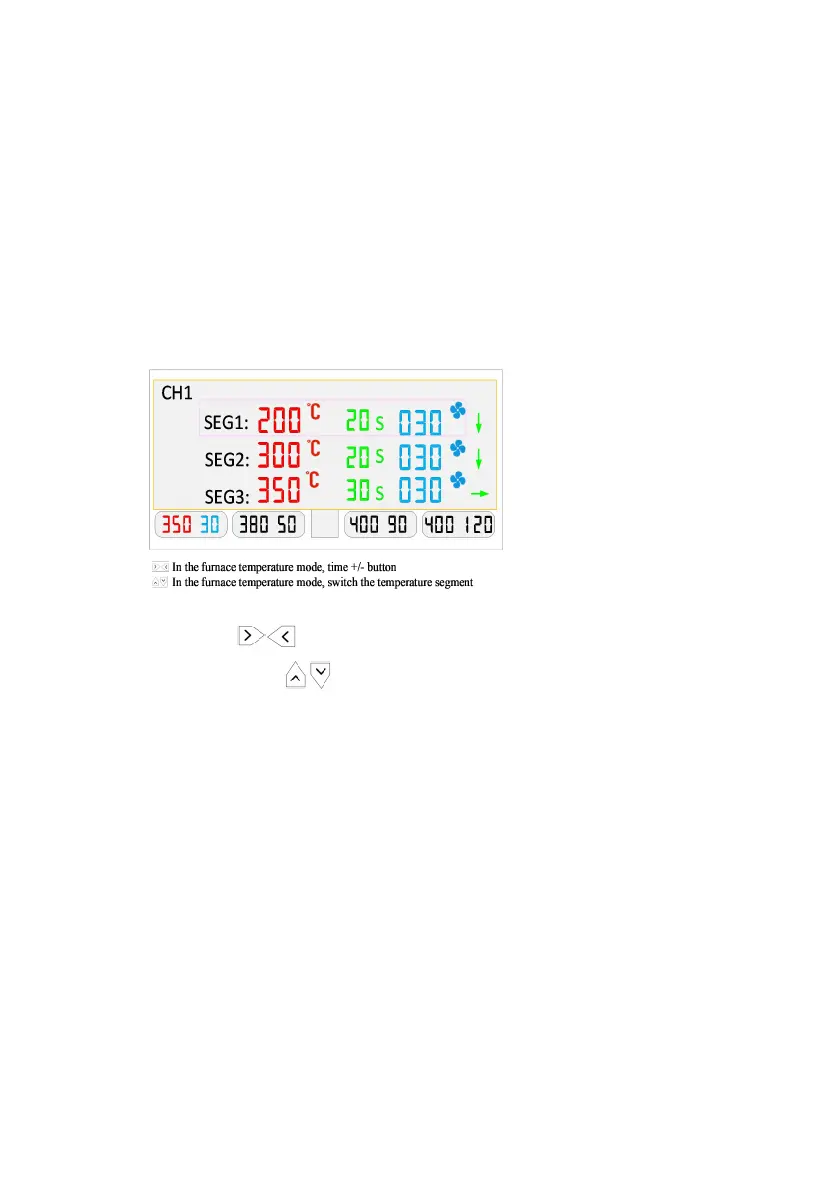
the time. Press the buttons respectively to switch
the temperature segment. Long press SET or short press the
current channel button to exit.
Take the picture below as an example:
You can set 3 temperature segments in furnace temperature mode. It
starts timing when the first temperature segment reaches the set
temperature at 200 ℃. After 20 seconds, it reaches the second segment
at 300℃. And then it continues to heat for 20 seconds to reach the
third segment at 350 ℃ and remains for 30 seconds. When the set time
(Cumulative time 70S) is reached it beeps, indicating a working cycle
ends. Then press CH1 to start cooling, when the temperature reaches



 To Next Page