28 Quickie F35 R2 Rev.E
10.0 Adjustments:
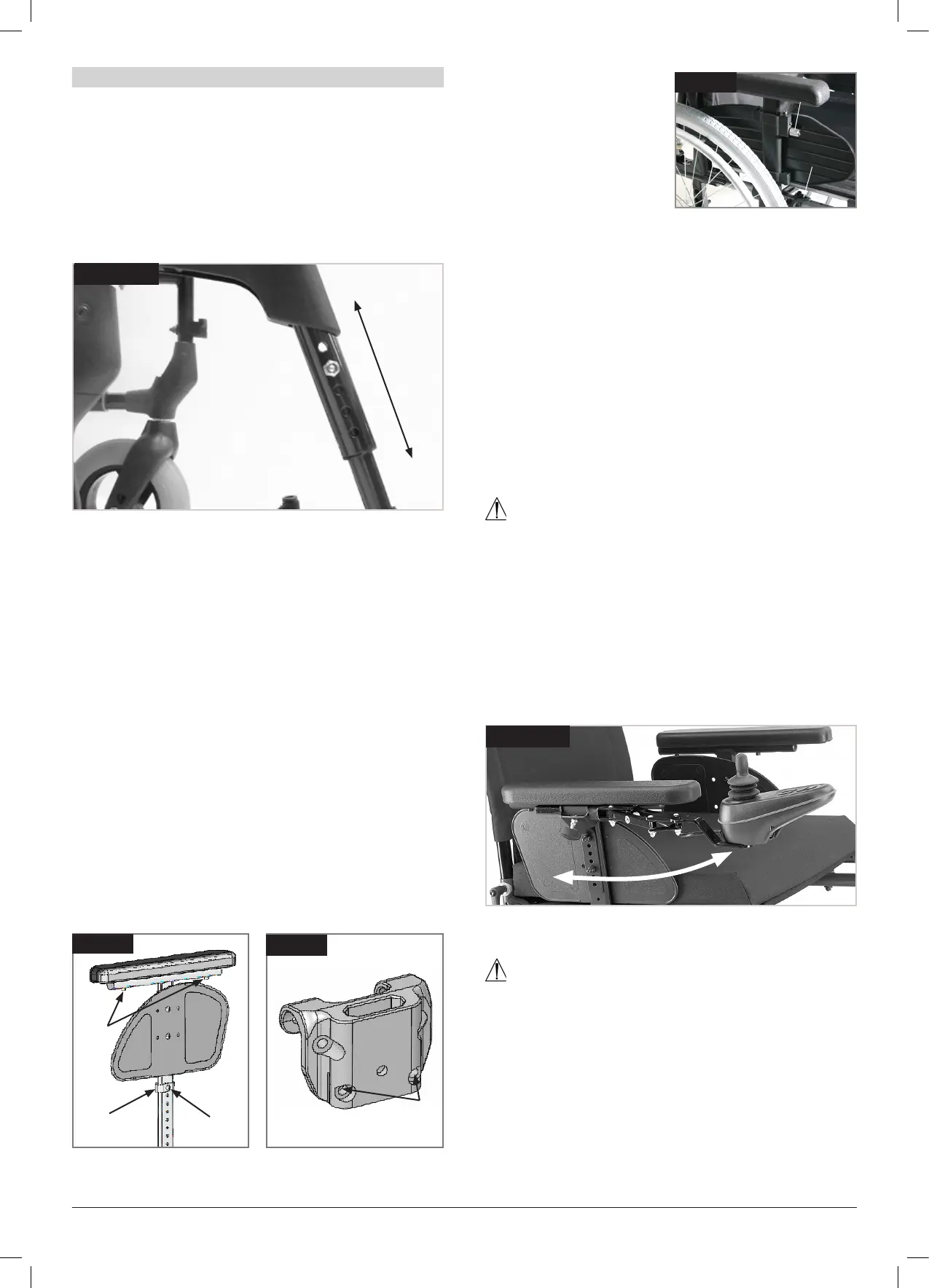
10.1 Adjustment of the footrest (Fig. 10.1):
To adjust the height of a footrest:
Loosen the screw, using a 10.0mm spanner and 5.0mm
Allen key. Set the footrest at the desired height, then
tighten the screw in the hole.
NOTE: Make sure that the screws are tightened securely.
Fig. 10.1
10.2 Adjustment of the armrests:
Tool Height Adjustable Armrest
Installation: Slide the arm post into the receiver, located
on the wheelchair frame, until it stops
Height adjustment:
Slide the arm rest post out of the receiver.
Adjust the position of the hight adjustment bracket (1)
by removing the screw (2) and moving it to the desired
posiion. Re-fit the screw and tighten it.
Slide the arm rest post back into the receiver, (Fig. 10.2).
Armpad Position:
The armpad position can be adjusted by relesing the
screws (3), then moving the arm pad to the desired
position. Re-tighten the screws, (Fig. 10.2).
Adjusting Armrest Receiver
The tightness of the armrest receiver can be adjusted
(tightened /loosened) by means of the 2 screws (1) - (Fig.
10.3).
Fig. 10.2
1
2
3
Fig. 10.3
1
Height-adjustable
armrests
To adjust the height, pull
the lever (1) and push the
armrest to the desired
height. Afterwards make
sure that the lever (1)
locks back into position.
Removing the armrest is
carried out in the same way.
To remove the sideguard completely, push the lever (2).
When fitting the sideguard, the lever (2) must also be
pulled.
Always make sure that the sideguard locks into
position correctly in the receiver. (Fig. 10.4).
10.3 Control Adjustment (Fig. 10.5):
The control can be adjusted to various positions by
pushing it along the armrest. The control can be moved
by turning the lever below the arm pad anti-clockwise,
reposition the controller and secure by turning the lever
clockwise to tighten.
WARNING!
• Do not replace the joystick knob with any unauthorised
item. It may cause hazardous operation and loss of
control of the chair.
• It is important that the joystick boot is replaced if it is
torn or brittle; failure to do so could cause substance
damage to the controller and unexpected movement
of the chair.
• Ensure that you always have comfortable access to
the controls whilst the chair is moving and make sure
that the controller is fixed securely to the chair.
Fig. 10.5
10.4 Dual/Attendant control:
WARNING!
• Ensure that you set the speed of the attendant control
to a speed that you can comfortably follow.
• Always turn off the power to the controller when
leaving the user in the chair. (See sections 7.11 - 7.15).
Fig. 10.4
1
2


 To Next Page