Function List Description Available Option
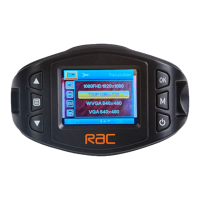
Setting for video resolution. 1920×1080 30fps
1280×720 30fps
1280×720 60fps
Select the movie quality.
Super Fine - The best movie quality.
Fine - The standard movie quality.
Super Fine / Fine
Setting for enabling automatic loop record
and the movie clip time.
Off - The recording will stop when the SD
card is full.
1min /2Min / 3min / 5min / 10min - Select
segment recording time. For example, the
recording time is 3 minutes. If 21 minutes
of video is recorded, then 7 segments each
of 3 minutes in length will be created.
Off / 1min / 2min /
3min / 5min / 10min
Setting the time of shut down after the
vehicle engine stopped. The time is also
limit by the battery storage capacity.
0min: The device will shut down
immediately.
5sec / 30sec / 1min
/ 3min
Setting the recording time for detected
motion in front of the camera
while stationary.
10sec / 30sec / 1min
Manual compensation for low or bright
light levels. The more negative “-“ in scale,
the darker the recorded video appears. The
more appears. 0 is the neutral setting for
this option and is the default value.
-2.0 / -1.66 / -1.33
/ -1 / -0.66 / -0.33 /
0 / +0.66 / +1 / +1 /
+1.33 / +1.66 / +2.0
Movie Mode
11


 To Next Page