Raddy PT-3 Manual [EN]
The icon " " is displayed, which means the network time, and at the same time, it starts to search for the
signal of the remote wireless sensor. The icon " " flashes, and the time is about 3 minutes. At this time, if
the outdoor wireless sensor is running normally, the main unit will start to search for the signal of the remote
wireless sensor in about 1-2 minutes. When a signal is received inside, the outdoor temperature will be
shown on the main unit's display.
There are two types of WIFI connection methods for the main unit. When using external power supply, WIFI
will always establish a connection, and data will be uploaded to the cloud server from time to time. When
powered by an internal lithium battery, WIFI uploads data every hour.
When using internal battery power, pressing the “SET/MODE” button can manually turn on WIFI for 5
minutes. Within this time, data can be uploaded from time to time. At the same time, the main unit can be
set for units, backlight brightness, and other settings through the APP
Outdoor sensor transmission:
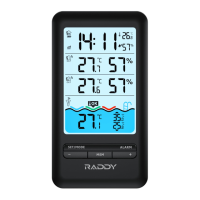
The main unit can connect up to 2 channel wireless temperature and humidity sensor and 1 channel
wireless pool temperature sensor registration, Each sensor has been fixed with its corresponding channel,
please use it according to the purpose of the sensor
The main unit will automatically connect to the wireless sensor. If there is a channel that is not connected
(the temperature and humidity values display -), first press the "-" button to select the corresponding channel
(the channel icon flashes), and then press and hold the "-" button for more than 3 seconds to enter the
registration mode. This time is kept for 3 minutes, and if there is a pairing signal from the wireless sensor
within 3 minutes, it indicates that the automatic pairing is successful, The temperature or humidity data of
the sensor will be displayed.
F.Y.I.:
When there is no wireless sensor signal transmission on the channel, the temperature or humidity on the
wireless sensor bar of the main unit are displayed - -,
If the battery icon “ ” is displayed under the wireless sensor bar of the main unit, you need to replace the
wireless sensor battery of your channel as soon as possible based on the channel display.
Manual time setting:
Press and hold down the “SET/MODE” button for 2 seconds, the 12/24 hour mode display starts to flash.
Now use “+” and “-” buttons to set the correct 12/24 hour mode.


 To Next Page