NEXT
PREV
NEXT
PREV
NEXT
PREV
Press “ ” or “ ” show the time.
Long press “ ” for 2 seconds, the hour “**” flashes. Press or long press “ ” or
“ ” to adjust current hour.
Long press “ ”, the minute “**” flashes. Press or long press “ ” or “ ” to
adjust current minute.
Press “ ” to show “24Hr” or “12Hr” time system. Press “ ” or “ ” to choose
“24Hr” or “12Hr” time system.
Press “ ” to confirm the adjusted running time and time system.
※Mode of time display: 12Hr system: “AM” on LCD means forenoon, and “PM” on
LCD means afternoon.
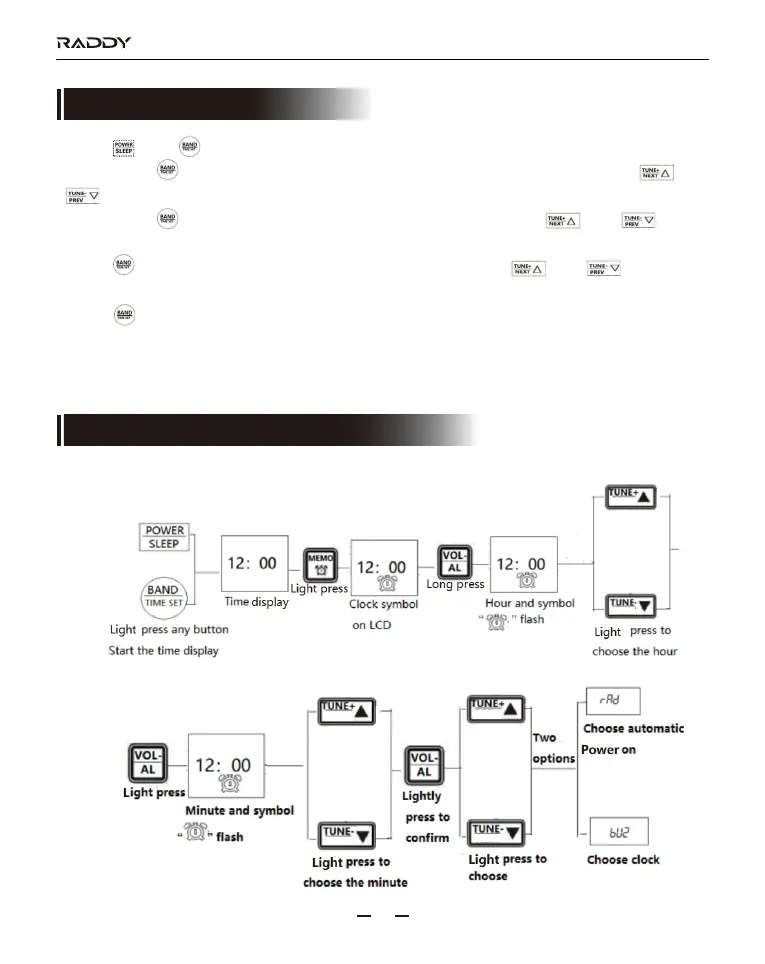
11.1. On timer and clock timer of this product can be set as follows:
RF320
15
10. Setting of Auto-on Timer
11. Setting of on timer and clock timer



 To Next Page