RF320
04
5. Function of buttons
Click “RF320-BLE” to connect the mobile APP. To disconnect the APP, press “ ” to
turn off the radio. Long press “ ” for 2 seconds, “ ” appears on the screen, and
now APP is disconnected.
To learn more about the functions of APP, please read the APP Instructions Manual.
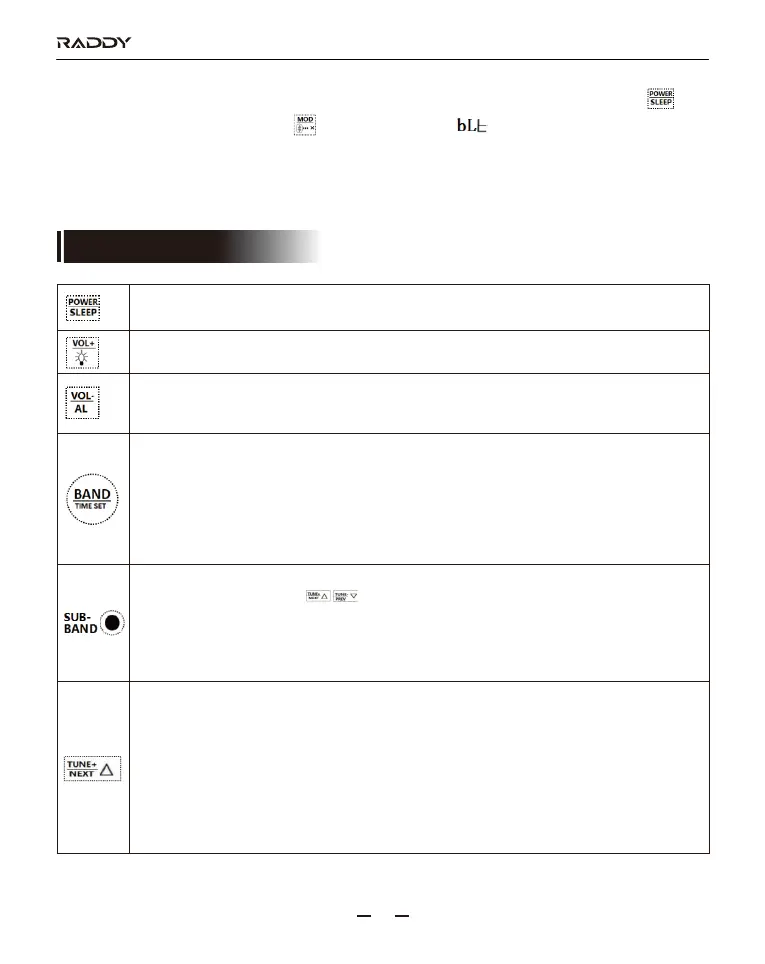
1: Power on/off【refer to details in 7.1.1】
2: Setting sleep time【refer to details in 7.1.2】
1: Time display status: set L1, L2 and L3 backlight【refer to details in 16】
2: Power-on state: volume increase.
1: Time display status: open the alarm clock function & setting the alarm clock time
【refer to details in 11】
2: Power-on state: volume decrease.
1: LCD off state: press for the start of backlight & time display.
2: Time display status: setting current time【refer to details in 10】
3: Power-on state: press the button, FM/VHF/MW/SW/AIR/WB band switching.
4: In the mode of FM/VHF/MW/SW/AIR: long press for 2 seconds to enter the mode of full
automatic channel search and automatic channel storage.
5: In the mode of WB: long press this button for 2 seconds to start the alarm.
Before finding the alarm signal, long press it again to exit the alarm search.
1: Time display status: long press this button for 2 seconds to adjustment of FM/MW/SW
frequency range press “ ”button choose a frequency range
【refer to details in 7.3.1】
2: At power-on status, use the rotating dial to search for stations and press the SUB-BAND
button to select FM/AM【refer to detail in 7.3.2.5】
3: In the mode of WB, press this button to switch between 7 frequencies.
1: Time display status: enter setting time mode is time+ adjustment.
2: Enter FM frequency range selection mode: switch between FM reception frequencies
(include the AM 9KHZ/10KHZ step to switch).
3: Enter backlight adjustment mode: choose the light display mode.
4: On the Radio receive mode: press this button, and frequency will increase based on the
min step value. Long press this button for 2 seconds to automatically search channels up.
5: On TF card play mode: press this button to play the next song, and long press it to fast
forward.
6: On the play mode of Bluetooth: press this button to play the next song.



 To Next Page