15.2. In the mode of reception: press “ ” to switch to the working state of marquee.
Press “
” to see four working states on LCD:
S1: natural flash;S2: quick flash;At: marquee is always on (no flash)
OF: marquee is off
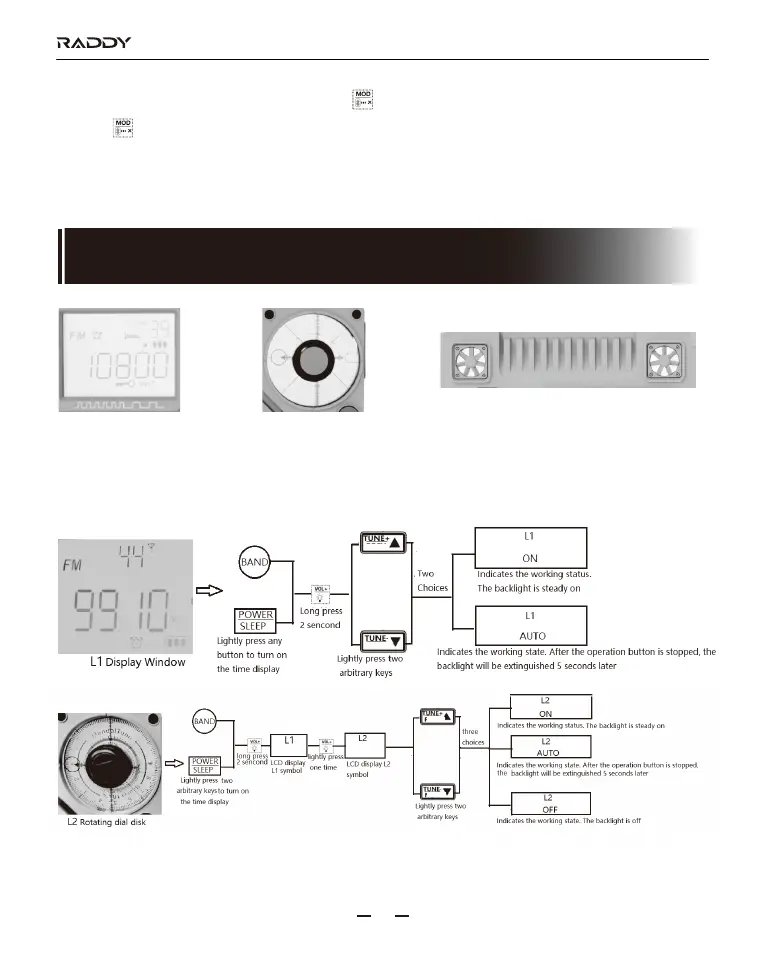
L1:backlight of
display window
Options for above three kinds of backlight:
L2:backlight of
rotating dial disk
L3:two decorative lights
(on the back of radio)
NEXT
PREV
NEXT
PREV
RF320
18
16. Setting of the backlight of the display window/backlight of
the pointer disk/decorative light (on the back of the radio)



 To Next Page