07
RF886
a
a
b
b
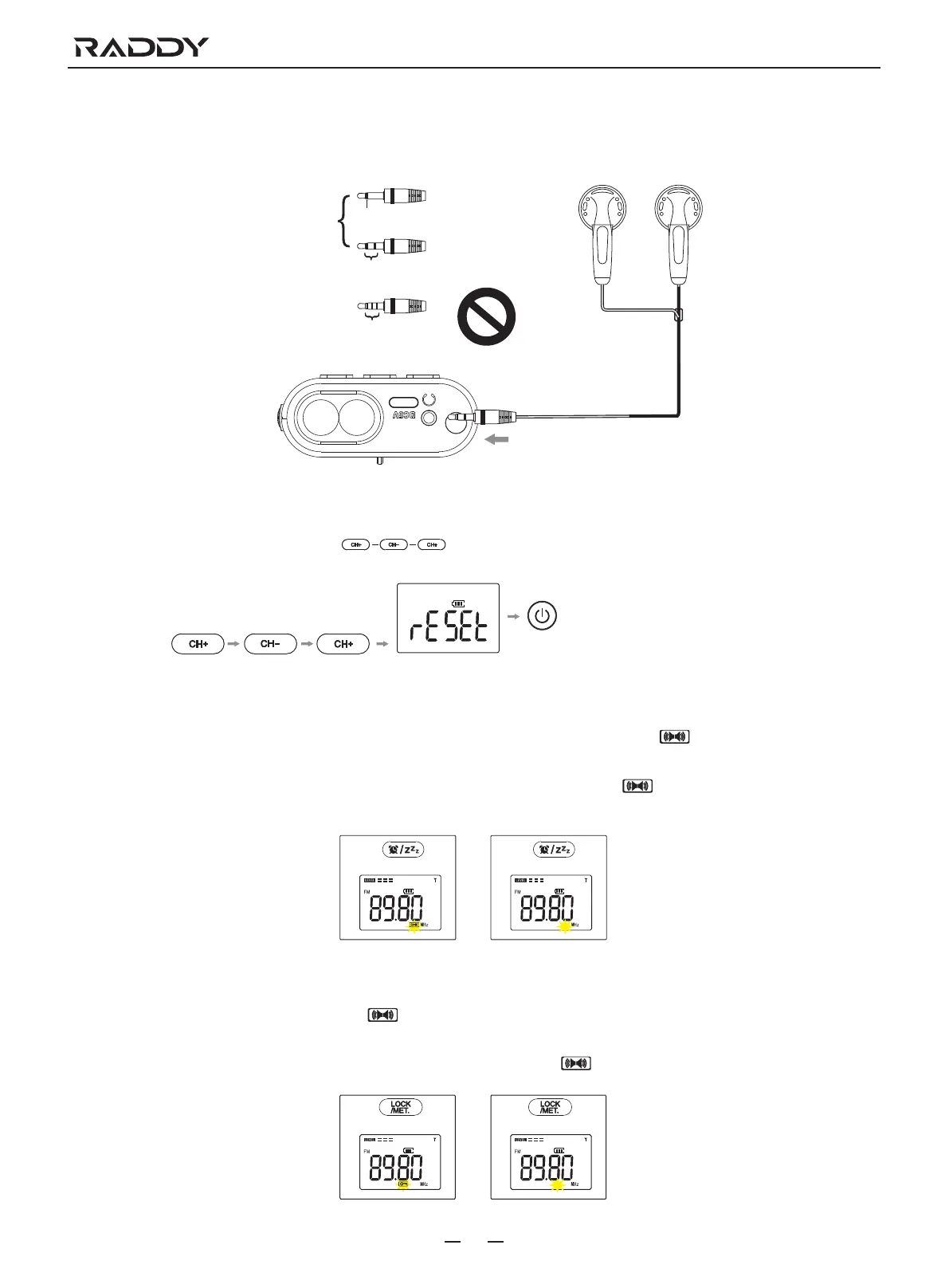
Earphone Jack
The radio is equipped with a φ3.5mm stereo earphone jack 12 on the top, which supports headphone for private listening.
Compatible
plug types
Other types of
plugs are not
compatible
1 ring
Mono plug
Stereo plug
2 rings
3 rings or more
Restore Factory Settings
In time mode, press the buttons 8, 9 and 8 in sequence and confirm by pressing the button 15 again when
“rESET” appears to flash.
Press sequence
Press while the reset icon is flasing
FM Stereo Function
a. To listen to FM station, plug stereo headphones into the earphone jack 12 and the FM stereo icon appears on the monitor 1
to listen to FM stereo.
b. If you do not want to listen to stereo, press the FM stereo button 10 and the FM stereo icon on the monitor 1 disappears
and it will be played in normal sound quality.
FM stereo
Locked status Unlocked
Normal sound quality
Key Lock Function
a. Press and hold the button 3 and the key lock icon appears on the monitor 1. Buttons locked except Siren and SOS light/
torch button 18 and button 3.
b. Press and hold the button 3 to cancel the key lock function and the key lock icon on the monitor 1 will disappear.



 To Next Page