=============================================================================
Function of Control Buttons
=============================================================================
=============================================================================
Button Operation
=============================================================================
1. [CITY]
1.1. Short press : Change City Mode( HIGHWAY -> CITY -> AUTO CITY )
1.2. Press and hold for 2 seconds : Volume Down
2. [MARK]
2.1. Short press : Add or delete User Point up to maximum 100 points, pressing button during RLC alert will
permanently MUTE the alert
2.2. Press and hold for 2 seconds : Volume Up (from 0 to 9 level)
3. [MUTE]
3.1. Short press : Change Mute Mode (Mute On <-> Mute Off ) (MUTE On will Mute all X and K signals)
3.2. Press and hold for 2 seconds : Add or delete Lockout location(200 points)
4. [POWER]
4.1. Short press : Power On/Off
4.2. Press and hold for 2 seconds to enter Menu Mode
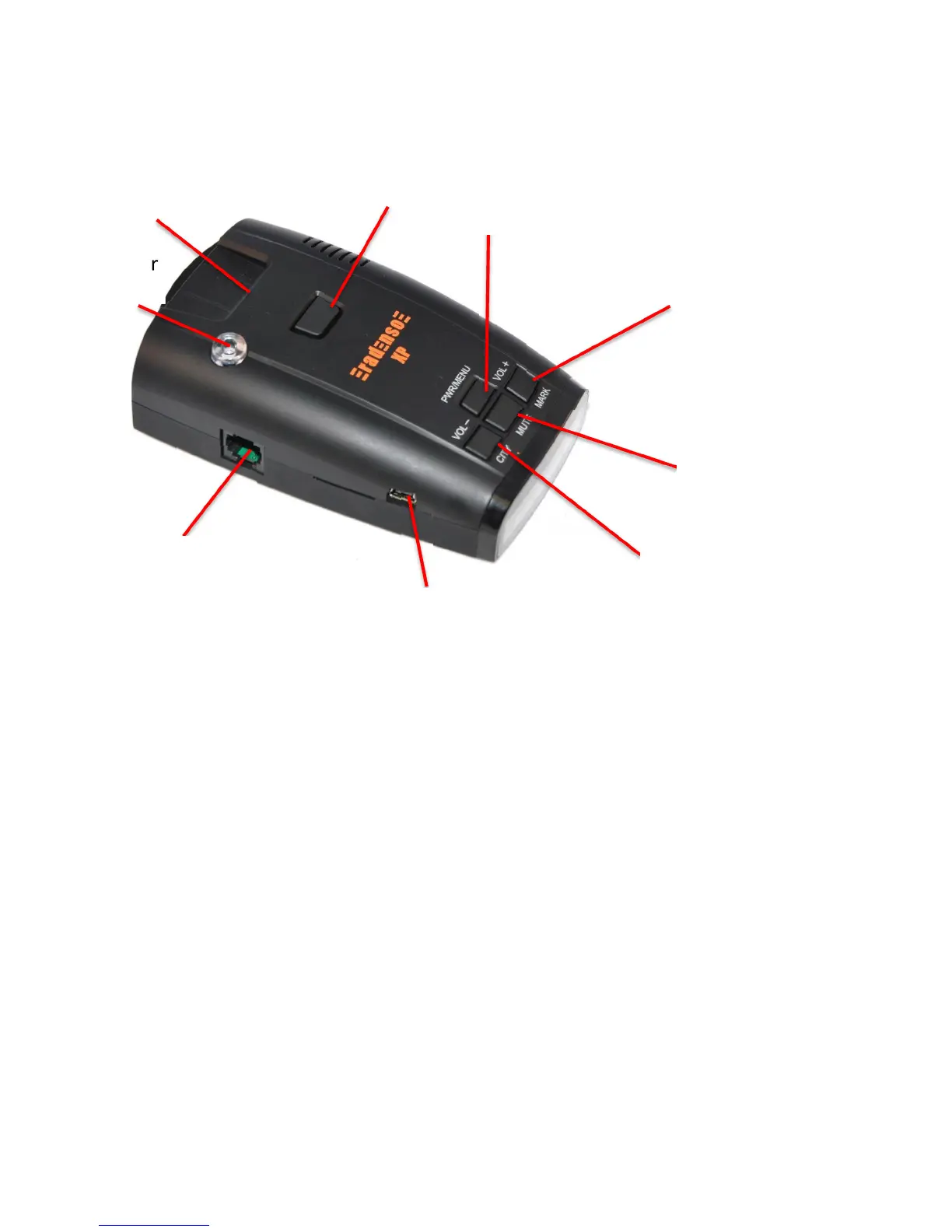
Volume +
Mark POI
QuickMount
slot
Power /
Menu
Volume –
City Mode
Mute
GPS Lockout
RJ11 Power
Jack
360º Laser
Sensor


 To Next Page