EasyManua.ls Logo

Radio Shack SSM-60 - User Manual

Radio Shack SSM-60
12 pages
Print Icon
To Next Page IconTo Next Page
Loading...
Owner’s Manual
Please read before using this equipment.
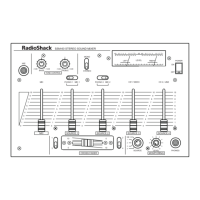
SSM-60 Stereo Sound Mixer
with Tone Controls
32-1214.fm Page 1 Friday, March 10, 2000 1:39 PM

Questions and Answers

  • M
    Michael ThomasJul 26, 2025
    What to do if Radio Shack Music Mixer has feedback squeals?
    • C
      Courtney GeorgeJul 26, 2025
      If your Radio Shack Music Mixer produces feedback squeals, move the microphone further away from the output speakers or use a directional microphone.
  • J
    Jason WilsonAug 2, 2025
    Why Radio Shack Music Mixer not working?
    • B
      Brandon HendersonAug 2, 2025
      If your Radio Shack Music Mixer is not working, check the AC power connection and ensure the AC outlet is live. Also, verify the power connections to the rest of your audio system, such as the amplifier or receiver.
  • O
    oparsonsAug 10, 2025
    What to do if Radio Shack SSM-60 Music Mixer has no signal from an audio input source?
    • G
      graysusanAug 10, 2025
      If there is no signal from an audio input source on your Radio Shack Music Mixer, check the control settings and the connections between the mixer and the input source.
  • J
    johnstonrobertAug 17, 2025
    How to stop hum from PHONO on Radio Shack SSM-60?
    • B
      butlersandraAug 17, 2025
      To eliminate hum from the PHONO input on your Radio Shack Music Mixer, connect the turntable's ground wire (usually black or green) to the GND screw on the back of the mixer.

Summary

Features Overview

Stereo Line Inputs

Connect high-level audio sources like CD players, tuners, or VCRs.

Low-Noise Tape Out Jack

Provides high-quality tape recording output.

Slide Volume Controls

Offers fingertip control for sound mixing and fading.

Fader Control

Enables quick switching between two playing input sources.

Monitor Control

Allows monitoring of line inputs via headphones before mixing.

Multiple Microphone Jacks

Accommodates three microphones with stereo/mono selection.

Bass;Treble Boost Controls

Adjusts bass and treble for the primary microphone.

Preparation and Setup

Presetting Controls

Initial control settings before connecting power to avoid damage.

Connecting Audio Sources

Operation and Usage

Using Headphones

Connect headphones for private listening and monitoring audio inputs.

Listening Safely

Guidelines to protect hearing from excessive volume levels.

Turning on the Mixer

Steps to power on the mixer and connected amplifier.

Monitoring Inputs

How to listen to individual audio input sources before mixing.

Mixing Inputs

Procedure for combining multiple audio input sources.

Using the Cross Fader

Smoothly transitioning between two audio sources.

Using Tone Controls

Adjusting bass and treble for desired sound.

Troubleshooting Guide

Mono Stereo Settings

Care and Maintenance

Technical Specifications

Notes Section

Limited One-Year Warranty

Radio Shack SSM-60 Specifications

General IconGeneral
BrandRadio Shack
ModelSSM-60
CategoryMusic Mixer
LanguageEnglish

Related product manuals