8
UP / DN Buttons On Microphone
In normal operation, press UP / DN buttons on the microphone to change the
channel. UP to increase, and DN to decrease the channel.
,Q0(18PRGH SUHVVWKHPUSH knob for about 3 seconds to activate this mode),
the UP or DN buttons allows to select the mune to be set.
SCAN
Press and hold UP or DN buttons on the microphone for 7 seconds or until a beep
sounds activate the 40 channels scan function. The scanning stops as soon as there
is a busy channel.
In scanning mode, turn rotary PUSH knob on the unit or press UP or DN buttons on
the microphone to change scan direction.
Press PTT button to exit channels scan.
PF Buttons On Microphone
Press PFEXWWRQRQWKHPLFURSKRQHWRVHOHFWWKHIHDWXUHWREHGLVSOD\HGLQ7;/&'
DOWHUQDWHVZLWKWKHHPLWWHGSRZHUOHYHORU6WDQGLQJ:DYH5DWLR6:5
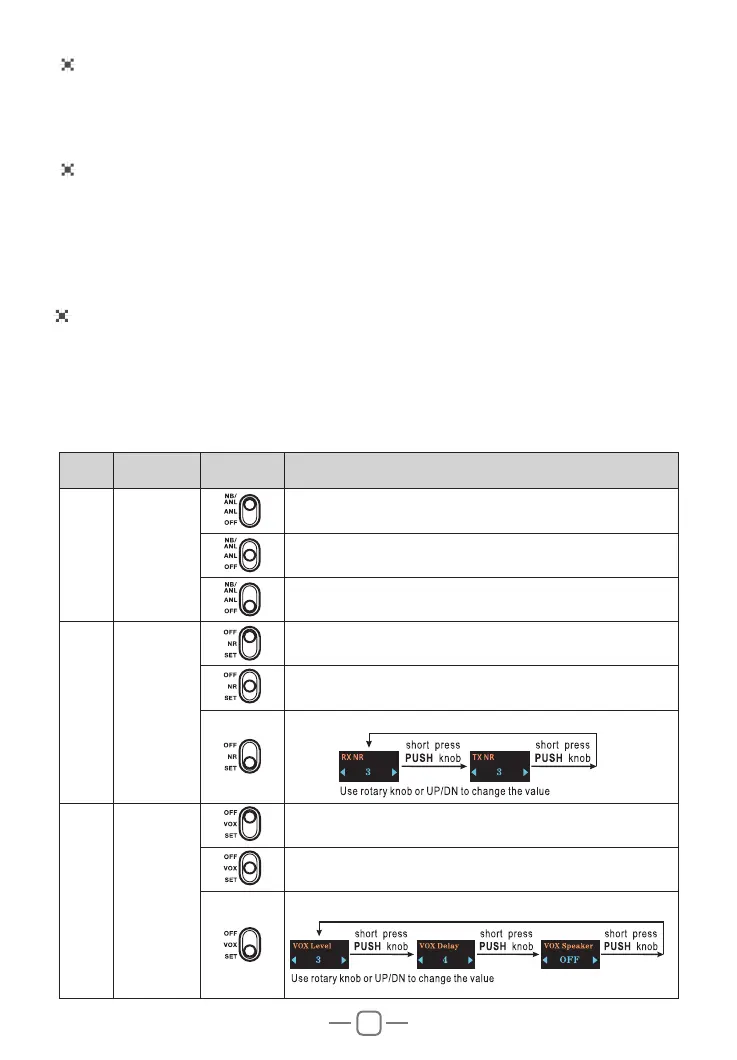
6. SLIDE SWITCHES
No. Function Position Description
1
1%$1/
¿OWHUV
7XUQRQ1%$1/IXQFWLRQ
7XUQRQ$1/IXQFWLRQ
7XUQRII1%$1/IXQFWLRQ
2
1RLVH
Reduction
15
7XUQRII15IXQFWLRQ
7XUQRQ15IXQFWLRQ
15SDUDPHWHUVVHWWLQJ
3 92;
7XUQRII92;IXQFWLRQ
7XUQRQ92;IXQFWLRQ
92;SDUDPHWHUVVHWWLQJ



 To Next Page