1
45"/%"3%"$$&4403*&4
015*0/"-"$$&4403*&4
*/45"--"5*0/
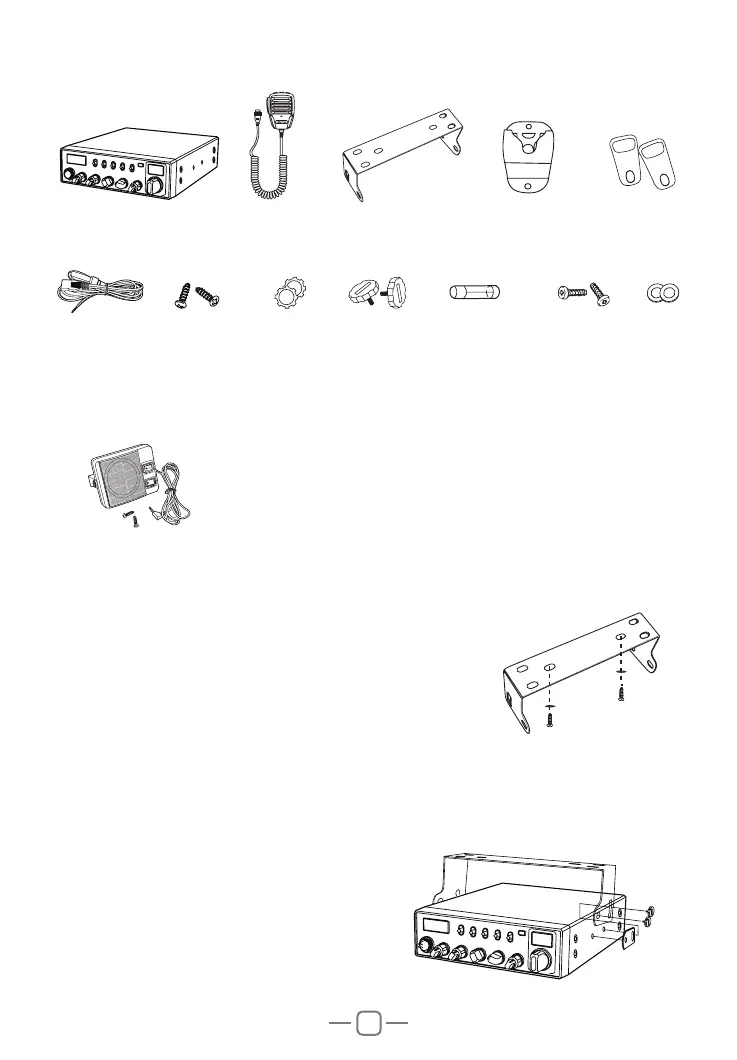
Radio
Screws for
bracket
DC Power
Cable
External Speaker
Self-tapping
Screws
Microphone
Pads for
bracket
PadsAdjusting
screws
Microphone
Hanger
Mounting Bracket
Adhesive Case
Protectors
Spare Fuses
(3A,250V)
Choose the most appropriate location from a simple
and practical point of view. If installed in a vehicle, care
should be taken to ensure your radio does not obstruct
the driver or passengers.
1. Use the Self-tapping Screws and Pads to fix the
Bracket to a suitable location.
2. Attach the Adhesive Case Protectors to the inside ends of the Mounting Bracket
and insert the Radio. Fit the Adjusting Screws loosely, and choose a suitable angle
by moving the Adjusting Screws to one of the 3 positions on the Mounting Bracket.
3. Tighten the Adjusting Screws firmly by hand. Make sure the radio and all
accessories are securely mounted.



 To Next Page