DMD20/20LBST Universal Satellite Modem TCP/IP Ethernet Setup
MN-DMD20-20LBST Revision 14 E–3
E.3 Network Configuration Summary
If the above steps were followed and the information was entered, then the following would be the
TCP / IP configuration summary for a ‘no router specified’ setup:
1. Boot Mode = NON-VOL
2. Bootp Server Tag = 206
3. Modem Host= DMDXX
4. IP Address Mask = 255.255.0.0
5. Modem IP Address = 172.18.100.215
6. Server IP Address = 172.18.4.250
7. Router IP Address = 010.000.001.001
8. Modem Ethernet Address= 0010650903EB
9. Ethernet Rate = 10 MBPS/HD
E.4 Ethernet Test
E.4.1 Connecting the Modem Ethernet Cable to a Network Link
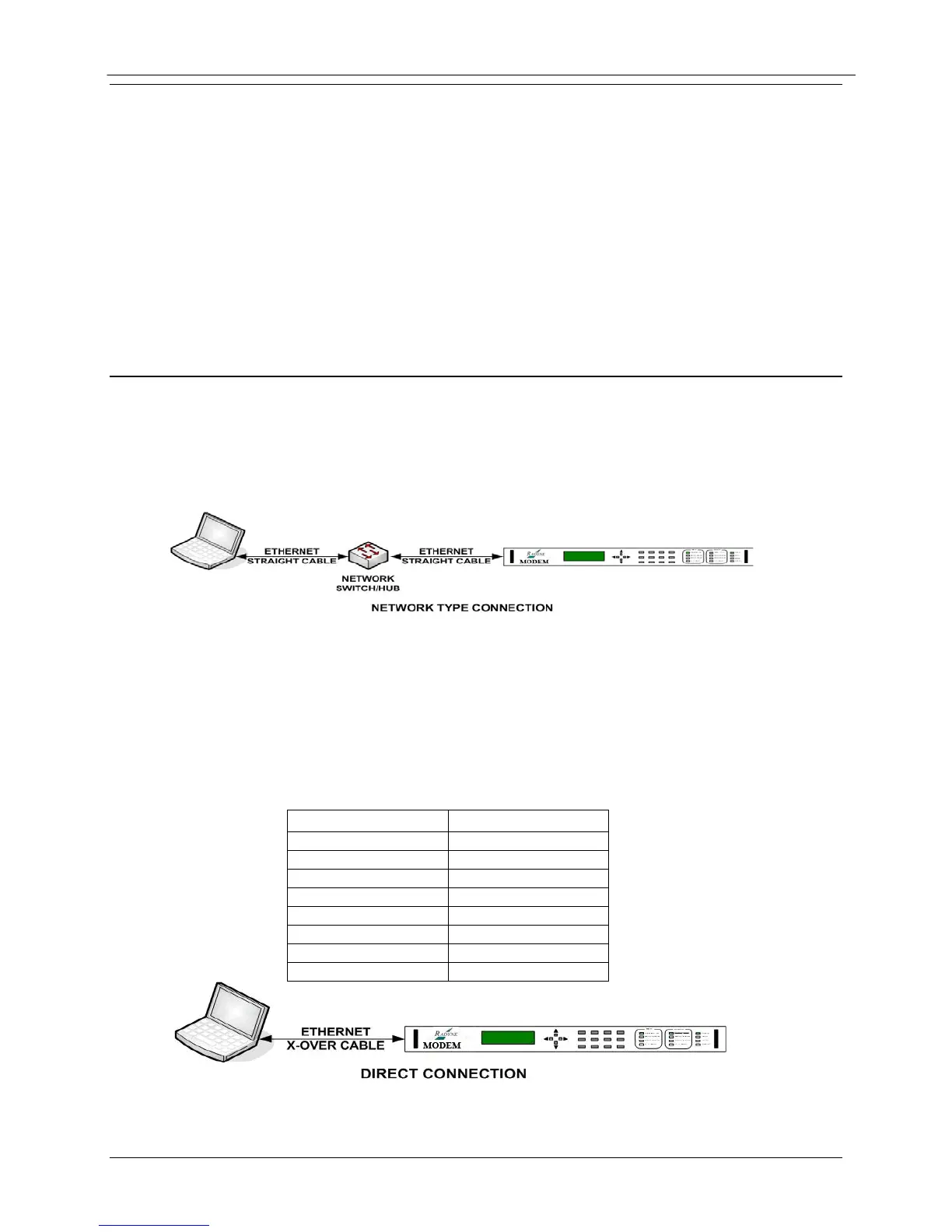
1. Connect the Network Switch (Hub) to the Modem Ethernet port (J9) using standard RJ-
45 to RJ-45 10BaseT (CAT-5) Cables as shown below.
Ethernet Network Connection
E.4.2 Connecting the Modem Ethernet Cable Directly to a Computer
(without a Network)
The user can directly connect to the equipment without connecting to a network. This will often
occur at remote sites where a network is not available. To connect, the user will need an
Ethernet Crossover (Null) cable. The pinout for this cable is as follows,


 To Next Page