DMD20/20LBST Universal Satellite Modem Web Browser Setup Guide
MN-DMD20-20LBST Revision 14 F–11
F.6.2.2 Install the Internet Explorer Tab V2 add-on
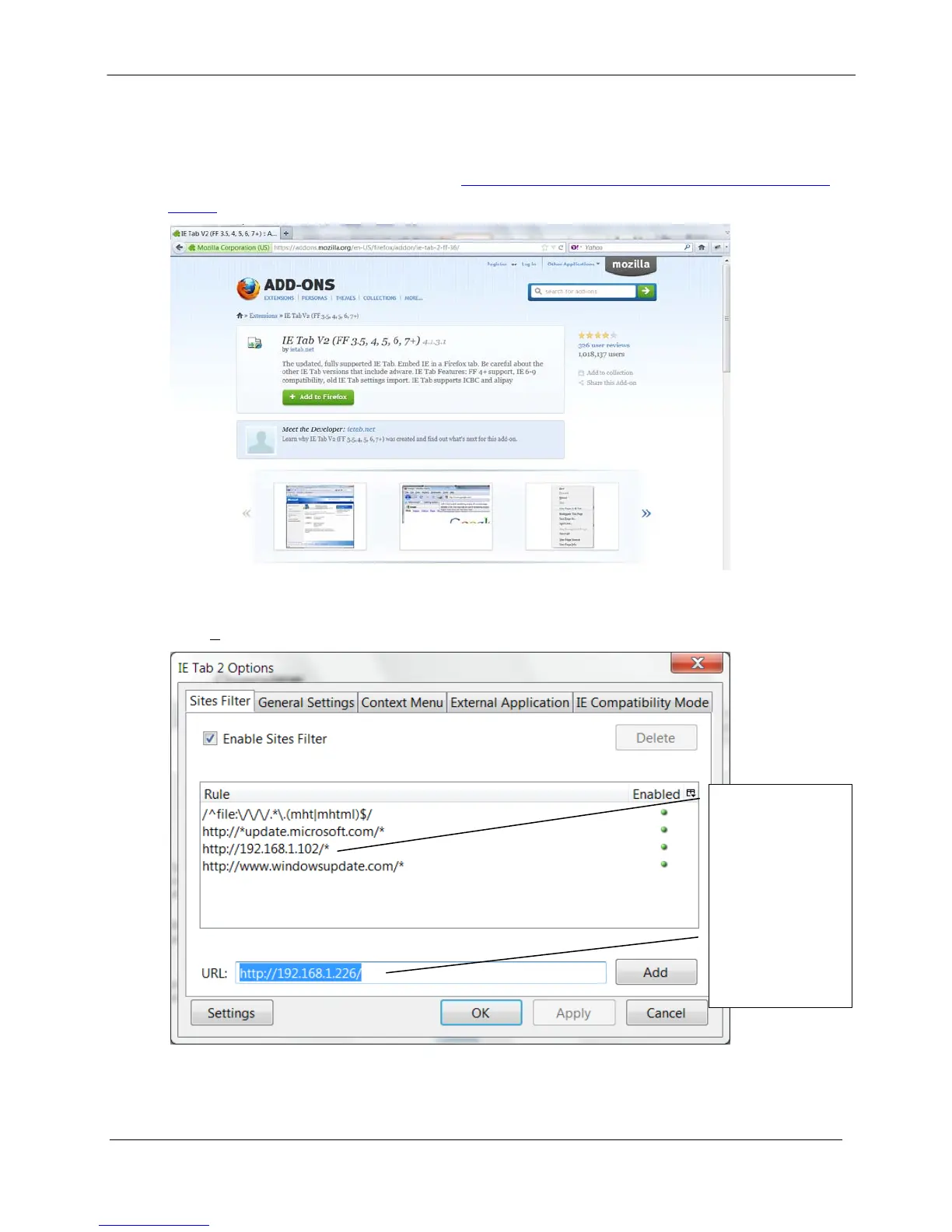
The Internet Explorer (IE) Tab V2 add-on lets you open WEB browser pages in Internet
Explorer 7 mode. The link to the add-on is https://addons.mozilla.org/en-US/firefox/addon/ie-tab-
2-ff-36/
Download and install IE Tab V2. After IE Tab V2 is installed, Firefox restarts.
Go to
Tools / IE Tab 2 Options and add the Radyne product IP address to the Sites Filter.
After the IP address is added to the
Sites Filter, the WEB browser pages show correct values.
In this example,
Address
192.168.1.102 was
added earlier.
Address
192.168.1.226 is
ready to be added.


 To Next Page