5
Flight Controls
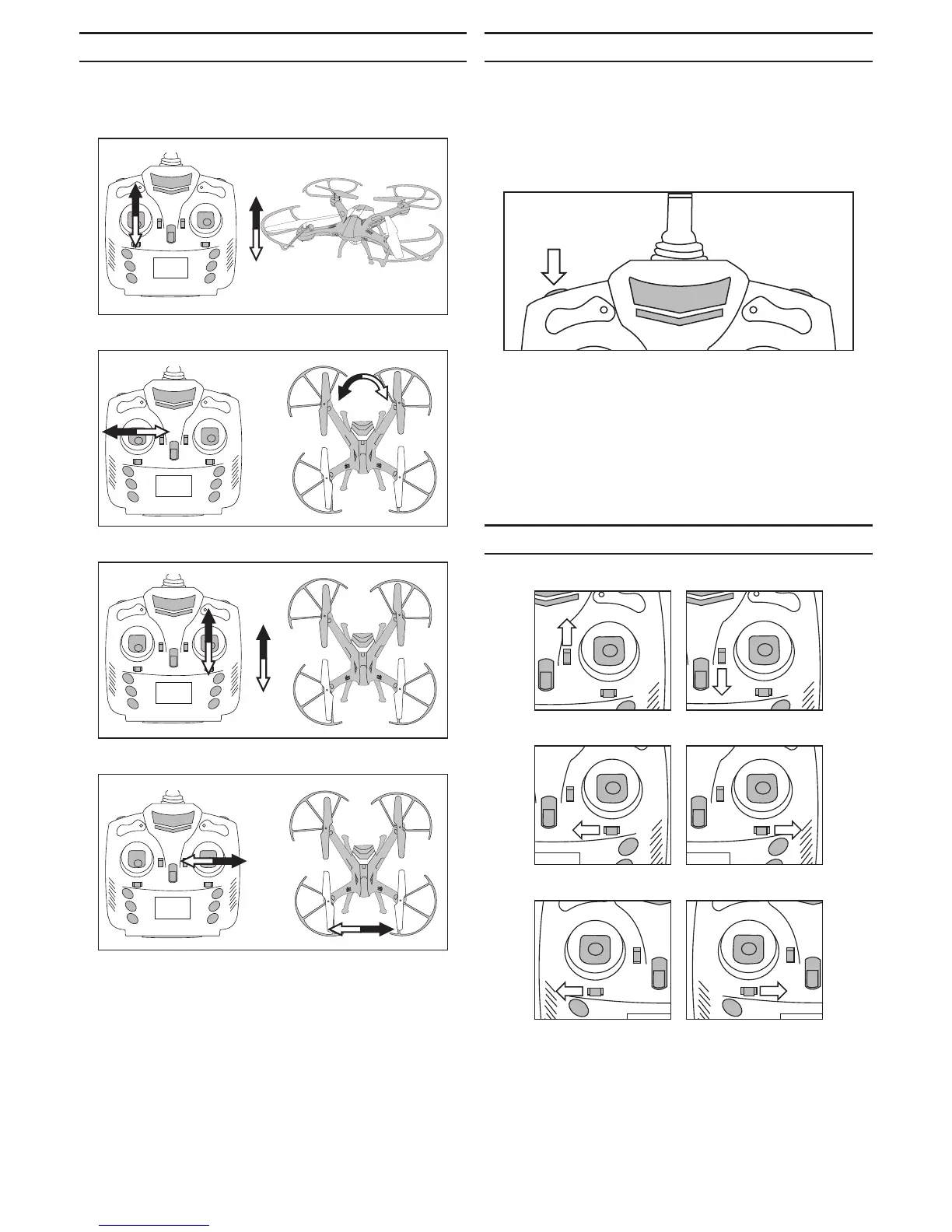
The following illustrates the ight controls and responses
for your drone:
Vercal - Up and Down
Rotaon
Fore and A
Le and Right
Rates
Your drone has three ight modes available. These are:
Low Rate (30%): Slower response for the beginning pilot.
Mid Rate (60%): Quicker response for the
intermediate pilot.
High Rate (100%): Extreme ight response for the
advanced pilot.
Push the buon on the top le of the transmier unl it
clicks and beeps to cycle through the ight modes. One
beep indicates Low Rate, two beeps indicates Mid Rate
and three beeps indicates High Rate.
The transmier will inialize to 50% (between Low and
Mid rates) when switched on. We recommend starng
with this rate, or switching to the Low Rate, unl you get
acquainted with your drone.
Trimming Your Model
Fore A
Le Right
Le Rotaon Right Rotaon
If your drone dris right-le or fore-a, you can ne tune
your drone to eliminate this dri. Use the trim levers to
eliminate any dri.


 To Next Page