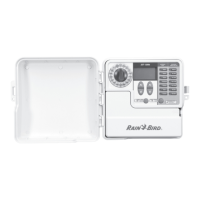
The Rain Bird SST Smart Controller is a sophisticated irrigation system designed for residential use, offering automated and intelligent watering based on local weather conditions. This controller aims to simplify the process of setting up and managing a watering schedule, ensuring optimal water usage for plants while minimizing waste.
Function Description:
The primary function of the Rain Bird SST Smart Controller is to automatically adjust watering times based on historical and current weather data for your specific area. Users set up a watering schedule for the hottest period of the year (typically July or August) and input their zip code. The controller then uses its internal weather database, combined with weather sensors (if attached), to dynamically adjust watering durations throughout the year. This "Smart Logic" feature ensures that plants receive the right amount of water, preventing overwatering during cooler or rainy periods and providing adequate hydration during hot, dry spells.
The controller supports up to 12 zones, allowing for customized watering schedules for different areas of a yard, each with unique watering needs. It can be programmed to water on specific days of the week, or on odd/even days, and allows for multiple watering times per day.
Usage Features:
The Rain Bird SST Smart Controller is designed for ease of use, featuring a clear dial and a display screen that guides users through the setup and programming process.
- Dial-Based Navigation: The central dial is the primary interface for navigating through the controller's functions. Users turn the dial to specific settings such as "SET CLOCK," "SET DATE," "SET ZIP CODE," "ZONE 1-12," "DELAY," and "AUTO RUN."
- Display Screen: The display screen shows relevant information for the selected function, including current time, date, zip code, zone number, watering duration, watering start times, and adjustment percentages.
- Up/Down Arrows: These buttons are used in conjunction with the dial to adjust values such as time, date, zip code, watering duration (in minutes), and watering start times.
- Watering Days Selection: Users can select specific days of the week (Sunday through Saturday) or choose "ODD DAYS" or "EVEN DAYS" for each zone's watering schedule.
- Watering Times Per Day Selection: The controller allows users to specify how many times per day a zone should be watered, with options for "ONE TIME," "TWO TIMES," "THREE TIMES," or "FOUR TIMES." This feature is useful for managing water runoff, as multiple shorter watering cycles can be more effective than a single long one.
- Zone-Specific Programming: Each of the 12 zones can be programmed independently, allowing for tailored watering based on the specific plants, soil type, and sun exposure of that area.
- "ZONE OFF" Function: This option allows users to temporarily disable watering for a selected zone without deleting the entire schedule.
- "WATER ALL NOW" Feature: This manual override allows users to initiate watering for all zones in sequence, according to their scheduled durations, regardless of the programmed schedule. This is useful for testing the system or providing extra water after a dry spell.
- "WATER 1 ZONE NOW" Feature: Similar to "WATER ALL NOW," this function allows users to manually water a single selected zone on demand. The duration can be adjusted using the Up/Down arrows.
- "RAIN DELAY" Function: This feature enables users to suspend scheduled watering for a specified period, typically up to 72 hours, due to rain or other reasons. The controller will automatically resume its normal schedule after the delay period. The display shows the current time and the remaining delay hours.
- "AUTO RUN" Mode: Once programmed, the dial is set to "AUTO RUN" for the controller to execute the watering schedule automatically, adjusting based on its Smart Logic.
- Rain Sensor Integration: The controller is designed to work with a rain sensor (sold separately). When a rain sensor is attached and activated, it will prevent scheduled watering, and the display will indicate the sensor's status. The "All Durations Adjusted" level will show -100% when the rain sensor is active, indicating no watering.
- Smart Logic Display: In "AUTO RUN" mode, the display shows the "All Durations Adjusted" percentage, indicating how much the watering durations have been reduced or increased based on weather conditions. For example, a "20%" adjustment means all watering durations are reduced by 20%.
- Error Detection: The controller can detect wiring faults, such as a "Valve Short," and display an error message, indicating a potential issue with a specific zone's wiring or valve solenoid.
Maintenance Features:
The manual provides troubleshooting guidance for common issues, which can be considered a form of user-level maintenance.
- Troubleshooting Guide: The manual includes sections for "Watering Issues" and "Electrical Issues," offering possible causes and solutions for problems like cycles not starting, blank LCD display, or a "frozen" controller.
- Reset Button: In case of an electrical surge or persistent programming issues, a reset button is available under the wiring cover. Pressing this button will reset the controller, requiring users to re-input the correct time and date, but potentially restoring normal operation if there is no permanent damage.
- Wiring Checks: For watering issues, the manual advises checking the main water line, supply lines, field wires, and master valve/pump start relay wiring for proper connections, cuts, or corrosion.
- Power Supply Checks: For electrical issues, users are guided to ensure the power cord is securely plugged in and that the wall socket is supplying power.
- Rain Sensor Management: If watering is not occurring due to an activated rain sensor, users can either wait for the sensor to dry out or temporarily disconnect it from the controller's terminals.
The Rain Bird SST Smart Controller is designed to be a "set it and forget it" solution for irrigation, leveraging intelligent technology to optimize water usage and simplify lawn care for homeowners.


 To Next Page
 General