EasyManua.ls Logo

Rain Bird STP-400i - User Manual

Rain Bird STP-400i
20 pages
Print Icon
To Next Page IconTo Next Page
Loading...
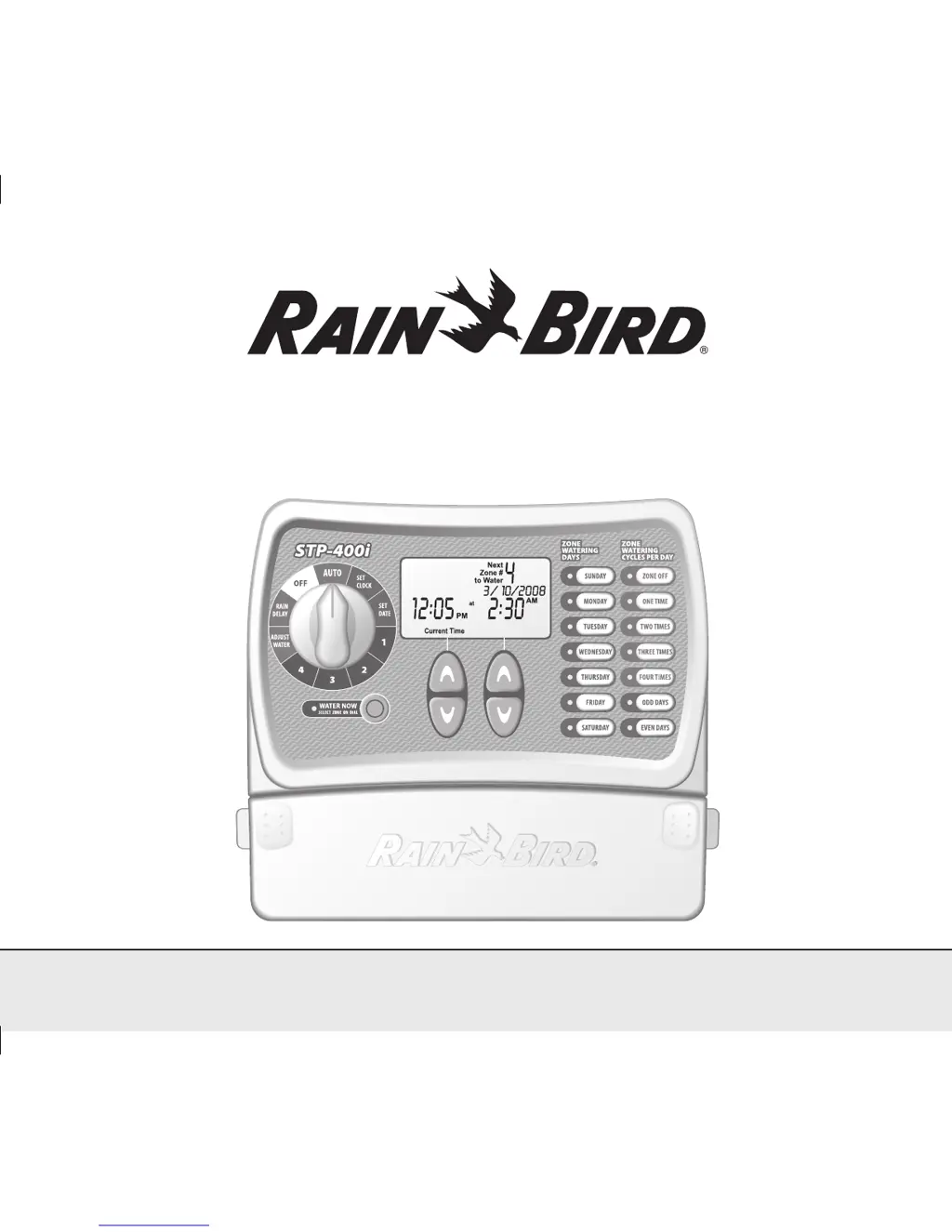
Simple To Program (STPi) Controller
Installation, Programming & Operation Guide
637418-01 Rev B (STP user manual) source.indd 1 3/7/2008 5:23:54 PM

Other manuals for Rain Bird STP-400i

Questions and Answers

  • S
    Samuel GreenJul 30, 2025
    How to fix a blank LCD display on a Rain Bird Irrigation System?
    • J
      Joshua FletcherJul 30, 2025
      If the LCD display on your Rain Bird Irrigation System is blank, check that the transformer is securely plugged in and the two-prong connector is connected. Also, ensure that the main AC power supply is working properly.
  • E
    Elizabeth BurkeAug 4, 2025
    What to do if the Rain Bird Irrigation System LCD display is frozen?
    • W
      William MillerAug 4, 2025
      If your Rain Bird Irrigation System's LCD display is frozen and the controller isn't accepting programming, an electrical surge may have damaged the controller's electronics. Unplug the controller for 3 minutes, then plug it back in. If there is no permanent damage, the controller should accept programming and resume normal operation.
  • J
    James CastilloAug 9, 2025
    Why won't my Rain Bird Control Unit start watering automatically or manually?
    • M
      Marvin HerringAug 9, 2025
      There are several reasons why your Rain Bird Control Unit might not be starting. First, ensure your main water line and all supply lines are open and working. Verify all field wires and master valve/pump start relay wiring are correctly connected. Check for any broken, cut, or 'skinned' wires, and replace them if needed, along with ensuring all wire connections are watertight. Make sure the dial is set to the AUTO position. If you have a Rain Sensor, it may be activated; wait for it to dry or disconnect it and connect the two yellow terminals with a wire. If you don't have a Rain Sensor, ensure the wire connecting the two yellow terminals is intact. Finally, an electrical surge might have occurred; press the reset button under the wiring cover to see if it resolves the issue.
  • D
    Dr. Rachel MasonAug 14, 2025
    What to do if the LCD display on my Rain Bird Control Unit is blank?
    • J
      Jacqueline FoxAug 14, 2025
      If the LCD display on your Rain Bird Control Unit is blank, first check that the transformer is properly plugged into a working wall socket and that the red light on the transformer is illuminated. Also, ensure that the main AC power supply is working correctly.
  • B
    breannamcdonaldAug 19, 2025
    How to fix a frozen LCD display on a Rain Bird Control Unit that won't accept programming?
    • B
      brian97Aug 19, 2025
      If the LCD display on your Rain Bird Control Unit is frozen and not accepting programming, it could be due to an electrical surge. Try unplugging the controller for 3 minutes, then plug it back in. If there's no permanent damage, the controller should resume normal operation.
  • A
    Anthony RaymondOct 24, 2025
    Why won't my Rain Bird Irrigation System start watering on automatic or manual?
    • D
      davidhaynesOct 24, 2025
      If your Rain Bird Irrigation System isn't watering during automatic or manual cycles, first, ensure the main water line and all supply lines are open and functioning correctly. Verify that all field wires and master valve/pump start relay wiring are properly connected. Check for any broken, cut, or 'skinned' wires, replacing them if necessary, and ensure all wire connections are watertight. Confirm the dial is set to the AUTO position. If you have a Rain Sensor, it might be activated; wait for it to dry or disconnect it from the yellow terminals, replacing it with a wire connecting the two terminals. If you don't have a Rain Sensor, ensure the wire connecting the two yellow Rain Sensor terminals is intact. Finally, an electrical surge may have damaged the controller; press the reset button...

Summary

Controller Functions

Set Clock

Set Date

Schedule Watering

Water Now

Rain Delay

Adjust Water

Normal Operation

Normal Operations Display

Describes the controller display during normal operations, showing next zone and time.

Watering Now Display

Shows the controller display when a zone is currently watering, including remaining time.

Rain Delay Display

Displays current time and remaining rain delay hours until watering resumes.

Error Detected Display

Indicates an error by showing the affected zone number on the controller display.

Mounting Controller

Connecting Power Cord

Master Valve or Pump Start Relay

Troubleshooting

Watering Issues

Covers problems with automatic/manual cycles not watering and their potential causes.

Electrical Issues

Addresses issues with the LCD display being blank or frozen and controller unresponsiveness.

Connecting Rain Sensor

Programming Chart

Start Time Sequence

Details the sequence of start times based on the number of watering cycles per day.

Rain Bird STP-400i Specifications

General IconGeneral
BrandRain Bird
ModelSTP-400i
CategoryControl Unit
LanguageEnglish

Related product manuals