Need help?
Do you have a question about the Rain Bird LNK2 and is the answer not in the manual?
Uses weather data for automatic adjustments to optimize watering based on the yard's needs.
Provides notifications and Delay Watering features for water conservation.
Allows remote control of irrigation via mobile device and FREE Rain Bird App.
Employs encrypted wireless communication to safeguard user privacy.
Offers smart home compatibility for voice-activated control.
Details compatibility with ESP-ME3 controllers for residential/light commercial use.
Details compatibility with ESP-ME controllers for residential/light commercial use.
Details compatibility with ESP-TM2 controllers for residential use.
Details compatibility with ST8 controllers for residential use.
Details compatibility with ESP-RZXe controllers for international/residential use.
Covers controller, network, and app version requirements for LNK2 WiFi compatibility.
Instructions to download the Rain Bird Mobile App from the App Store or Google Play.
Guide to opening the controller, inserting the LNK2 module, and checking its initial status.
Steps to add the controller in the Rain Bird app using the setup wizard.
Option to go back to the login screen to manage controllers or send invitations.
Function to change the designated name of the irrigation timer.
View details of the next scheduled irrigation event, including zone, start time, and run time.
Check WiFi signal strength at the controller; low RSSI may require a signal booster.
View or adjust automatic seasonal watering adjustments.
Allows adding or removing irrigation zones from the schedule.
Displays the watering schedule in a convenient calendar format.
Option to manually start watering for a specific zone.
Set a delay for watering for up to 14 days.
Button to confirm and save any modifications made in the app.
View current weather and a 5-day outlook, which influences irrigation adjustments.
Activate Auto, Seasonal Adjust, or modify the watering schedule.
Update app notifications, network settings, passwords, and smart home options.
Verify controller compatibility with LNK2 WiFi, checking model and manufacturing date.
Ensure the WiFi network is 2.4 GHz; 5.0 GHz is not supported.
Confirm that the Rain Bird App is updated to the latest compatible version.
Check controller model, manufacturing date, and look for the WiFi symbol.
Instructions for downloading the Rain Bird app on Apple App Store and Google Play.
Step-by-step guide for downloading the app, installing the module, and setting up via the app.
Confirms compatibility with Amazon Alexa and Google Assistant for voice control.
Troubleshooting steps for connection errors, checking WiFi name and location services.
Resolving connection issues when the WiFi module light is blinking green but not connecting.
Explains how WiFi range extenders can improve signal strength for the LNK2 module.
Troubleshooting steps for controller connection issues, including network type and password verification.
Steps for troubleshooting mobile device connection issues to the Rain Bird hotspot network.
Diagnosing and resolving issues where the controller disconnects from the home WiFi network.
Steps for when temporary connection to the controller fails, including re-inserting the module.
Guidance on using range extenders and updating controller connections.
Information on using third-party apps to test WiFi signal strength at the controller location.
Procedure to reset WiFi settings to factory defaults via the LNK2 module button.
Explains usage of guest/unsecured networks, limitations on 5 GHz and public networks.
Details on how the controller reconnects after power or WiFi service interruption.
Requirements and considerations for setting up LNK2 using a cellular hotspot.
Explains light indicators during the initial setup phase of the LNK2 WiFi module.
Details light cues during the WiFi pairing process for the LNK2 module.
Interprets light cues during troubleshooting, including error messages and connection status.
Describes the solid light indication during the reset process to factory settings.
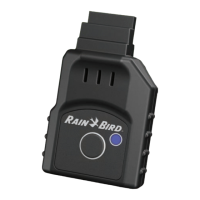
The Rain Bird LNK2™ WiFi Module is a smart and responsible solution designed to add instant WiFi connectivity to compatible Rain Bird irrigation controllers, enabling users to manage their watering systems remotely and efficiently. This module is an affordable and simple upgrade that installs in seconds without the need for specialized tools, transforming a standard irrigation controller into a smart, connected device. Once installed and set up, users can monitor multiple sites with ease directly from their mobile device, gaining access to advanced water-saving features that can reduce water consumption by up to 50%.
The primary function of the LNK2 WiFi Module is to provide wireless connectivity to Rain Bird irrigation controllers, allowing for remote management via the Rain Bird Mobile App. This connectivity facilitates several key usage features aimed at optimizing irrigation, conserving water, and enhancing user convenience.
One of the core usage features is Optimize Irrigation. By leveraging local weather data sources, the LNK2 module triggers automatic adjustments to run times. This ensures that the yard receives only the water it needs, preventing overwatering and promoting healthier landscapes. This intelligent scheduling helps in maintaining optimal soil moisture levels based on real-time environmental conditions.
Another significant feature is Conserve Water. Through the mobile app, users gain access to various tools that help reduce water usage. These include notifications, which keep users informed about their system's status and potential issues, and the "Delay Watering" feature, which allows users to pause irrigation for a specified period, for example, after rainfall or during maintenance. These features contribute to significant water savings and environmental responsibility.
The module also enables Manage Remotely capabilities. Users can control their irrigation system from anywhere in the world using their mobile device, without any hidden fees. By downloading the free Rain Bird App, they can start, stop, or adjust watering schedules, monitor system performance, and receive alerts, all from the palm of their hand. This remote access provides unparalleled flexibility and control, whether at home or away.
Protect Privacy is a built-in feature, as the LNK2 module uses encrypted wireless communication to safeguard user data and ensure the privacy of their irrigation system. This security measure provides peace of mind, knowing that the system is protected from unauthorized access.
Furthermore, the LNK2 module unlocks Voice Control, making it smart home compatible. It integrates with popular voice assistants like Amazon Alexa and Hey Google, allowing for convenient, voice-activated control of the irrigation system. This hands-free operation adds another layer of convenience, enabling users to manage watering with simple voice commands.
The LNK2 WiFi Module is compatible with several Rain Bird controller models, including ESP-TM2, ESP-RZXe, ESP-ME3, and ESP-ME controllers manufactured after November 2, 2016. To verify compatibility, users should look for the "LNK™ Ready" WiFi symbol on the front panel of their controller. It is also compatible with LXIVM, LXME2, and LXME2 Pro controllers. For network compatibility, the LNK2 requires a 2.4 GHz WiFi network and is not compatible with 5.0 GHz networks. Users are advised to ensure their Rain Bird App is updated to the latest version for optimal performance.
Installation is straightforward: users first download the Rain Bird Mobile App, then open the controller's front panel and insert the LNK2 WiFi module into the accessory slot. The module should begin blinking blue, indicating it's ready for setup. From there, users open the Rain Bird app, select "Add Controller," and follow the guided setup wizard, providing necessary information such as WiFi network name (SSID), WiFi network password, email address, and residence zip code.
The Rain Bird Mobile App offers a comprehensive interface for managing the irrigation system. Key elements of the app include a "Return to Login Screen" for managing access and controllers, an "Edit Timer Name" function to customize the controller's name, and a "Next Scheduled Event" display showing details of upcoming irrigation. The app also features a "WiFi Tab" to measure signal strength, a "Weather Forecast" for current and future weather conditions, and an "Edit Program" section to activate auto-scheduling, seasonal adjustments, and modify watering schedules. Users can view "Seasonal Adjust %," "Add/Remove Zone" from schedules, access a "Calendar View of Watering Schedule," and manually water zones or set a "Manual Water Delay." "Settings" allow for updating notifications, network settings, passwords, and smart home options.
Maintenance features primarily revolve around troubleshooting and resetting the module. The troubleshooting guide helps users confirm controller compatibility, verify network settings (2.4 GHz), and check for app updates. If issues arise, such as the module not connecting or blinking green but not connecting, the guide provides steps like checking WiFi network names and passwords, looking for physical obstacles, and restarting the setup process. For poor WiFi signal strength, the guide suggests using a WiFi Range Extender and provides resources for scanning network congestion.
To reset the controller's WiFi settings back to QuickPair broadcast mode, users can hold down the button on the LNK2 WiFi Module for more than 5 seconds. This action erases all settings and resets the module to factory defaults, though watering schedules are retained. If the controller was previously connected, the old controller card needs to be deleted from the app before re-adding it. The module's light cues provide visual feedback on its status, indicating power on, device initiating, preparing for operation, ready for setup, searching for WiFi network, attempting to connect, connection ready, troubleshooting, and failure. These cues help users diagnose issues and follow the appropriate troubleshooting steps.
The LNK2 module also addresses common questions, such as using guest (unsecured) WiFi networks (not recommended due to authentication requirements), what happens during a power loss (it should reconnect automatically), and setting up with a cellular hotspot (requires specific conditions like an active data plan, 2.4 GHz AP, and DHCP enabled). Overall, the Rain Bird LNK2 WiFi Module is a robust and user-friendly solution for modernizing irrigation systems, offering convenience, efficiency, and significant water savings.
 General
| Connectivity | Wi-Fi |
|---|---|
| Voice Control | No |
| Wireless Standard | 2.4 GHz Wi-Fi |
| Remote Access | Yes, via mobile app |
| Compatibility | Compatible with Rain Bird ESP-TM2 and ESP-Me controllers |
| Mobile App | Rain Bird Mobile App |
| Notifications | Yes |
| Power Source | Powered by the controller |
| Weather Adjustment | Automatic weather adjustments based on local weather data |

 To Next Page