LNK2™ WiFi Module User Guide
© 2023 RAIN BIRD CORPORATION RAINBIRD.COM
4
Rain Bird Mobile App
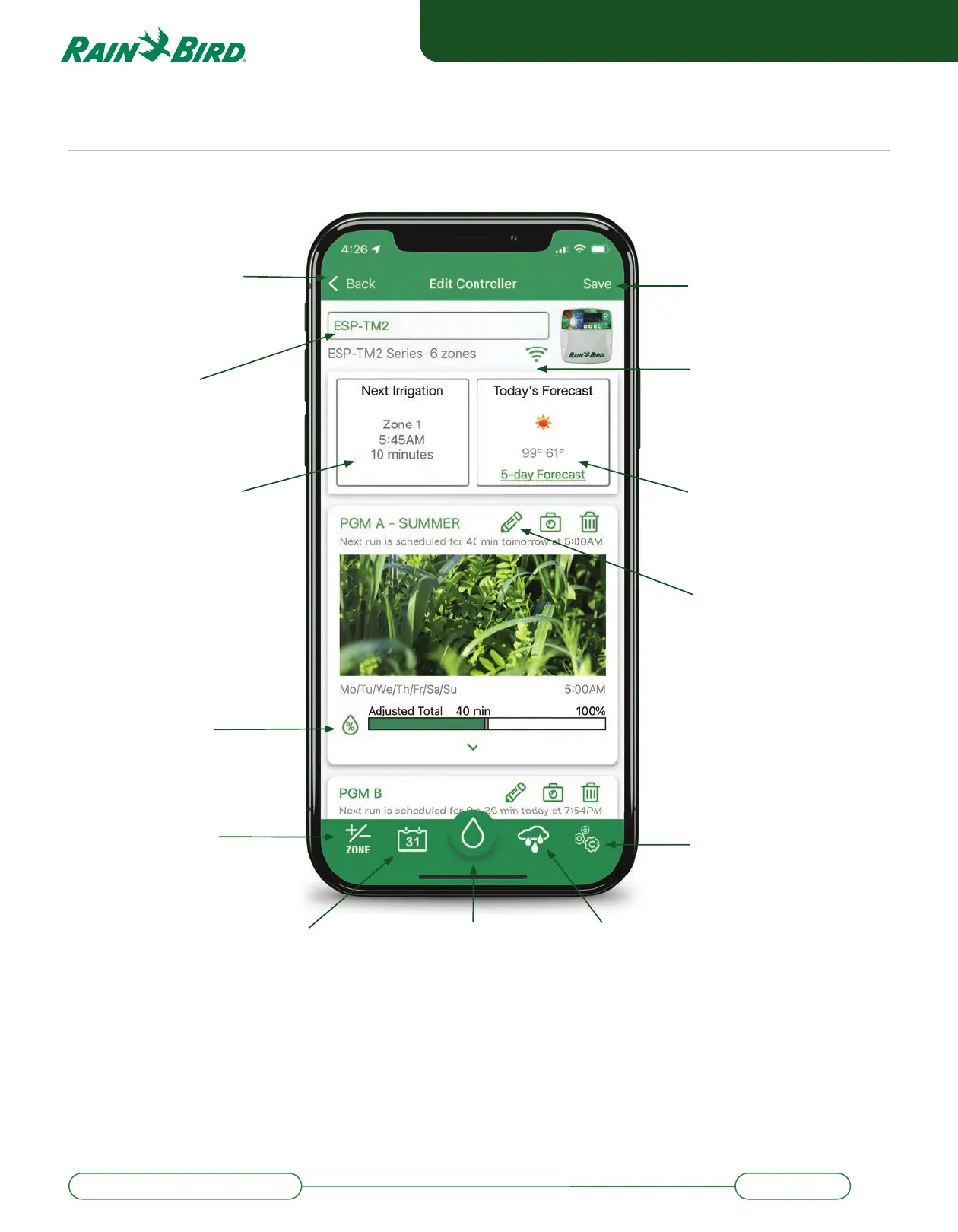
Save Changes
Weather Forecast*
View today’s weather
and the 5-day outlook
*with internet connection
Edit Program
Activate Auto, Seasonal
Adjust, change watering
schedule
Se ings
Update app notifi cations,
network se ings, controller
passwords, and smart
home options
Seasonal Adjust %
View automatic seasonal
watering adjustment
Next Scheduled Event
View Zone, Start Time
and Run Time of the next
scheduled irrigation event.
WiFi Tab
Measure WiFi signal strength
at the controller. RSSI values
larger than -70 (-70’s, -80’s
or -90’s) indicate need for
signal booster.
Return to Login Screen
Send access invitations,
add/remove controllers,
or view all controllers
Edit Timer Name
Change the designated
name of the timer.
Calendar View of
Watering Schedule
View the watering schedule
in convenient calendar form
Manually Water Zone
Choose a Zone to start
watering immediately
Manual Water Delay
Up to 14 day delay
Add/Remove Zone
Click to add or remove a
Zone from the schedule


 To Next Page